6
Installing the battery
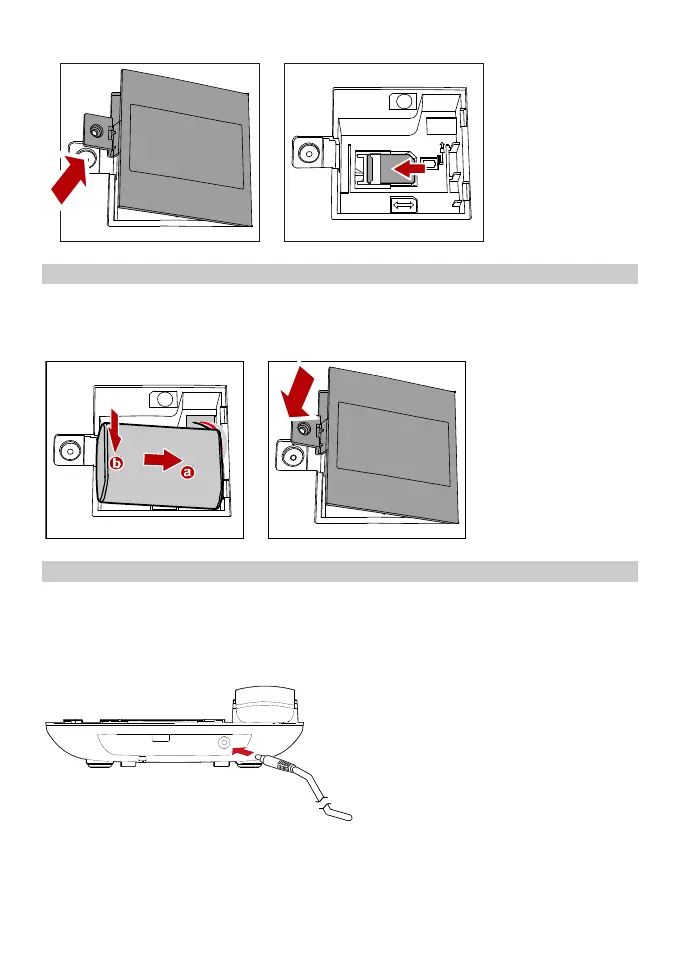
Power off the FWT and remove the power supply cable. Install the battery according
to the following figure. Make sure that the battery cord plug matches the battery jack.
Do not insert the battery reversely.
Installing the power adapter
1. Install the battery based on the battery installation steps.
2. Connect one end of the power adapter cable to the FWT and the other to the
power socket.
3. The battery charging icon is displayed on the screen. The battery charging icon
becomes static when the battery is fully charged.
Note:
Remove the battery if the FWT is left unused for a long period.
If the battery has not been used for a long time or the battery is
exhausted, the screen of the FWT may not function when you charge the



 To Next Page