7
battery again. This is normal. After the battery is being charged for a
while, you can power on the FWT for use.
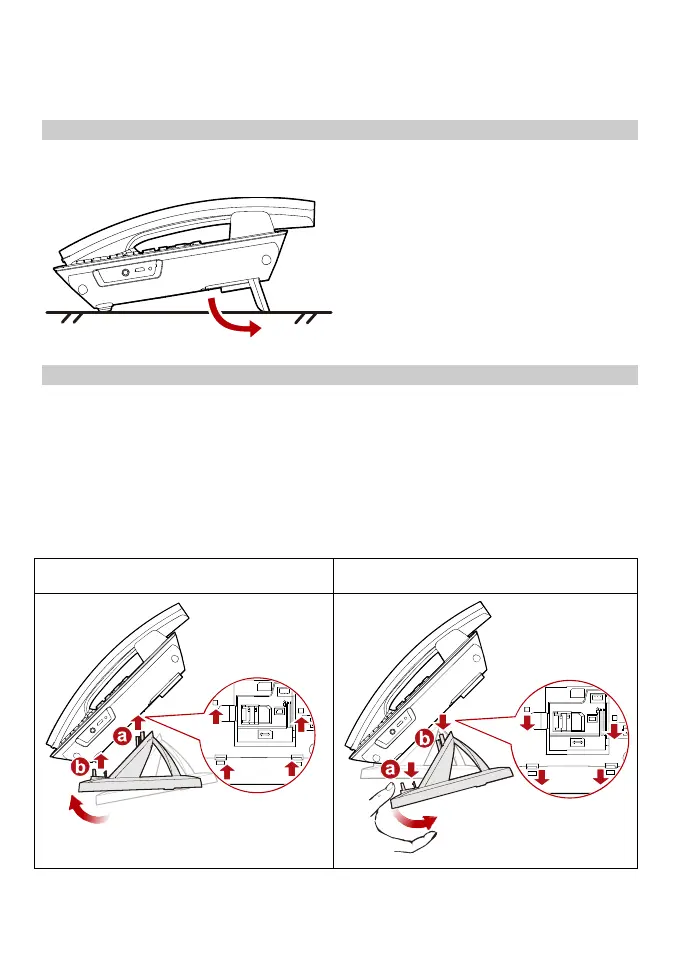
Flip-out feet (optional)
Flip out the feet for a better viewing angle and easier operation, as shown in the
following figure.
Installing and uninstalling the table stand
Your FWT can be placed upright with the use of a table stand.
Insert latch A and then latch B into the slots on the back of the FWT, as shown in
the Install procedure. The table stand allows the FWT to stand on a flat surface,
such as a table or desk.
To uninstall the FWT from the table stand, unbuckle latch A and then latch B, as
shown in the Uninstall procedure. Do not try any other methods to avoid damaging
the table stand.
Install Uninstall



 To Next Page