EasyManua.ls Logo

Huawei M-Pen lite - 1 M-Pen lite; Using your M-Pen lite for the first time

Huawei M-Pen lite
9 pages
Print Icon
To Next Page IconTo Next Page
To Previous Page IconTo Previous Page
Loading...
1
1 M-Pen lite
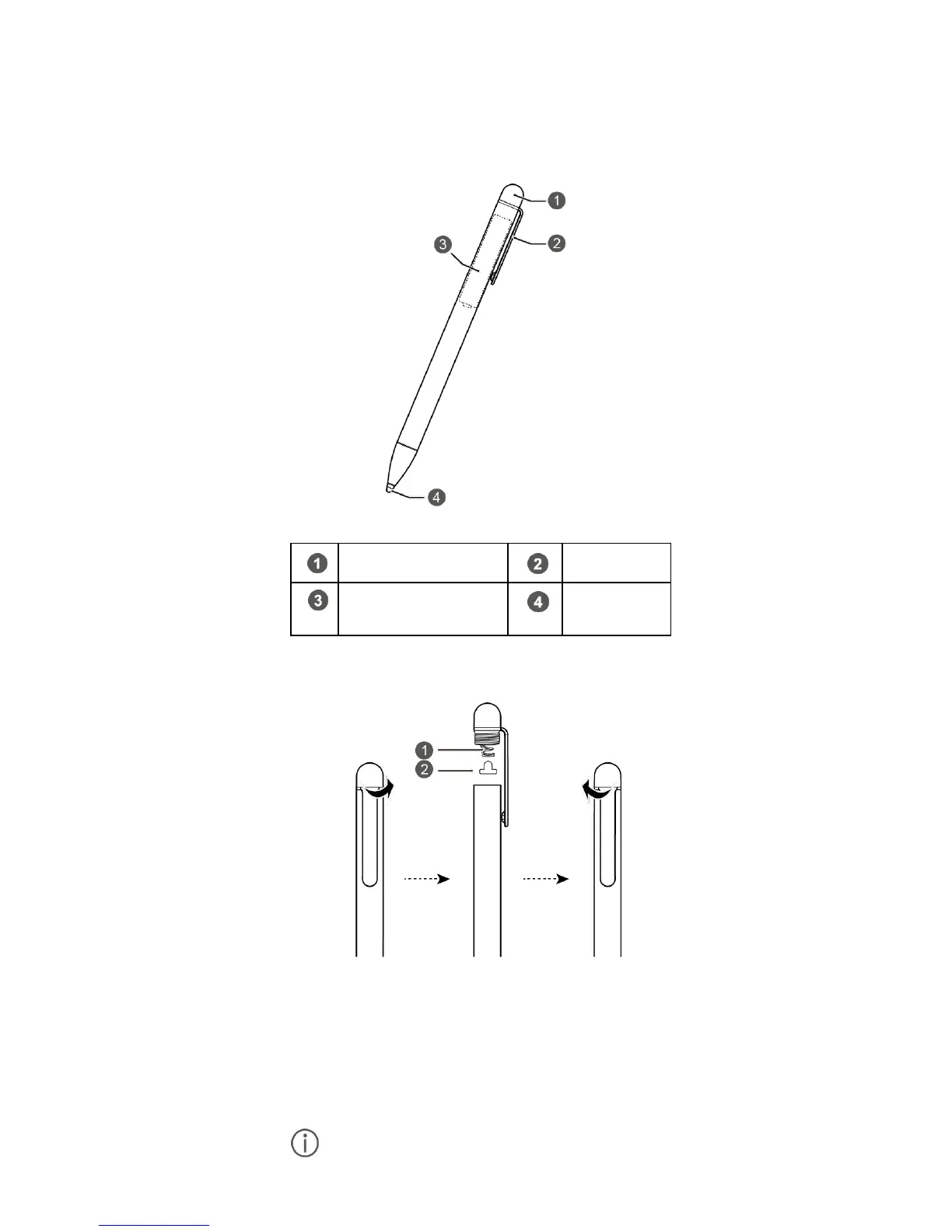
The M-Pen lite is a substitute for your fingers,
offering you a lot of handwriting and drawing fun
when working with feature apps.
Pen cap
Pen clip
Dry cell battery
(AAAA)
Pen tip
Using your M-Pen lite for the first time
Before using your M-Pen lite for the first time,
unscrew the pen cap, take out the red
insulation pad beneath the pen cap, and then
screw in the pen cap, as shown in the preceding
illustration. You are now ready to use your
M-Pen lite.

Remove the battery from your M-Pen lite if

Related product manuals