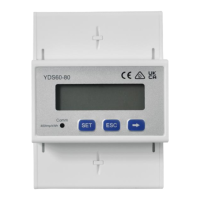
The YDS60-80 Smart Power Sensor is a device designed for measuring electrical parameters in various power grid systems. It functions as a power meter, providing essential data for monitoring and managing energy consumption.
Function Description:
The primary function of the YDS60-80 is to measure electrical quantities such as voltage, current, active power, and power factor. It supports both direct connection for currents up to 80 A and connection through current transformers for currents exceeding 80 A. The device is compatible with three-phase four-wire and three-phase three-wire power grid systems. It outputs data via an RS485 interface, allowing for integration into larger monitoring systems, such as those involving a SmartLogger or an inverter.
The sensor can be configured to operate in different wiring modes (3P4W or 3P3W) and connection modes (direct connection or current transformer connection). It also allows for setting the current transformation ratio (CT) and potential transformation ratio (PT) when current and potential transformers are used, respectively. The device features a display for local viewing of measured parameters and offers parameter setting capabilities through its buttons.
Important Technical Specifications:
- Nominal Voltage: 230 V AC/400 V AC, 50 Hz/60 Hz
- Current Measurement Range:
- Direct connection: 0–80 A
- Connection through current transformers: > 80 A
- Voltage Measurement Range: 90–1000 V (line voltage); potential transformers are required if the voltage is greater than 500 V.
- Electricity Metering Accuracy: Class 1 (error within ±1%)
- Power Grid System: Three-phase four-wire or three-phase three-wire
- Baud Rate: 4800/9600/19200/115200 bps (default value: 9600 bps)
- Operating Temperature: -25°C to +60°C
- Installation Mode: Guide rail-mounted (DIN35mm)
- Certification: CE, RCM, and UKCA
- Dimensions: 72 mm (width) x 100 mm (height) x 80 mm (depth, including 44.5 mm for the main body and 35.5 mm for the rail mount)
- Terminal Screw Torque:
- Ua, Ub, Uc, Un terminals: Maximum 1.7 N·m, recommended 0.9–1.1 N·m.
- Ia*, Ia, Ib*, Ib, Ic*, Ic, RS485A, RS485B terminals: Maximum 0.4 N·m, recommended 0.15–0.25 N·m.
- Cable Specifications:
- Channel 1 voltage cable (Ua IN and OUT, Ub IN and OUT, Uc IN and OUT, Un IN and OUT): Single-core outdoor copper cable, 25 mm² cross-sectional area, 10 mm outer diameter.
- Channel 2 voltage cable (Ua IN, Ub IN, Uc IN, Un IN): Single-core outdoor copper cable, 4–25 mm² cross-sectional area, 5–10 mm outer diameter.
- Channel 2 current transformer cable (Ia, Ia, Ib, Ib, Ic*, Ic):** Single-core outdoor copper cable, 2–4 mm² cross-sectional area, 3–5 mm outer diameter.
- Communications cable (RS485A, RS485B): Two-core outdoor shielded twisted pair copper cable, 0.25–1.5 mm² cross-sectional area, 4–11 mm outer diameter.
Usage Features:
The YDS60-80 is designed for easy installation on a standard DIN35mm guide rail. It features a clear display that shows various electrical parameters, including positive and negative active energy, communication address, phase voltages (Ua, Ub, Uc), phase currents (IA, IB, IC), total and phase active power (PFt, PFa, PFb, PFc), and total and phase power factors.
The device has a user-friendly interface with SET, ESC, and arrow buttons for navigation and parameter setting. Users can configure critical parameters such as the current transformer ratio, potential transformer ratio, communication protocol (parity, data bits, stop bits), baud rate, Modbus communication address, wiring mode, rotation display time, and backlight illumination time. A password (default 701) is required to access the parameter setting interface, and the password can be modified for security.
The sensor supports both SmartLogger networking and non-SmartLogger networking scenarios. In SmartLogger networking, the power meter connects to the SmartLogger, while in non-SmartLogger networking, it connects to the inverter. The wiring diagrams provided in the manual illustrate connections for both current and voltage direct connection (for currents ≤ 80 A and line voltage ≤ 500 V) and connection through current transformers and voltage direct connection (for currents > 80 A and line voltage ≤ 500 V). It also covers connection through current transformers and potential transformers (for current ≥ 0 A and line voltage > 500 V).
Maintenance Features:
Troubleshooting guidance is provided for common issues such as no display after power-on, abnormal RS485 communication, and inaccurate metering. For instance, if there is no display, users are advised to check cable connections and ensure the correct voltage supply. For RS485 communication issues, checking the cable integrity (disconnected, short-circuited, or reversely connected) and verifying that communication parameters (address, baud rate, data bit, parity bit) match those of the inverter are recommended.
In cases of inaccurate metering, users should verify the cable connections, especially the phase sequence of voltage and current. If negative power values (Pa, Pb, Pc) are displayed, it indicates that the high and low ends of the current transformer inlet are reversely connected, and the connection should be corrected.
Before initial operation, an installation verification process is recommended to ensure that all mounting brackets are securely installed, screws are tightened, and all cables are reliably connected with correct polarity and without short circuits. This proactive approach helps prevent operational issues and ensures the longevity and accuracy of the device. The device is designed for industrial and commercial high-current scenarios, emphasizing the importance of accurate current transformer ratios for precise measurements.


 To Next Page
 General






