The Hubitat Elevation® is a home automation hub designed to provide local, reliable, fast, and private control over smart home devices. It serves as the central brain for your smart home, allowing various Zigbee and Z-Wave compatible devices to communicate and work together. The system emphasizes local processing, meaning that automations and commands are executed directly on the hub rather than relying on cloud servers, which enhances speed, reliability, and privacy.
Function Description
The primary function of the Hubitat Elevation® hub is to act as a universal controller for smart home devices that utilize Zigbee and Z-Wave radio technologies. It enables users to create complex home automation rules, manage devices, and integrate with third-party services. The hub facilitates communication between different types of smart devices, allowing them to interact seamlessly. For instance, a motion sensor (Zigbee) could trigger a light switch (Z-Wave), or a door sensor could initiate a security alert.
The Hubitat Elevation® supports the creation of "Apps" and "Rules" which are essentially custom automation routines. These can range from simple lighting schedules to intricate sequences involving multiple devices and conditions. The hub's web interface provides a comprehensive platform for configuring these automations, adding new devices, and monitoring the status of your smart home.
Key functionalities include:
- Device Management: Discovering, adding, and controlling Zigbee and Z-Wave devices. This includes a wide range of products such as light bulbs, switches, dimmers, sensors (motion, contact, temperature), and more.
- Automation Engine: A powerful rule engine, often referred to as "Rule Machine," allows users to define custom logic for their smart home. This can involve triggers, conditions, and actions, enabling highly personalized automation scenarios.
- App Integration: The hub supports built-in applications for common tasks like simple lighting, button controllers, and safety monitoring. It also allows for integration with popular third-party services and platforms such as Amazon Alexa, Google Assistant, IFTTT, Lutron, Hue, Ecobee, and Rachio.
- Local Processing: A core feature of Hubitat Elevation® is its emphasis on local execution of automations. This means that once rules are set up, they run directly on the hub without needing an internet connection, ensuring faster response times and continued functionality even during internet outages.
- User Interface: A web-based interface provides a centralized point for all configuration, management, and monitoring tasks. This interface is accessible from any computer or device on the same local network as the hub.
- Location and Mode Management: Users can define locations and various modes (e.g., Home, Away, Night) to tailor automations based on the state of their home. The hub can also use postal code information to determine local sunrise and sunset times for time-based automations.
Usage Features
The Hubitat Elevation® is designed for users who desire advanced control and customization over their smart home environment. Its usage features cater to both beginners and experienced automators.
- Initial Setup and Registration: The setup process involves connecting the hub to your network via an Ethernet cable and powering it on. Registration is done through a web portal, where you create an account, link your hub, and define your location. The system guides users through these steps, including email verification and a tutorial for the user interface.
- Network Connectivity: The hub requires a wired Ethernet connection to your router for initial setup and ongoing network access. It is recommended to reserve a static IP address for the hub within your router's DHCP settings to ensure consistent access.
- Device Pairing: Adding devices involves putting the hub into discovery mode and then activating the pairing mode on the device itself. The hub supports both Zigbee and Z-Wave devices, and specific instructions may vary depending on the device type. For Z-Wave devices, an exclusion process might be necessary before inclusion, especially if migrating from another system.
- Automation Creation: The web interface provides tools for creating and managing automations. Users can define triggers (e.g., a door opening, a specific time), conditions (e.g., light level, mode), and actions (e.g., turn on a light, send a notification). The "Rule Machine" app offers extensive flexibility for complex logic.
- Dashboard Creation: Users can create custom dashboards to control and monitor their devices from a single interface. These dashboards can be accessed from various devices, providing a personalized control panel for the smart home.
- Third-Party Integration: The hub allows for seamless integration with popular voice assistants like Amazon Alexa and Google Assistant, enabling voice control over connected devices and automations. It also supports other integration apps for specific brands or services.
- User-Friendly Interface: While powerful, the web interface is structured to be intuitive, with clear navigation for devices, apps, settings, and logs. A tutorial is provided upon initial setup to help users familiarize themselves with the layout and functionalities.
- Community Support: Hubitat maintains an active online community where users can share ideas, ask questions, and get support from other users and Hubitat staff. This community is a valuable resource for troubleshooting and learning advanced techniques.
Maintenance Features
Maintaining the Hubitat Elevation® hub ensures its optimal performance and the reliability of your smart home system.
- Firmware Updates: The hub regularly receives platform updates that can include new features, bug fixes, and performance enhancements. Users can check for and apply these updates directly from the settings page of the web interface.
- Backup and Restore: The system allows users to create backups of their hub's database. These backups are crucial for disaster recovery, enabling users to restore their entire smart home configuration in case of a hub malfunction or when migrating to a new hub.
- Network Optimization: For optimal performance of Zigbee and Z-Wave devices, it is recommended to place the hub as close to the center of your home as possible, away from metal obstructions. The use of signal repeaters (dedicated Zigbee or Z-Wave devices that extend the network range) is strongly advised to build a robust mesh network, especially in larger homes or those with challenging layouts. It is important to note that Zigbee lightbulbs are generally not recommended as repeaters for other Zigbee devices due to their poor performance in this role.
- Troubleshooting: The documentation provides guidance for common issues, such as devices not being discovered or registration problems. Recommendations include using a different device for registration, ensuring the computer is on the same network segment as the hub, rebooting the ISP modem/router, and power cycling the hub. The hub's light indicator (blue during boot-up, green when ready for operation) provides visual cues for its status.
- System Logs: The hub maintains system logs that can be accessed through the web interface. These logs provide detailed information about device activity, app execution, and system events, which are invaluable for diagnosing issues and understanding how automations are performing.
- Hub Security: The settings page allows users to configure hub login security, protecting access to the hub's interface.
- Reboot and Shutdown: The hub can be safely rebooted or shut down from the settings page, which is useful for maintenance or when relocating the hub.
- Email Support: For issues that cannot be resolved through documentation or community forums, Hubitat offers email support.
By adhering to these usage and maintenance guidelines, users can ensure a stable, efficient, and secure smart home experience with the Hubitat Elevation® hub.

 Need help?
 General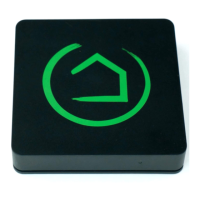

 To Next Page