17
Channel Configuration
If you are adding new instrumentation, changing existing instrumentation
or reconfiguring the HM-3000’s channel setup, you need to configure the
channel for use with the devices you have.
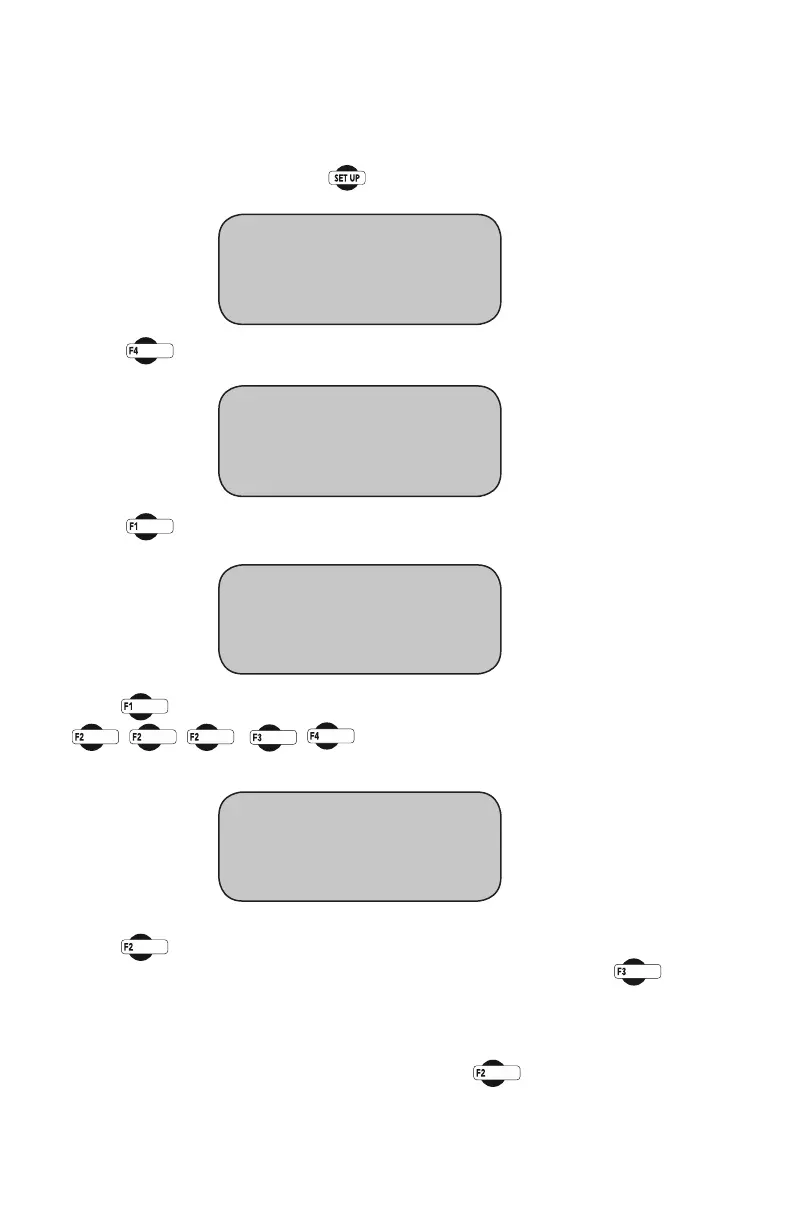
To configure a channel, press You should see this screen:
Press you will see this screen:
Press (ENGINEERINGSETUP).Youshouldseethisscreen:
Press (CONFIGURATION)Youwillbeaskedforapassword,enter:
You should see this screen:
Press (SELECTCHANNEL)toscrollthroughandchoosethechannel
you wish to configure. Once you have selected a channel press
(CONFIGURECHANNEL).Youshouldseethisscreen:
Naming Channel
Fromthepreviousscreen,shownabove,Press (NAME)toselectthe
name you wish to change, press the key until the name you wish to change
is indicated. You should see this screen:
* REVIEW LAST TEST
* RUN TEST
* MORE SETUP
* ENGINEERING SETUP
* SENSOR LIMITS OFF
* RAW_DATA
* MORE SETUP
* CONFIGURATION
* CALIBRATION
* LOGGING INTERVAL
CONFIGURATION screen
* SELECT CHANNEL "CHI"
* CONFIGURE CHANNEL
* CONFIGURE TEST


 To Next Page