20
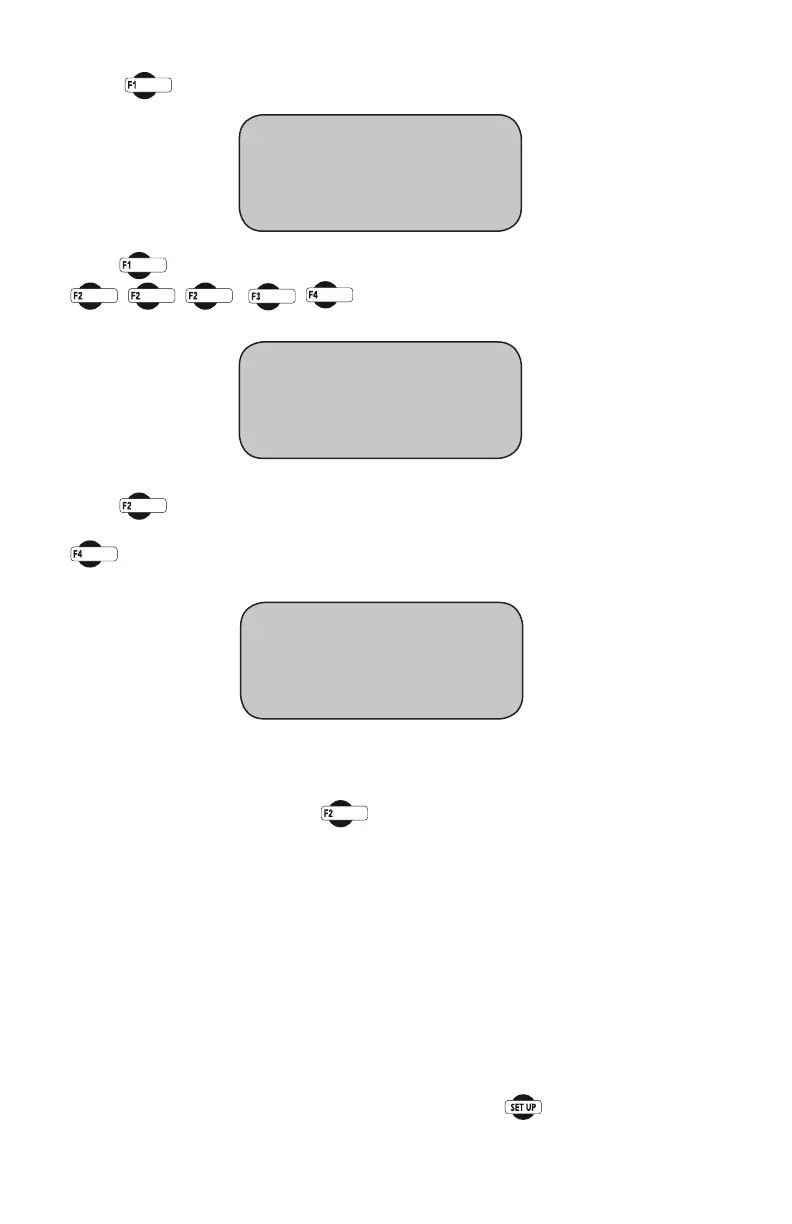
To assign a test to the selected channel, press the corresponding function
keytothetestyouwishtoselect.Pressingakeywilltogglebetween“Y”
and“N”.Forexample,press to choose Marshall Test, which will
changethe“N”toa“Y”nexttoMarshall.Thiswouldindicatethatthe
channel selected would be set up to run Marshall Test.
NOTE: Multiple tests can be assigned to a single channel, however, multiple
channels of the same category cannot be assigned to the same test.
Example: Ifchannel1isconguredwitha10,000lb(50KN)loadcell,and
channel2isconguredwitha5,000lb(25KN)loadcell,itispossibletouse
either channel to perform a Marshall test. However, only one of the channels
can be used as the load channel (Stability channel).
To return to any prior screen you can always press
Press (ENGINEERINGSETUP).Youshouldseethisscreen:
Press (CONFIGURATION)Youwillbeaskedforapassword,enter:
You should see this screen:
Press (SELECTCHANNEL)toscrollthroughandchoosethechannel
you wish to configure test for. Once you have selected a channel press
(CONFIGURETEST).Youshouldseethisscreen:
* CONFIGURATION
* CALIBRATION
* LOGGING INTERVAL
CONFIGURATION screen
* SELECT CHANNEL “CH1”
* CONFIGURE CHANNEL
* CONFIGURE TEST
* CBR/LBR TEST N
* MARSHALL TEST N
* USER DEFINED N


 To Next Page