13
Using ChartSelect
5
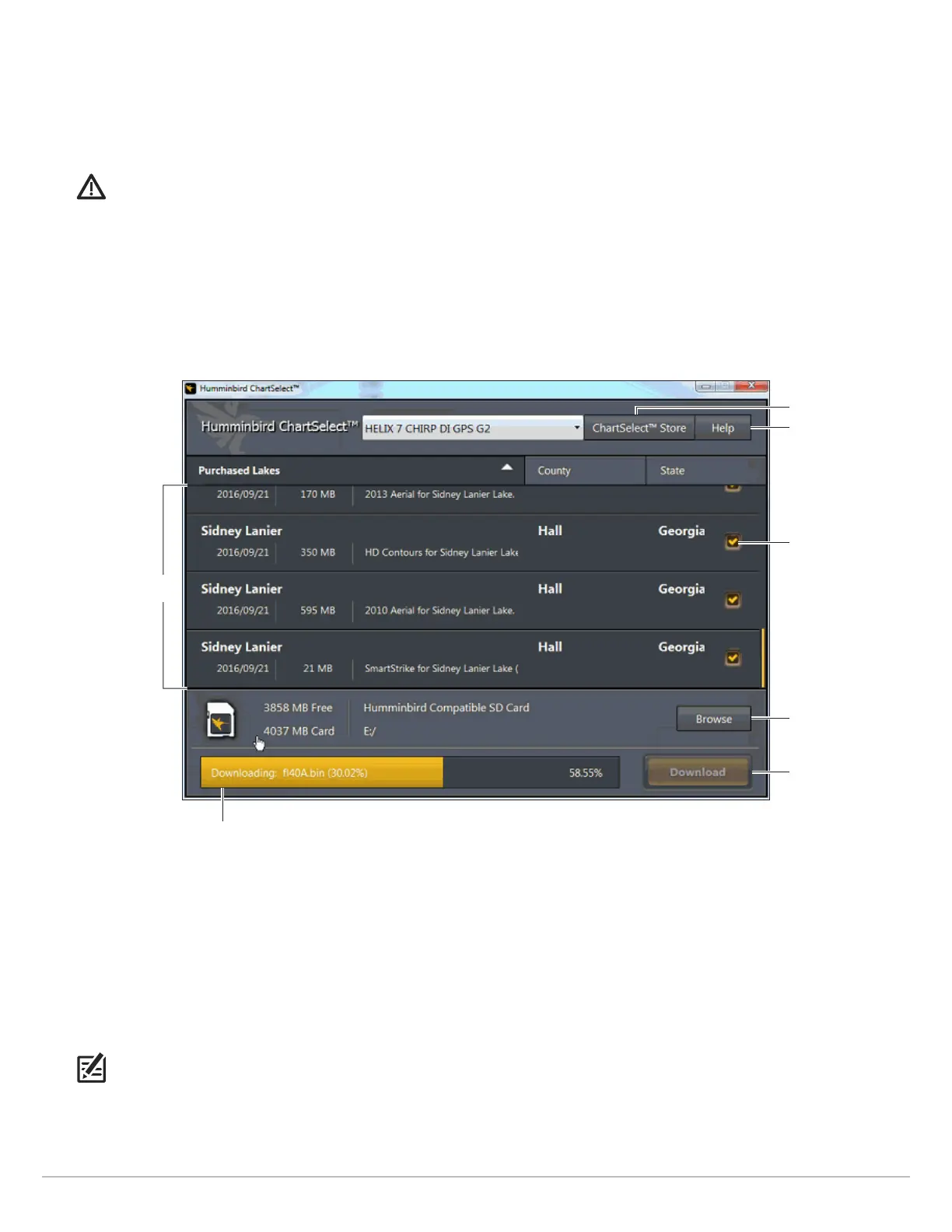
. Select LakeMaster Chart(s): Select the LakeMaster chart(s) you want to save to the SD or microSD card. Click inside the
c
heckbox to select.
OR
Select One AutoChart ZeroLine Map: Select the AutoChart ZeroLine region map you want to save to the SD or microSD card.
Click inside the checkbox to select.
WARNING! Do not save LakeMaster charts and AutoChart ZeroLine maps to the same SD or microSD card. A separate 32 GB SD
or microSD card is required for each AutoChart ZeroLine region map.
6. Click Browse. Under Computer, select the SD or microSD card (commonly displayed as Removable Disk), and click Open to
select.
7. Click Download. A status bar will display to indicate the download progress.
8. A confirmation box will display when the download is complete. Click OK.
9. Remove the SD or microSD card from your PC card slot.
The SD or microSD card is now ready for operation.
To Display a Lake on the Control Head: Insert the SD or microSD card into the control head card slot. When you install an SD
or microSD card, the map source is changed automatically to match the SD or microSD card map source. If you install more
than one SD or microSD map card, you can choose which chart source you want to use. Depending on your control head
model, the map source menu will be under the Chart Menu Tab (800, 900, 1100, and HELIX Series) or under Settings > Chart
(SOLIX, ONIX, and ION Series). See your control head operations manual for further details about selecting chart sources.
NOTE: Once the SD or microSD card is installed on the control head, AutoChart and LakeMaster menu options are automatically
added to the menu system. See your control head operations manual for more information.
Click Download to
download the selected
chart(s) to the SD card.
link to
ChartSelect store
Click Browse to select
the installed SD card.
currently selected
chart
ChartSelect Help
The download status bar shows the download
progress and file size of currently selected chart(s).
Saving a Lake Chart to an SD or MicroSD Card
purchased charts
and chart layers










 To Next Page