15
Using FishSmart
USING FISHSMART
C
onfirm you have read the setup instructions in the previous section FishSmart Overview. Use the following sections to get started
u
sing FishSmart. Refer to the instructions for your mobile device operating system: Apple iOS or Google Android.
NOTE: Wi-Fi or cellular data must be enabled on your mobile device to download purchased charts and share navigation data.
Location Services must also be enabled for GPS tracking.
What’s on the Display
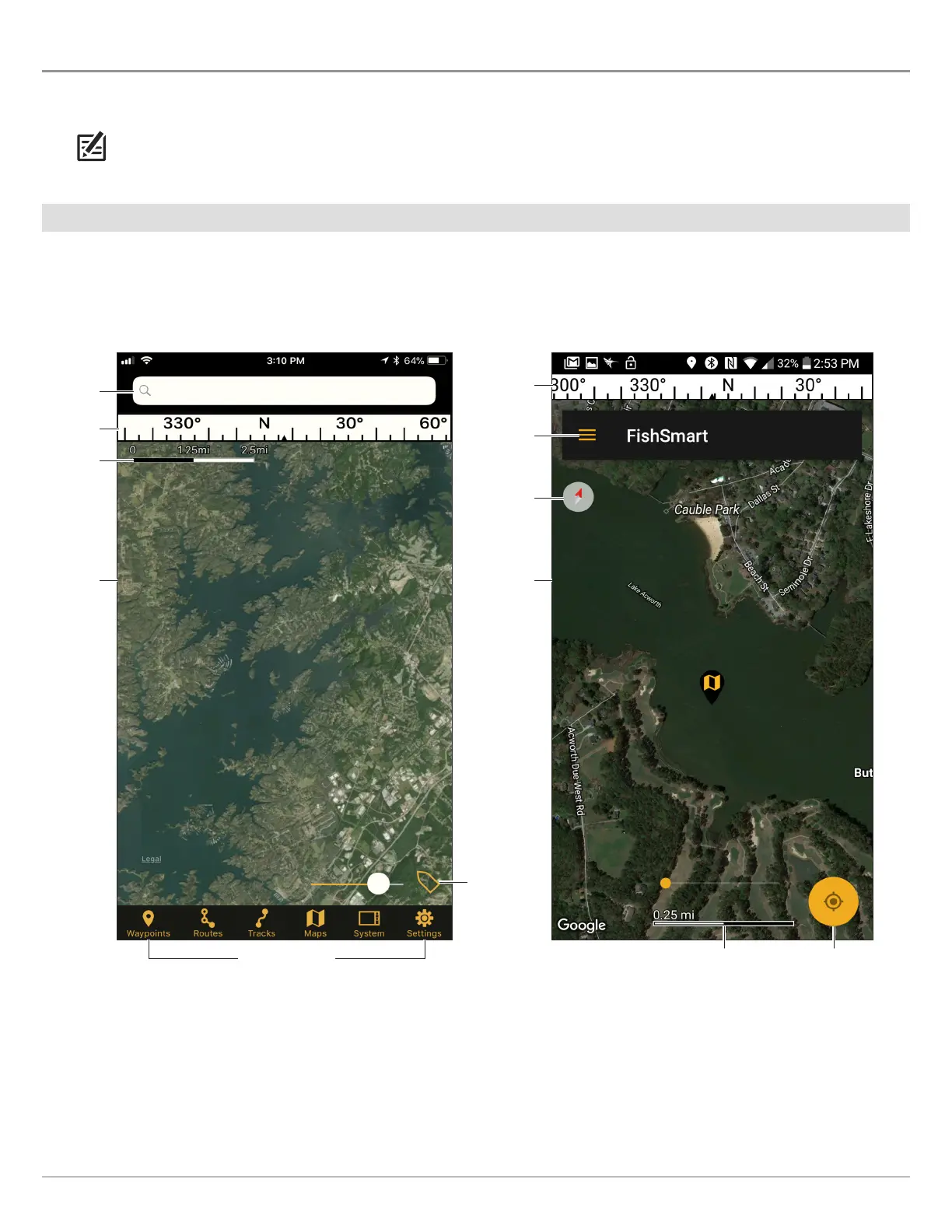
The FishSmart app opens to display a topographical map of the area surrounding your current location. This is referred to as the
chart display.
FishSmart menus
search bar
GPS & chart
orientation
indicator
base map
map scale
compass
Nort
h-Up
ind
ic
a
t
o
r
FishSmart
main menu
map scale
Opening FishSmart
(
Apple iOS Phone)
Opening FishSmart
(
Google Android Phone)
compass
base map
GPS & chart
orientation indicator










 To Next Page