5
|
Set the Chart Orientation
T
he default chart orientation is North-Up. Use the following instructions to change the chart orientation to Head-Up or Center
Vessel.
• North-Up: The chart is oriented with North up on the display, and the boat rotates according to its heading or COG (Course Over
Ground).
• Head-Up: The boat’s current heading points up, and the chart rotates around the boat icon so that it always points up on the
display. The heading is provided by the mobile device's internal compass.
• Center Vessel: The chart is oriented with North up on the display, and the chart rotates around the boat icon so that the boat
is always in the center of the screen.
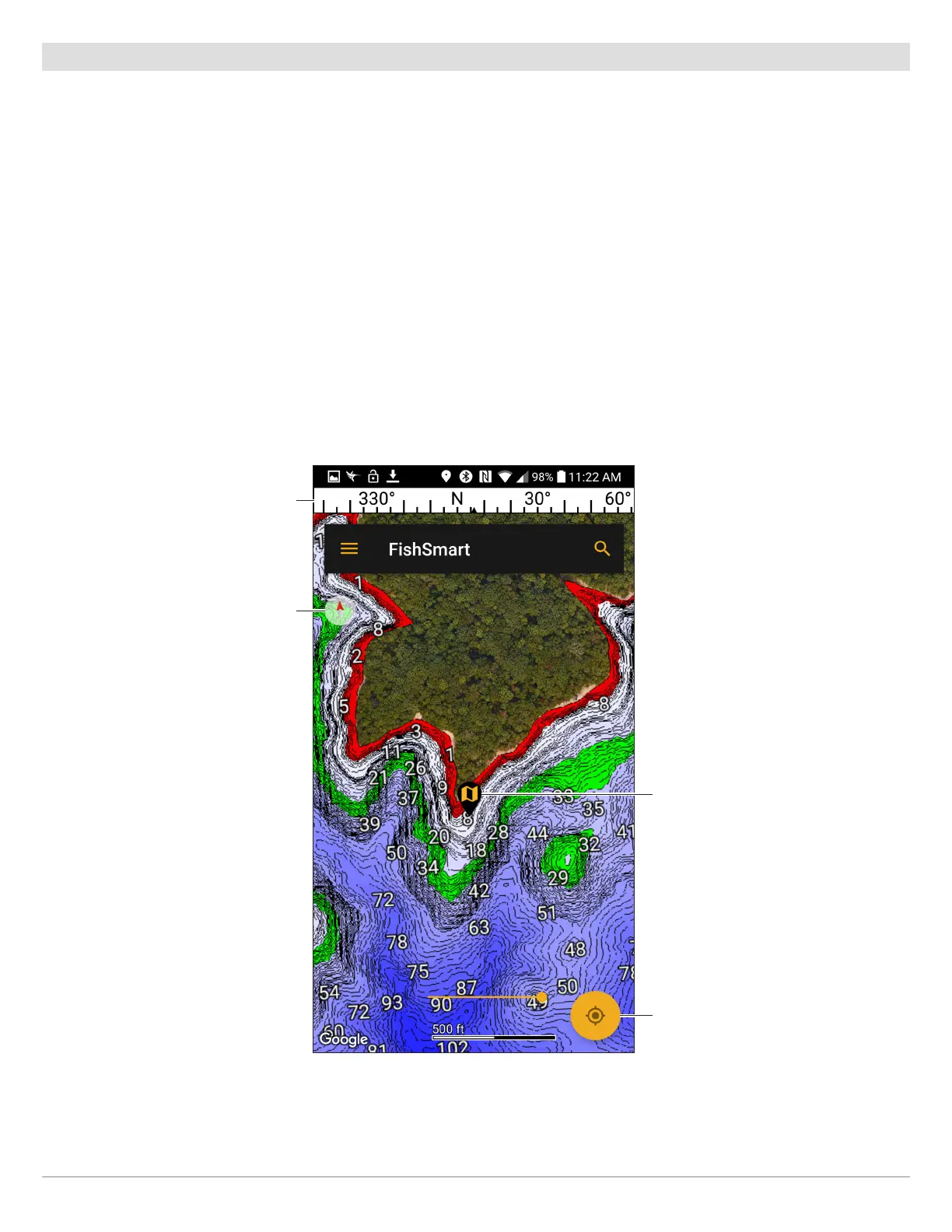
Set the Chart Orientation
1. Apple iOS: Tap the chart orientation indicator until the display is set to either Head-Up, North Up, or Center Vessel.
Google Android: Tap the chart orientation indicator until the display is set to either Head-Up or Center Vessel. To return to
North-Up, tap the North-Up Indicator, which displays under the FishSmart main menu.
Setting the Chart Orientation
(Google Android Phone)
chart
orientation
indicator
(currently set
to North-Up)
lake map
marker
compass
North-Up
indicator
23
Using FishSmart










 To Next Page