4
. Apple iOS: Tap Save.
Google Android: Edits are automatically saved.
Delete a Route
1. Apple iOS: Tap the Routes menu icon. Swipe left on the route name using one finger. Tap Delete.
Google Android: Tap the FishSmart main menu. Select Routes. Press and hold a route until it is highlighted, and tap the Trash
icon.
Display/Hide a Saved Route
Use the following instructions to display or hide a saved route from the chart display.
1. Apple iOS: Tap the Routes menu icon.
Google Android: Tap the FishSmart main menu. Select Routes.
2. Apple iOS: Select a route. Tap Show/Hide.
Google Android: Select a route. Tap the More Options icon to open the submenu and select Show/Hide.
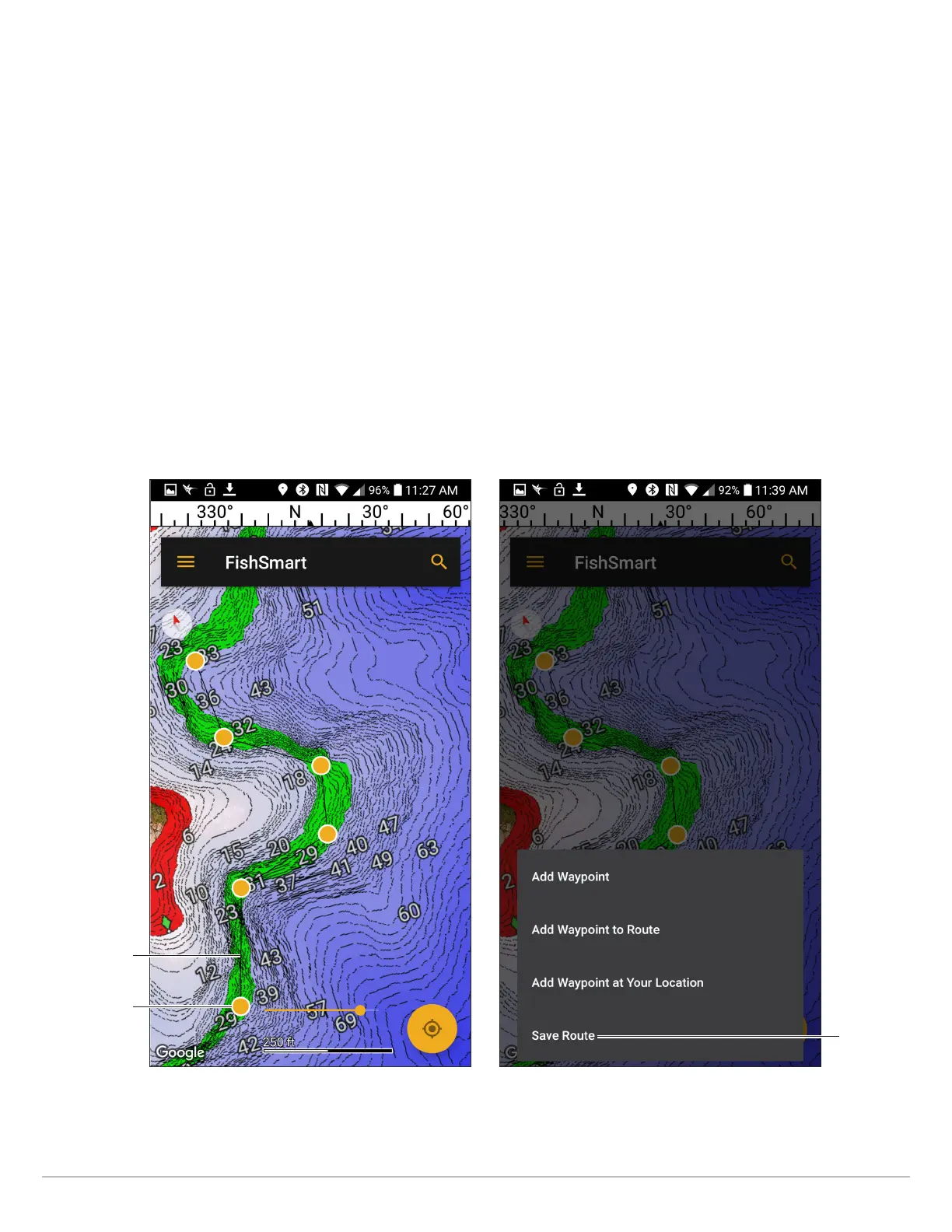
route
(black line)
Creating a New Route
(Google Android Phone)
Tap a position to
add a waypoint
to the route.
Editing a Route
(Google Android Phone)
Tap to save
the route.
29
Marking Waypoints, Routes, and Tracks










 To Next Page