4
|
Display the Chart on the Control Head
O
nce the chart has been uploaded to the SD or microSD card, LakeMaster menu options are automatically added to the control head
menu system. See your control head operations manual for further details about selecting chart sources.
SOLIX Series
1. With a Chart View displayed on-screen, tap Chart in the status bar.
2. Select Info.
3. Select Lake List.
4. Select the name of the lake.
HELIX G2N Series
1. Main Menu: Press the MENU key twice. Select the HB Chart tab.
2. Select Lake List.
3. Press the RIGHT Cursor key.
4. Scroll: Press the UP or DOWN Cursor keys to scroll through the list. As each lake is highlighted, you can view information about
the lake in the box displayed on the screen.
5. Cursor To: Select a lake on the list. Press the RIGHT Cursor key.
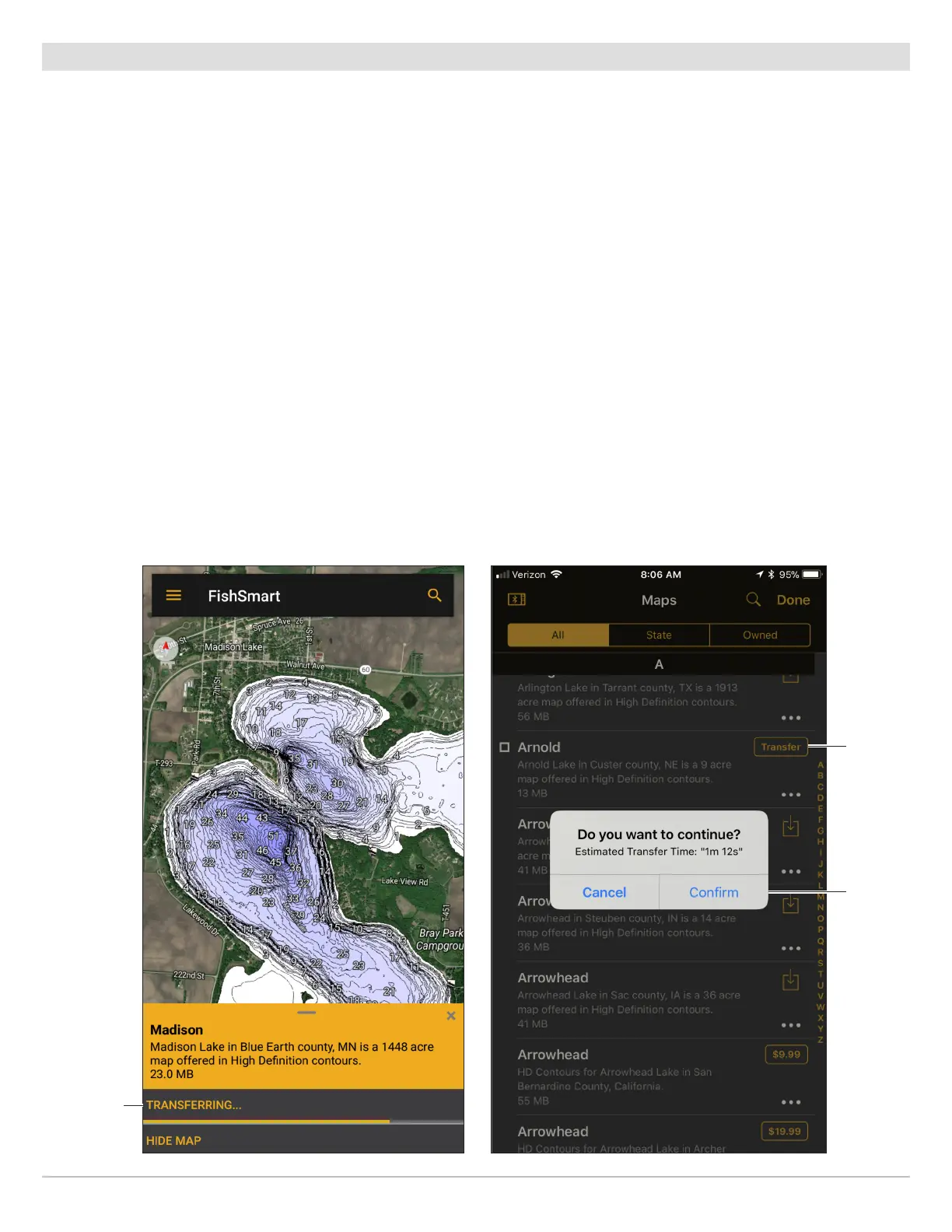
Transfer
map from
Chart Display.
Transferring Map from Chart Display
(Google Android Phone)
Tap to
transfer
map.
Transferring Map from Maps Menu
(Apple iOS Phone)
Tap to
confirm
transfer.
38
Transferring Charts to the Control Head










 To Next Page