12
Electrician Installation Manual
Typhoon Ceiling Fan
1. Do not attempt to operate the fan (or optional light kit) with any wall control that is not
approved by Hunter Pacific for use with its fans. DO NOT use solid state controllers. The
use of unapproved controllers will void your warranty.
2. Do not
mix blade sets from one fan to another as this may upset the balance of the fan. If
only one blade is damaged you are still required to replace with a new set.
Trouble Shooting Tips - Light
Light will not turn on - Make sure globe has not blown and it is properly fitted
between the metal prongs. Check all light wires in the light kit, the terminal block
in the canopy cover and the wall switch has been connected together correctly.
Light is not responding to remote control- Make sure globe has not blown
and it is properly fitted between the metal prongs. Check all light wires in the
light kit, the terminal block in the canopy cover and the wall switch has been
connected together correctly. Check dip switch settings in remote hand piece
and remote receiver correspond.
Light wires appear to be missing or too short - Wires may be stuck in the
motor housing. Carefully pull wires out of the motor housing, careful not to strip
the wires as this may cause the fan to short.
Light flickers or flashes - Check globe is secured between the metal prongs in
the light kit. Make sure you are using the globes specified.
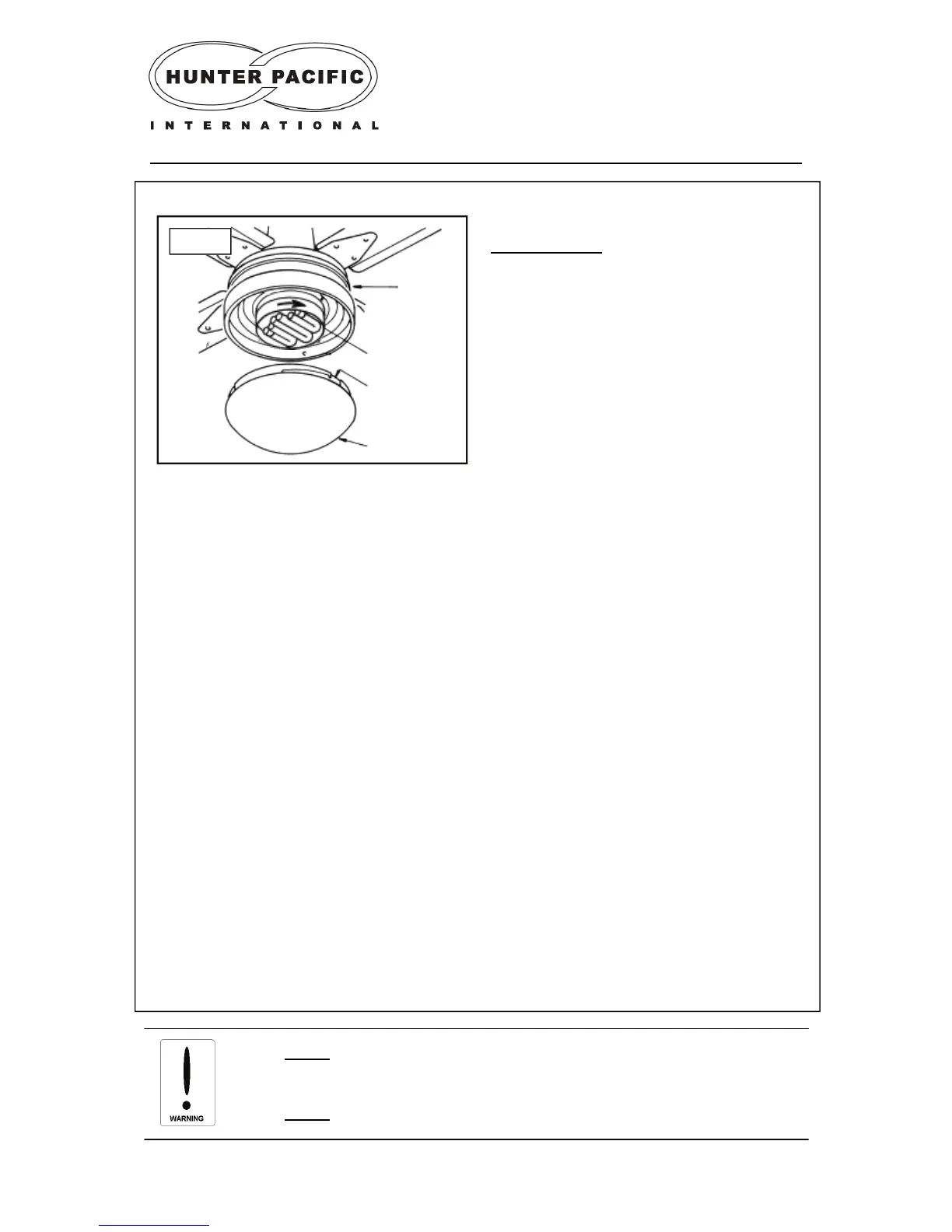
Glass Cover
Tabs
Compact
Fluorescent
Light
Motor
Housing
Fig. 22
STEP 5 (Fig. 22)
a) Turn the light to attach it firmly to the light
socket.
b) Gently push the glass cover upwards and
turn it to attach glass cover to the fan.
c) Do not over-tighten the glass cover as it may
become difficult to remove.
Attaching a accessory light kit — GX53M 14W compact fluorescent light


 To Next Page