nt
r
•
nderwater
ea
.
Fi
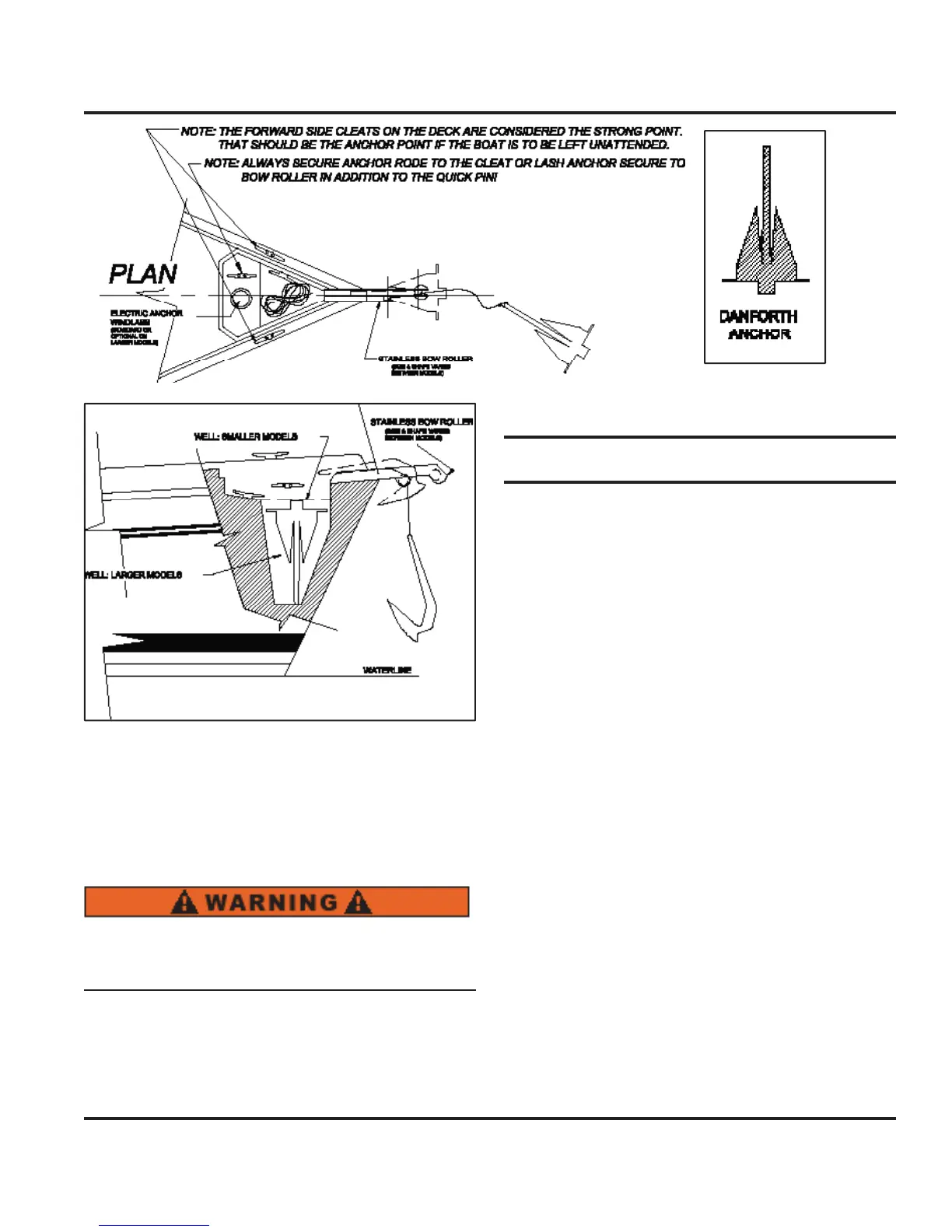
6.9 shows
ou a pro
ile view o
the anchorin
, and
w
n
ass s
stem.
s
ustrat
on s
ows t
e sma
er an
the lar
er anchor well, in relation to the location.
nc
or
n
n unusua
water, an
or weat
er con
-
tions will re
uire additional
recautions. Consult an
pproved
uide for su
estions
6.5 Troubleshootin
ou
we cannot cover ever
pro
em
ou m
t
ncounter in boatin
, we hope to assist
ou in the
basic operation and maintenance of the com-
ponents a
oar
, or
nsta
e
on
our
oat.
As difficult as it would be to also cover ever
option
r com
onent
nsta
e
we
o
e we
ave covere
t
e
basic essentials
ou will need in order to have man
a
safe and comfortable outin
s in
our new boat. As in all
ases alwa
s consult
our
EM manuals in all cases o
review o
the documentation o
the components aboard
r installed on
our boat. If the manuals are not available
in
our owner
s packet, contact Hunter Marine, or
our
dealer. It is the ultimate in importance that
ou under-
stand all
ou should about the equipment on
our boat.
ere we
ive
ou a short
uide concernin
the trouble-
shootin
o
the equipment that
all in the underwater
ear section of
our boat. Read this
uide, and use it in
tr
in
to discover the root o
an
issues that mi
ht arise.
emember:
EM manuals take precedence over an
in
ormation
ou ma
ind in the Hunter
wner’s or
perator’s Manuals.
Fi
. 6.
Fi
. 6.9



 To Next Page