INSTALLATION
7
■
Attach the enclosure to the mounting surface with screws, which go through the holes in
the mounting feet.
If not using the Mounting Feet for Surface or Recessed Mounting
■
You may optionally remove the mounting feet.
➤
On the inside of the enclosure, remove the screws that secure the four mounting feet
to the enclosure.
■
Secure the enclosure to an appropriate mounting surface.
➤
Use the four pre-drilled holes located on the back panel of the power supply enclosure.
NOTE: Studs or solid wood are the preferred mounting surfaces.
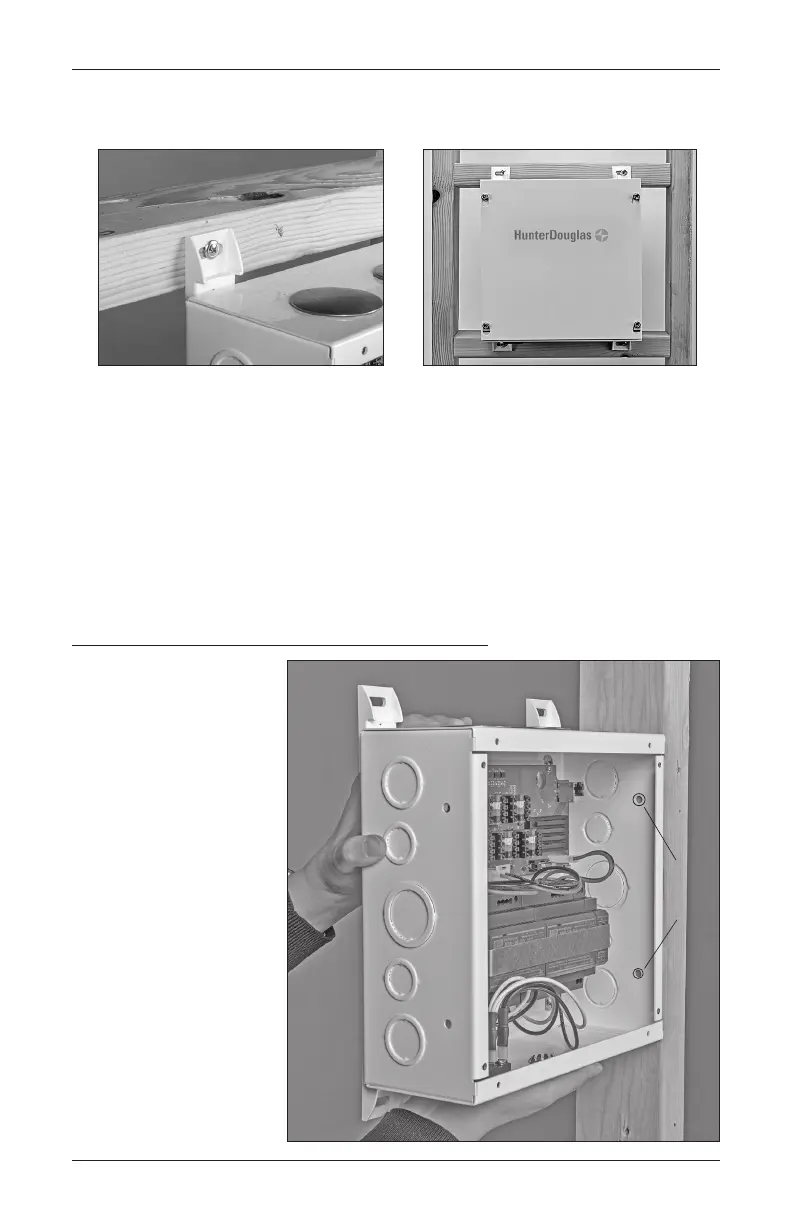
Side Mounting for the Enclosure (Optional)
■
Secure the enclosure to
an appropriate mounting
surface.
➤
Use the pre-drilled
holes located on
the side panels of
the power supply
enclosure.
NOTE: Studs or
solid wood are the
preferred mounting
surfaces.
Side
Mount
Holes



 To Next Page