10
3. Description of Controls, Indicators,
Symbols and Displays
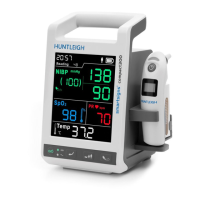
3.1 Identifi cation of Front Panel Controls and Symbols
4
2
1
3
8
5
6
7
1 Carry handle
2 Display
3 ON / OFF
4
Battery Indicator
• ON: Battery is being charged, or fully charged
• OFF: Battery is not fi tted or faulty
• FLASHING: The battery is supplying power to the monitor.
AC Power Indicator
• ON: Monitor is connected to AC power
• OFF: Monitor is not connected to AC power
5 Return
6 Patient group selection
7 Start / Stop NiBP
8 Wireless infrared thermometer
Description of Controls, Indicators, Symbols and Displays


 To Next Page
 Loading...