EasyManua.ls Logo

HuPro PRO-773 - User Manual

HuPro PRO-773
24 pages
Print Icon
To Next Page IconTo Next Page
Loading...
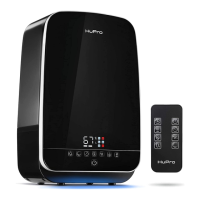
Warm & Cool Mist Humidification
ULTRASONIC HUMIDIFIER
MODEL: PRO-773
Question and Answer IconNeed help?

Do you have a question about the HuPro PRO-773 and is the answer not in the manual?

Summary

Introduction

Applications of the Device

Health and Comfort Benefits

Covers improved sleep, relief from colds, headaches, dry skin, and allergies.

Environmental and Practical Benefits

Includes benefits for indoor plants, wooden surfaces, and low energy consumption.

Key Device Features

Key Features and Design

Details capacity, mist types, speed levels, auto shut-off, and design aspects.

Advanced Functions

Describes remote control, automatic humidity control, anion function, and aroma tray.

General Safety Precautions

Electrical and Placement Safety

Covers voltage checks, proper placement, and avoiding wet hands for plug.

Operational Safety Rules

Rules regarding cable damage, water type, handling, and liquid spills.

Continued Safety Guidelines

Maintenance and Handling Warnings

Advice on cable replacement, water handling, cleaning, and preventing damage.

Usage Environment and Power

Restrictions on usage environments and ensuring safe power cable management.

Final Safety Considerations

Usage Restrictions and Humidity Levels

Guidance on avoiding certain environments and optimal humidity levels.

Final Safety Checks

Emphasis on voltage verification and retaining instructions for safe operation.

User Safety Tips

Airflow, Placement, and Surface Care

Tips on airflow direction, device placement, and protecting surfaces from moisture.

Usage Restrictions and Protection

Rules on avoiding floor heating, covering the device, and carpet use.

Further User Safety Advice

Environment and Water Usage

Advice on avoiding chemical vapors and using appropriate water and additives.

Maintenance and Storage Safety

Guidelines for unplugging, cleaning, drying, and storing the device.

Voltage and Plug Handling

Important notes on voltage compatibility and safe plug removal.

Humidifier Parts Identification

Main Unit Components

Identification of top cover, mist outlet, handle, water tank, and housing.

Internal and Accessory Parts

Details on float, filter, transducer, heater, aroma box, and remote control.

Instructions for Use: Setup

Device Placement and Tank Filling

Instructions for placing the device and correctly filling the water tank.

Final Assembly Steps

Guidance on attaching the top cover and ensuring proper fit.

Initial Setup and Operation

Power Connection and Readiness

Procedure for plugging in the device and preparing it for operation.

Initial Operation and Water Guidelines

How to start the humidifier and important rules on water type and filling.

Operating Instructions: On-Device Controls

Power and Mist Level Control

How to use ON/OFF and MIN/MAX buttons for basic operation.

Humidity Level Management

Setting and maintaining desired humidity levels, including auto-adjustments.

Advanced On-Device Functions

Specialized Modes: ANION, AUTO, TIMER

Explanation of Anion, Auto Mode, and Timer functions for enhanced operation.

SLEEP MODE and Water Shortage

How to use Sleep Mode and what the water shortage indication means.

Aroma Tray Usage

Aroma Tray Operation

Steps for adding oils, activating the function, and disabling it.

Essential Oil Recommendations

Advice on using natural oils and adjusting quantities for desired scent intensity.

Remote Control Functions

Basic and Mode Controls

Covers ON/OFF, AUTO MODE, TIMER, and WARM MIST functions.

Level and Mode Adjustments

Explanation of MIN/MAX, HUMIDITY, SLEEP MODE, and ANION controls.

Remote Control Battery Replacement

Battery Compartment Access

Steps to press buttons to open and remove the battery container.

Battery Installation

Procedure for replacing the battery and securing the container.

Water Filter Information

Filtration Mechanism

Explanation of the acid ion exchange resin's role in softening water.

Filter Maintenance and Lifespan

How to clean the filter and its non-replacement condition.

Device Care and Maintenance

Limescale Prevention and Water Choice

Advice on using distilled water to prevent scale buildup from hard water.

Cleaning Procedures

Detailed steps for cleaning the transducer and the humidifier base.

Storage and Disposal

Proper Storage Method

Steps for unplugging, drying, and storing the humidifier in a cool, dry place.

End-of-Life Disposal

Information on proper disposal and recycling of the device.

Technical Specifications

Model, Voltage, and Power

Details on model number, voltage, and power consumption for different modes.

Capacity, Rate, and Dimensions

Information on water capacity, evaporation rate, noise level, and product size.

Troubleshooting Common Issues

Power and Mist Output Issues

Resolving issues like no power, no mist, or low mist output.

Operational and Noise Problems

Addressing abnormal smells, noise, and mist escaping the nozzle.

Warranty Information

Warranty Terms and Support

Covers warranty period, defect resolution, and contact methods.

Usage Limitations

Important warning about the device being for household use only.

Overview

The HuPro ultrasonic humidifier is designed to improve indoor air quality by restoring appropriate humidity levels and alleviating discomfort associated with dry air. This device offers a comprehensive solution for various needs, from enhancing sleep quality and relieving cold and flu symptoms to moisturizing skin and protecting wooden surfaces and floors.

Function Description

The core function of the HuPro humidifier is to provide warm and cool mist humidification, ensuring a comfortable and healthy environment. It features a 5.5-liter capacity, allowing for up to 40 hours of continuous humidification. The device operates with three speed levels for mist output, giving users control over the intensity of humidification.

An intuitive interface and automatic safety system contribute to a seamless user experience. The humidifier includes an automatic shut-off feature that activates when the water tank is empty, preventing damage and ensuring safety. Its bottom-filling design simplifies the refilling process.

Beyond basic humidification, the HuPro device incorporates several advanced functions:

  • Automatic Humidity Control: The humidifier can automatically control the humidity level, maintaining a desired range for optimal comfort.
  • Antibacterial Anion Function: This feature releases 240 million cleansing ions per minute to purify the air, contributing to a healthier indoor environment.
  • Aroma Oil Tray: A dedicated aroma oil tray allows users to add essential oils, diffusing pleasant fragrances and enhancing the overall ambiance. This function is activated automatically when the device is on and essential oils are added to the sponge in the tray.
  • On/Off: A short press of the On/Off button turns the humidifier on or off. When turned on, it defaults to the second mist power level and independently determines the current room humidity. If unplugged and then re-plugged, it will restart in the second mist power level.
  • Mist Power Levels (MIN/MAX): Users can adjust the mist output to three different power levels by pressing the MIN/MAX button. The chosen level is indicated on the display.
  • Humidity Level Selection: The desired humidity level can be set between 40%RH and 80%RH. Once set, the humidifier will work to reach and maintain this level, entering standby mode when the target is achieved and restarting if the humidity drops 5%RH below the set level. If the set humidity is lower than the actual room humidity, the device will run for 2 minutes and then stop automatically.
  • Auto Mode: Activating Auto Mode allows the humidifier to maintain relative humidity between 55% and 68%. In this mode, the device automatically selects the best humidity and mist power levels based on current room conditions. If humidity exceeds 68%RH, it will run for 5 minutes and then enter standby.
  • Timer Function: A timer can be set for 1 to 10 hours, after which the humidifier will automatically shut off.
  • Sleep Mode: This mode turns off the display and backlight, allowing for undisturbed sleep. The humidifier continues to operate in the background.
  • Water Shortage Indicator: If the water tank runs low, the device automatically stops, emits three warning beeps, and displays a water shortage symbol, prompting the user to refill the tank.

Usage Features

To ensure proper operation and longevity, several usage guidelines must be followed:

  • Placement: The humidifier should always be placed on a hard, flat surface, away from direct sunlight, walls, and heat sources like stoves or radiators. It is crucial not to place it on varnished, painted, or wooden surfaces directly, as moisture can cause damage; a plastic mat (30"x30") or similar substitute should be used underneath. The device should not be placed on floors with underfloor heating, carpets, or towels.
  • Water Type: Only cold, distilled, or demineralized water should be used to fill the tank. Using tap water, especially hard water with high mineral content, can lead to the emission of "white dust." Hot water (over 100°F) should never be poured into the tank.
  • Filling the Tank: The water tank is a bottom-filling model. To fill, remove the top cover, take out the water tank, turn it bottom up, unscrew the lid, and pour water into it. After refilling, screw the lid gently back on and place the tank back into the humidifier base, ensuring it is correctly seated. It is critical not to pour water directly into the mist outlet or the humidifier base itself, as the base is automatically filled via a valve from the tank.
  • Essential Oils: Only natural essential oils should be used in the aroma tray. Synthetic oils or adding oils directly to the water tank can damage the device. The number of drops should be adjusted according to personal preference, starting with 3 drops.
  • Safety Precautions:
    • Do not insert or remove the electric plug with wet hands.
    • Do not shake the appliance during operation to prevent water spillage into the unit base.
    • Never touch the water or internal components while the unit is in operation.
    • If an unusual smell occurs, switch off, unplug, and consult the dealer.
    • Do not immerse the appliance, mains cable, or plug in water or other liquids.
    • Avoid obstructing the nozzle with clothing or towels, as this can cause malfunction.
    • When moving the appliance, lift it by the unit base, not the water tank.
    • Do not use the humidifier if the room's relative humidity is already above 50%. The ideal range for human comfort is 45-60%.
    • The device is designed for indoor use only and should not be used in rooms where aerosol products are used or oxygen is administered.
    • The device is designed for 120V supply only. Always check the voltage on the back panel matches the outlet.

Maintenance Features

Regular maintenance is essential to ensure the humidifier's efficiency and longevity, especially in areas with hard water.

  • General Cleaning:
    • Unplug the device before any cleaning or maintenance.
    • If the humidifier is not used for 2 or more days, pour out all water from the reservoir and base, clean the entire unit, and ensure all parts are completely dry before storage.
    • To prevent bacteria growth, do not leave the humidifier filled with water for several days without use.
    • Store the device in a cold, dry place, away from children.
  • Water Tank and Basin:
    • Clean the water tank and basin weekly.
    • Change water in the tank often to keep it fresh.
    • Use a soft cloth and cleaning agent/vinegar to clean the water basin, especially if limescale is present.
    • If deposits are on the security switch, apply cleaning agent/vinegar and clean with a brush.
    • Rinse the water basin with clean water after cleaning.
  • Transducer:
    • The transducer, if covered in limescale from hard water, can interfere with unit operation.
    • To clean, apply 5-10 drops of cleaning agent/vinegar to the transducer surface and let it sit for 2-5 minutes.
    • Brush off the scale from the surface.
    • Rinse the transducer with clean water.
  • Water Filter:
    • The water filter contains acid ion exchange resin that softens water by reacting with calcium and magnesium ions.
    • To clean the water filter, soak it in saline water for 24 hours and then dry it cool.
    • The water filter does not need replacement as long as its structure is not compromised.
  • Aroma Tray:
    • To disable the aroma function or clean the tray, remove the sponge from the aroma tray and wash it with water.
  • Disposal: At the end of its life, the device must be disposed of separately and can be recycled at local electronics and appliance recycling depots.

HuPro PRO-773 Specifications

General IconGeneral
Humidifier TypeUltrasonic
Mist OutputUp to 300ml/h
Coverage AreaUp to 500 sq ft
Noise Level≤30dB
Humidification MethodUltrasonic
Power Consumption25W
FeaturesAuto Shut-Off, Timer
Operating Frequency60Hz

Related product manuals