EasyManua.ls Logo

Huskylock 340D - Setting Differential Feed; Differential Feed Control Lever

Default Icon
42 pages
Print Icon
To Next Page IconTo Next Page
To Previous Page IconTo Previous Page
Loading...
01/23/2008
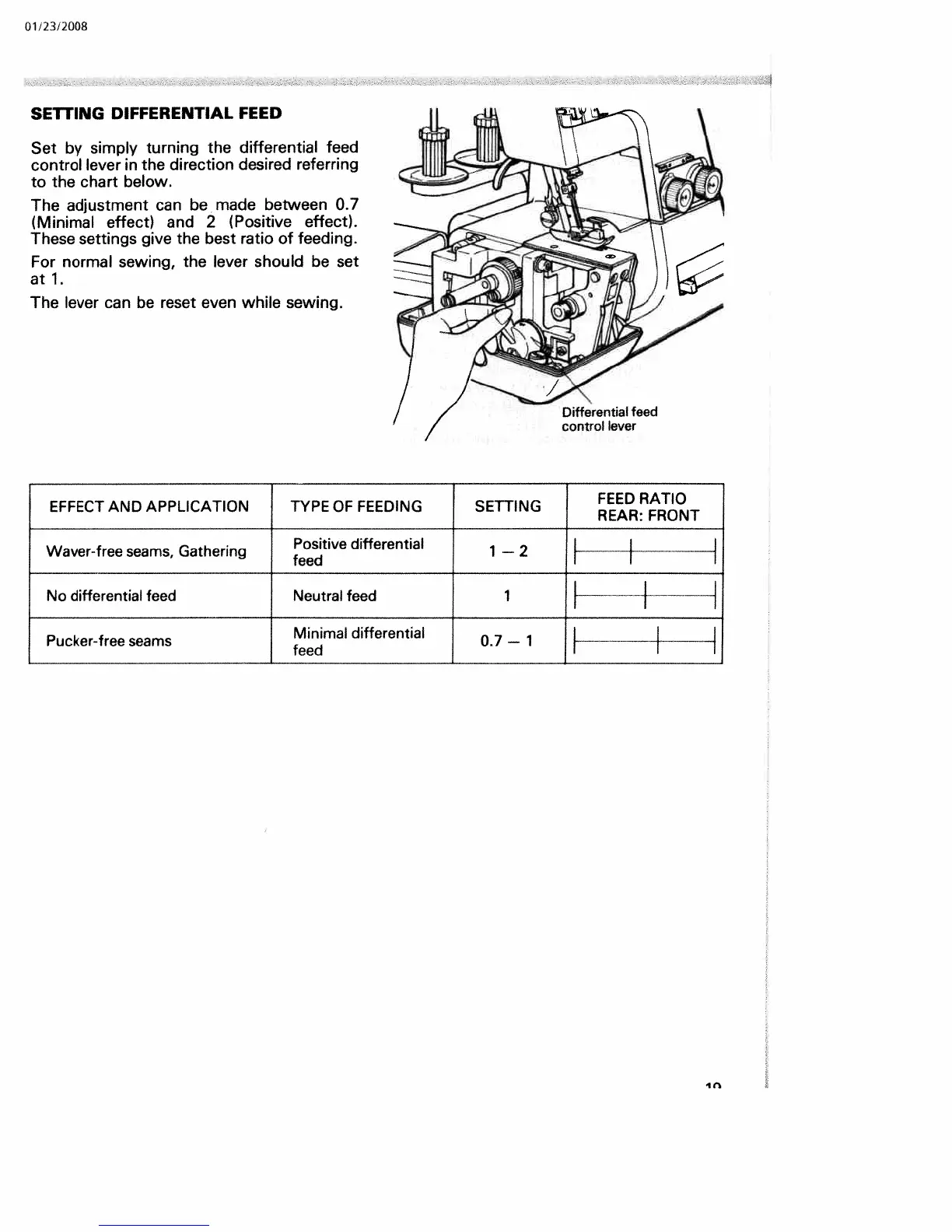
SETTING
DIFFERENTIAL
FEED
Set
by
simply
turning
the
differential
feed
control
lever
in
the
direction
desired
referring
to
the
chart
below.
The
adjustment
can
be
made
between
0.7
(Minimal
effect>
and
2
(Positive
effect>.
These
settings
give
the
best
ratio
of
feeding.
For
normal
sewing,
the
lever
should
be
set
at
1.
The
lever
can
be
reset
even
while
sewing.
FEED
RATIO
EFFECT
AND
APPLICATION
TYPE
OF
FEEDING
SETTING
REAR:
FRONT
Positive differential
1
2
Waver-free
seams,
Gathering
feed
No
differential
feed
Neutral
feed
1
Minimal
differential
0.7
1
Pucker-free
seams
feed
In

Related product manuals