Installation and Maintenance Manual
34
Installing Photoelectric (Non-contact) Sensors
General Information:
Follow the guidelines in the Entrapment Protection Schematic to plan the most appropriate mount-
ing positions for the photo-eye sensors to be installed. If there are no other secondary external
entrapment protection sensors (typically an edge sensor), at least two photoelectric sensors are
required to serve to reverse the gate in each direction of travel. The Smart Touch Controller has
two photoelectric sensor inputs (Photo eye open and Photo eye close).
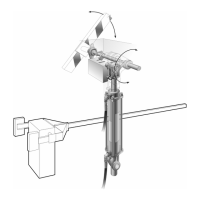
There are two common types of photoelectric sensors, thru beam and retro-reflective, each has
some advantages. A thru beam sensor is generally more powerful and able to function reliably with
dirty optics and in poor weather. A retro-reflective sensor has the convenience of not requiring the
installation and electrical wiring of the remote emitter required in a thru beam system, but is gener-
ally more problematic in poor weather. Avoid use of a retro-reflective device to span a distance
greater than 24 feet in an outdoor environment or performance will probably be unsatisfactory.
Compatibility:
A requirement of the UL 325 standard is that a photoelectric sensor be laboratory tested and “rec-
ognized” under UL 325. In order to be compatible with a Hy-Security operator, a photo eye must be
rated to function from 24 Volts DC source power.
Installation:
Mount the photo eyes approximately 15" to 30" above the ground and as close to the gate as
possible. Unless there are also gate edges for entrapment protection, a minimum of two photo
eyes will be required to function for both the open and closing directions of travel. Mount the receiv-
ers on the left and right sides of the gate operator and the emitters just beyond the travel of the
gate in both the full open and full closed positions of travel. In some situations, an additional photo
eye should be installed on the public side of the gate. The installation locations described above
are intended for pedestrian detection, if photo eyes are also to be used for vehicular detection,
consider, in addition to the low elevation photo eye for cars, another photo eye at a height of around
55" to detect semi-trucks.
Configuration:
If the photo eye has an internal switch for setting Light Operate vs. Dark Operate, select Light
Operate. If the photo eye has a relay output and has both NO and NC terminals, some experimen-
tation may be required to determine the proper connection. This is because in the Light Operate
mode the output relay is normally energized and releases when the beam is blocked. Some manu-
facturers label an output as NO, when it is actually an NC contact. If the photo eye has a solid-state
output you must, choose a sinking type connection.
Connection:
Three wires to the receiver and two wires to the emitter are all that is required.
a. The +24 Volt source power is obtained at one of the three spade terminals on the power supply
board.
b. The -24 Volt source power is obtained from spade terminals on our terminals #14 or 15, labeled
(Photo Eye Power) on the Smart Touch Controller board.
Note: The -24 Volt Photo Eye Power also supplies the photo eye output Common.
c. The photo eye NO or NC output connects to the Smart Touch Controller board at terminal #19 if
the photo eye spans the road, or at terminal #17 if the photo eye spans the gate’s open storage
area.



 To Next Page