3. Operation
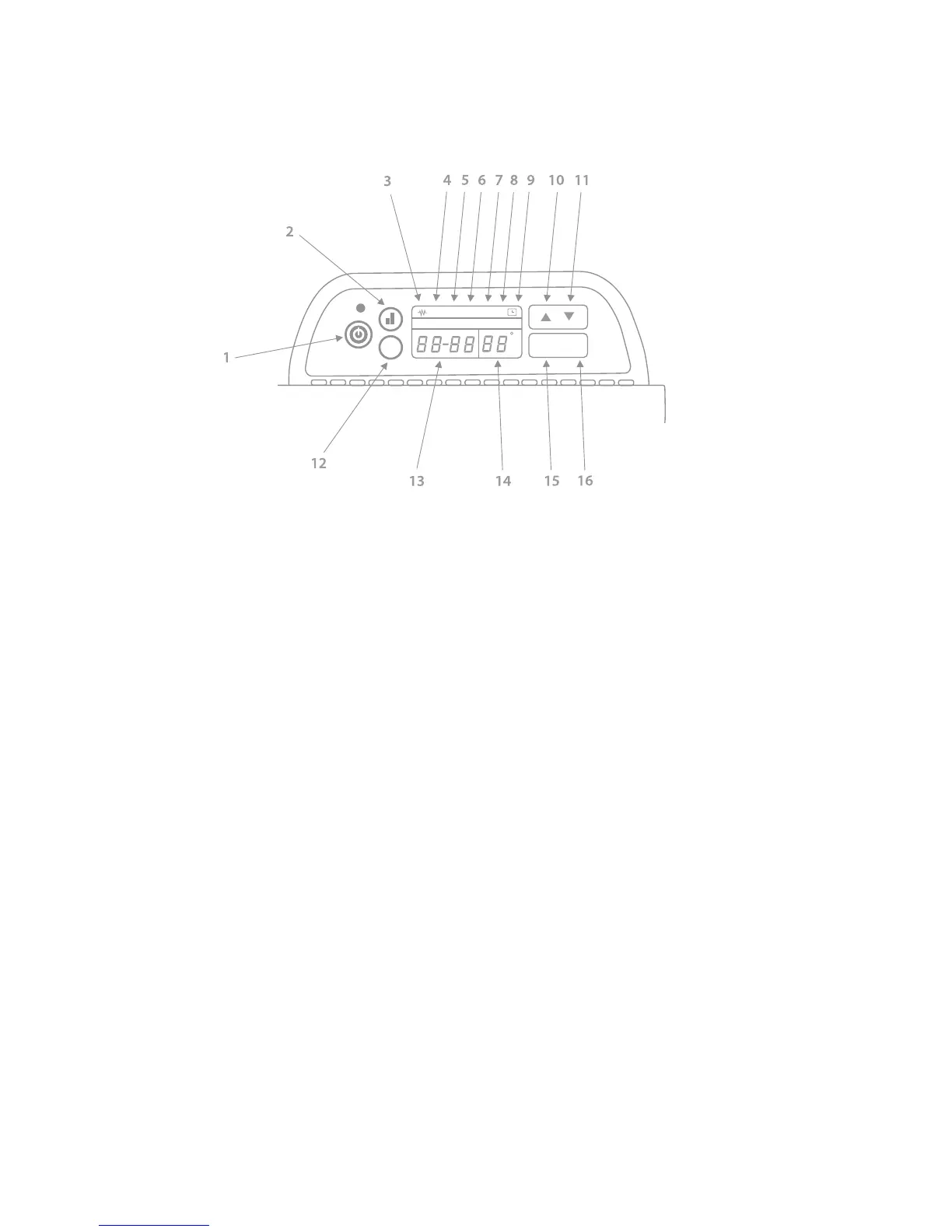
Control panel overview
1. Standby on/off 7. Manual mode active 13. Time display
2. Full/half power select 8. Automatic mode active 14. Target temperature
3. Element on indicator 9. Timer active 15. SET select
4. Low power active 10. UP select 16. OK select
5. High power active 11. DOWN select
6. Open window active 12. Manual/Auto select
Once the heater has been switched on using the rocker switch on the right-hand side the
blue power LED indicator will be illuminated. You will then need to press the standby
on/off button under the LED indicator to activate the panel.
Setting the clock
•
Hold down the SET & OK buttons simultaneously until a beep sounds and the current
day setting flashes.
•
Use the UP/DOWN buttons to cycle to the correct day and press the SET button
to store.
•
The hour segment of the time display will flash with the current setting, use the
UP/DOWN button to cycle to the current hour and press the SET button to store.
•
The minute segment of the time display will flash with the current setting, use the
UP/DOWN button to cycle to the current minute and press the SET button to store.


 To Next Page