1
4.OPERATION AND USE
4.6
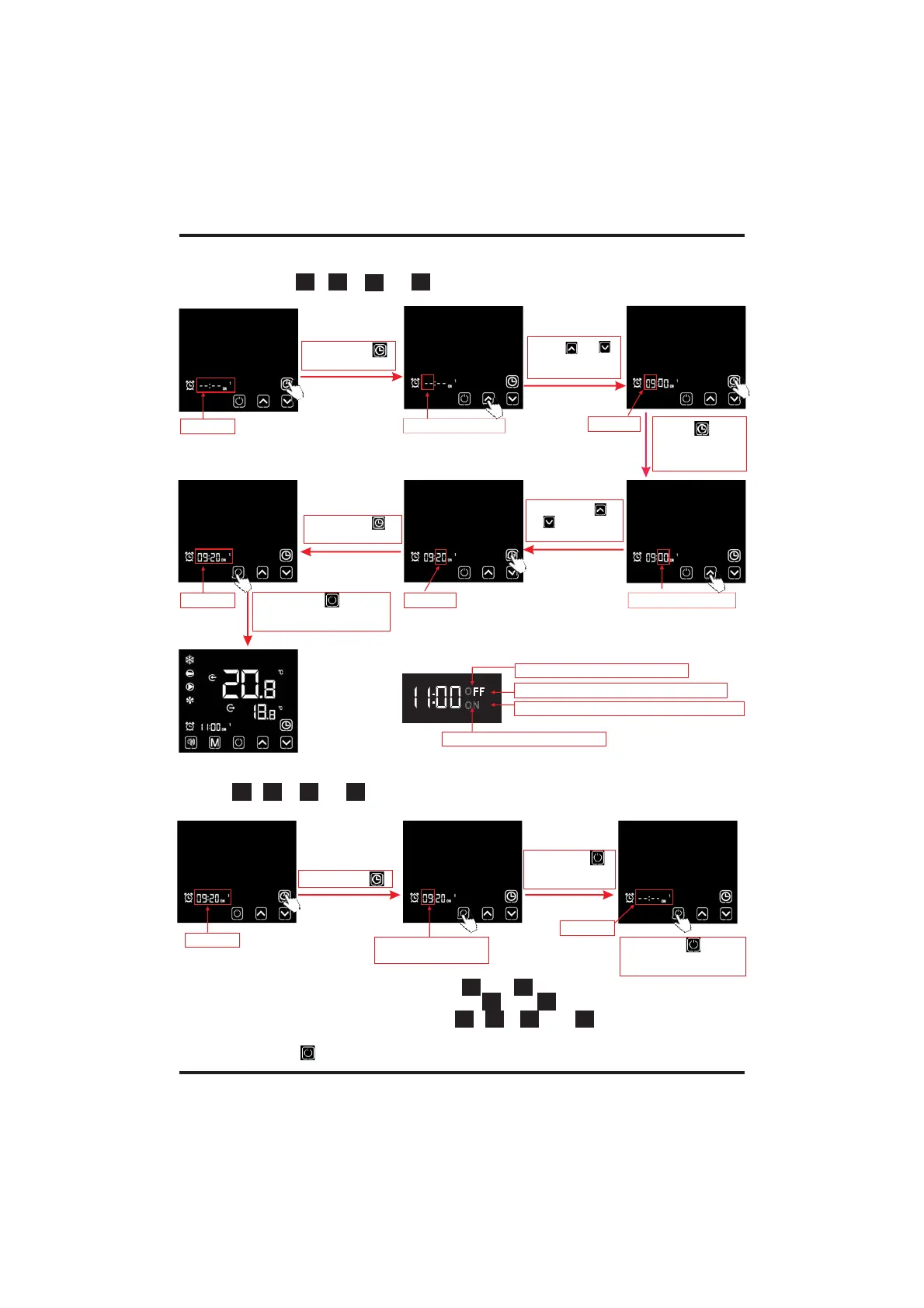
.2.3 Setting the Timer ON/OFF function
Short press " "
to set hour digit
Flashing
Press " "or " "
to adjust hour
digit
Press " " to
save the settings
and skip to the
minute digit setting
Hour digit flashing
Short press " "
or " " to adjustt
minute digit
Minute digit flashing
Short press " "
to save the settings
Flashing
Flashing
Flashing
Short press " " to save
the settings and return to
the main interface
4.6
.2.4 Cancelling the Timer ON/OFF function
Flashing
Short press " "
Flashing
(hour or minute digit)
Short press " "
to cancel the timer
settings
Flashing
Short press " " to save
the change and return to
the main interface
While enter into the , set the Timer ON/OFF as below:
"," ", " " or " " timer setting interface
"
2)) 2))
21 21
* Take for example:
ON1
1) Select , cancel the Timer ON/OFF as below:
" "," ", " " or " " timer setting interface refers to 6.2.1
2 )) 2 ))
21 21
* Take for example:ON1
Note: Under the Timer ON/OFF setting interface, if the timing symbol and entire time digits flash at
the same time, click " " to return to the main interface;
0''
0/
1
2
Displays the first-stage timing switch on
Displays Timer ON function on
Displays the second-stage timing switch on
Dsiplays Timer OFF function on
2) To cancel the first-stage timing switch: cancel both ;
To cancel the second-stage timing switch: cancel both
" " and " " ;
To cancel the two stage timing switch: cancel all " "," ", " " and " " .
" " and " "
2 ))
21
2))
21
2 )) 2 ))
21 21



 To Next Page