1
4.OPERATION AND USE
4.7. Silent setting
4.7
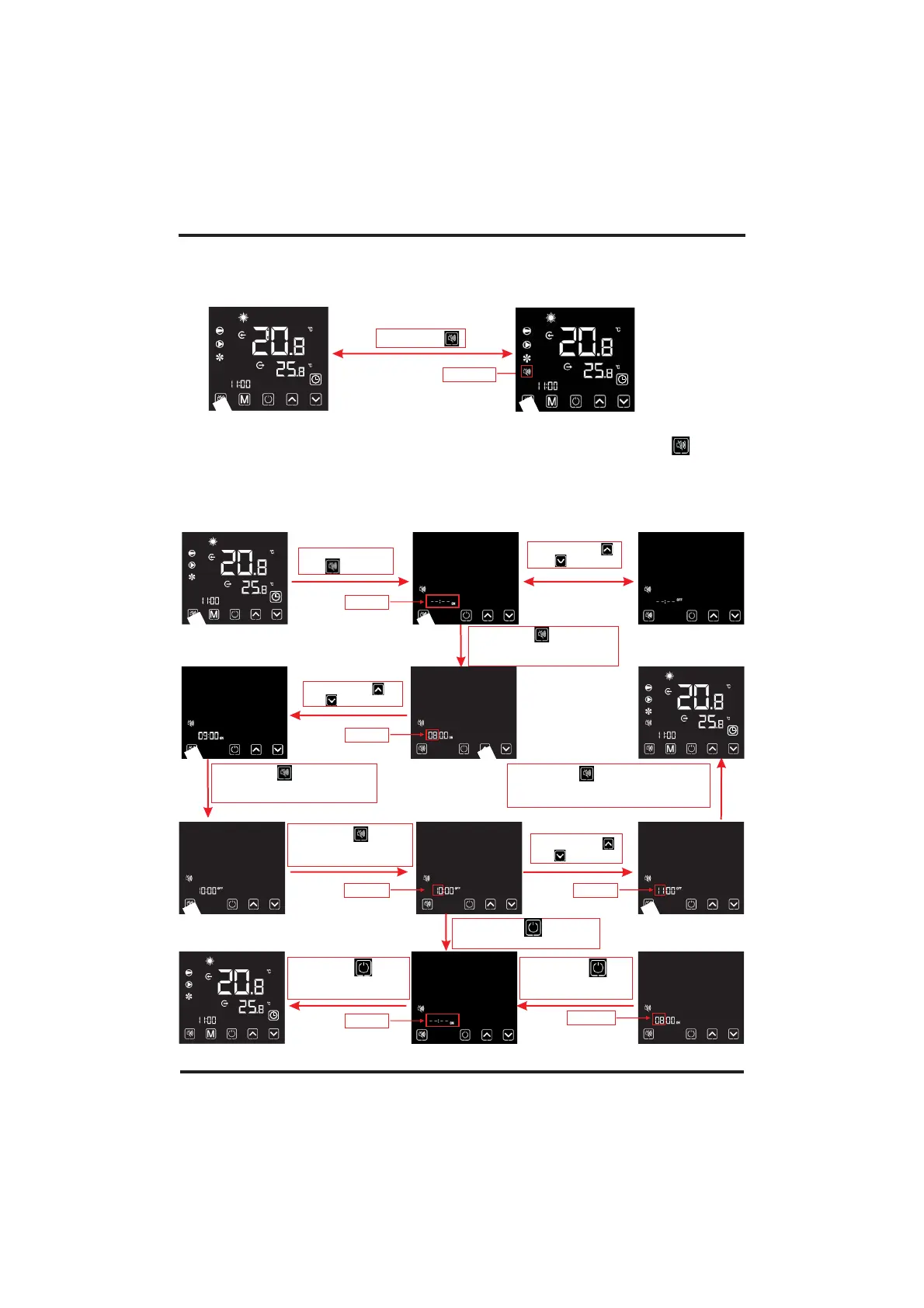
.1 One-click silent function
short press " "
Notes:
1). If one-click silent and timming silentaare stared at the same time, short press " " for
canceling one-click silent and quitting the timing silent for this time.
2). At night or the rest time, user can start one-click silent or timing silent function to reduce
the noise.
4.7
.2 Setting and cancelling the silent function
Keep long press
of " " for 2 s
Short press"
or " "
"
Short press" " for entering
the hour digit setting of
timing-on silent
Short press" "
or " "
Short press" " for confirming
the timing-on silent, and turn to
the setting of timing-off silent
Short press " " for
entering the hour digit
setting of timing-off silent
Short press" "
or " "
Short press" " for confirming
timing-off silent, saving the changes
and returning to the main interface
Short press " for
cancelling the timing silent
"
Flashing
Flashing
Flashing
Flashing
Short press" " for
cancelling the timing
silent
Flashing
Flashing
Short press " to
save the changes and
turn to the main interface
"
Flashing



 To Next Page