1
4.OPERATION AND USE
4.6.2
S
etting and cancelling the Timer ON/OFF function
4.6. Clock setting
4.6.1
S
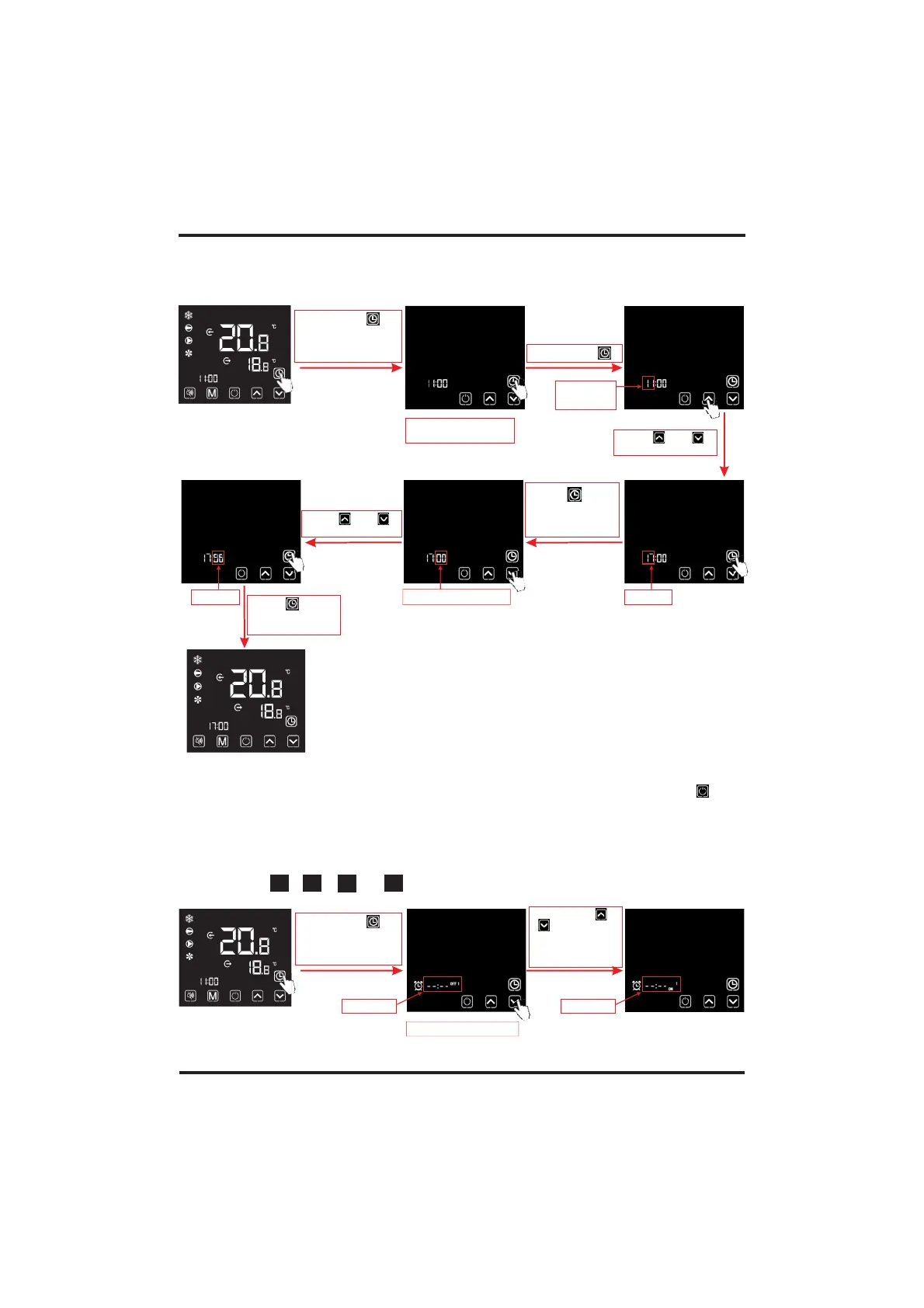
ystem time setting
Press " " to
save, and return to
the main interface
Hour digit
flashing
System time setting
interface
Notes: , if there is no operation for 20 s, the system will
automatically memorize use's settings, and return to the main interface; if short press " "
during any operating steps, the changes will not be saved and return to the main interface.
Under the clock setting interface
Long press " "
for 2 s to enter into
the system times
setting interface
Short press " "
Press " " or
to adjust hour digit
" "
Flashing
Stort press " "
to enter into
the timer setting
interface
Short press" " or
" " to circularly
display among
timer ON1, OFF1,
ON2 and OFF2
4.6.2.2 Select
, , or timer setting interface:
"
2Q
"" " " " " "
2)) 2))
2Q
Timer setting interface
Flashing
Press " " to
save the settings
and skip to the
minute digit setting
Minute digit flashing
Flashing Flashing
Press " " or
to adjust minute digit
" "
4.6.2.1
The wire controller can set up a two-stage timing switch: Timer ON1~ OFF1;Timer ON2~OFF2.



 To Next Page