1
4.OPERATION AND USE
4.9.Fault interface
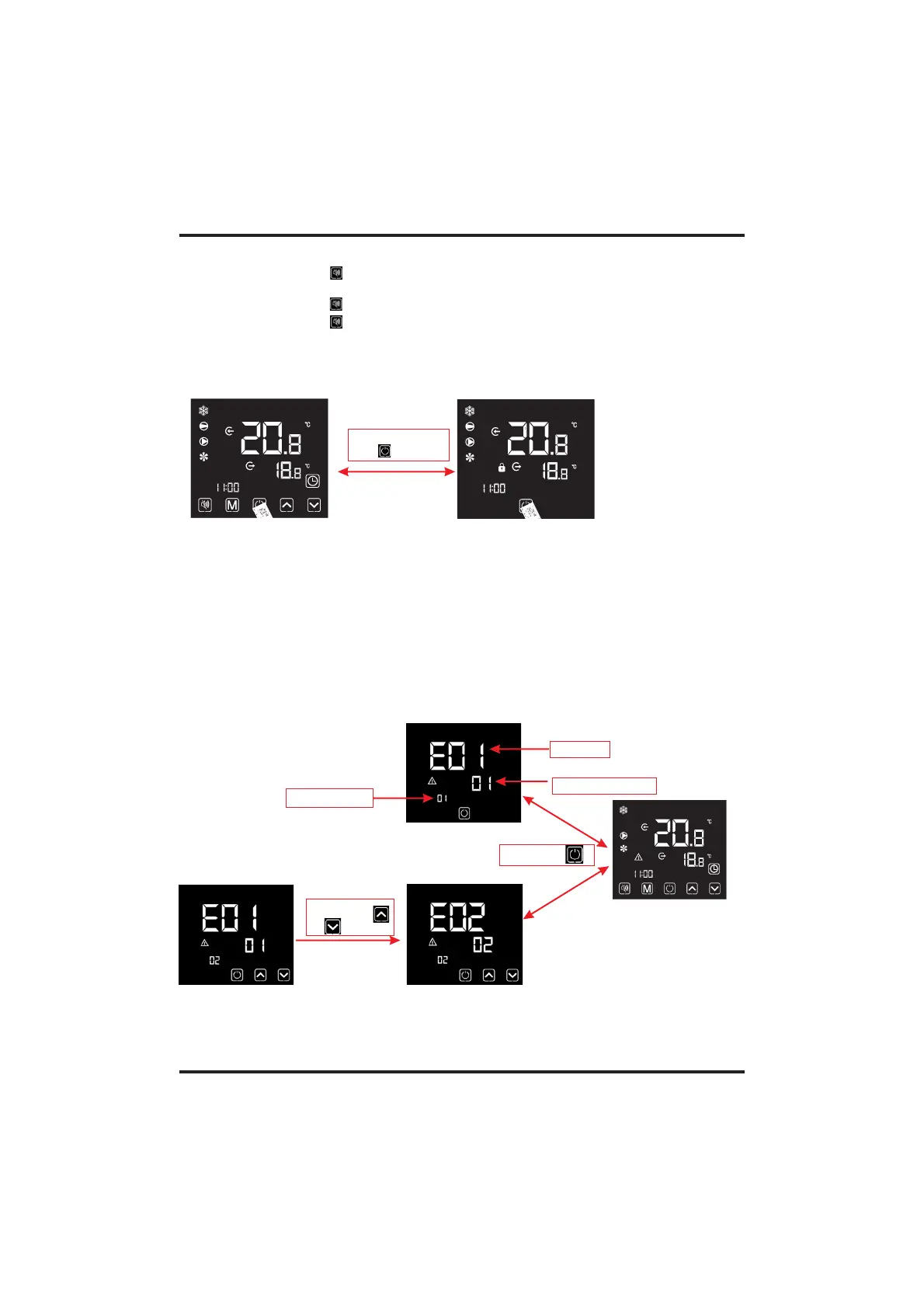
Keep long press
of " " for 5 s
4.8.Keyboard lock
To avoid others' misoperation, please lock the wire controller after completing
the setting.
When the unit fails, the wire controller can display the corresponding code according to the
fault reason. Refer to the fault table for the specific definition of the fault codes.
Notes:
1).Under the locked screen interface, only unlocking operation is available, and the screen
will be lighten after other operations conducted.
2).Under the OFF interface, locking operation is available , and the operation method is the
same as locking screen under the ON interface.
2).Two or more faults:
1).Single fault:
Short press" "
or " "
Fault code
Fault serial number
Quantity of fault
Short press" "
For example:
Notes:
1). When the silent icon" " is lighten:The timing mute has been set, but it's not under silent
status.
2). When the silent icon" " flash:It's under the silent status.
3). When the silent icon" "disappear: The timingsilent is not set.
Remark:
The wire controller can display the temperature unit as "" or "ć" according to the unit
model you bought.


 To Next Page