Installation Manual 5.1.2
35
10.1 Zone Sensor / T-stat
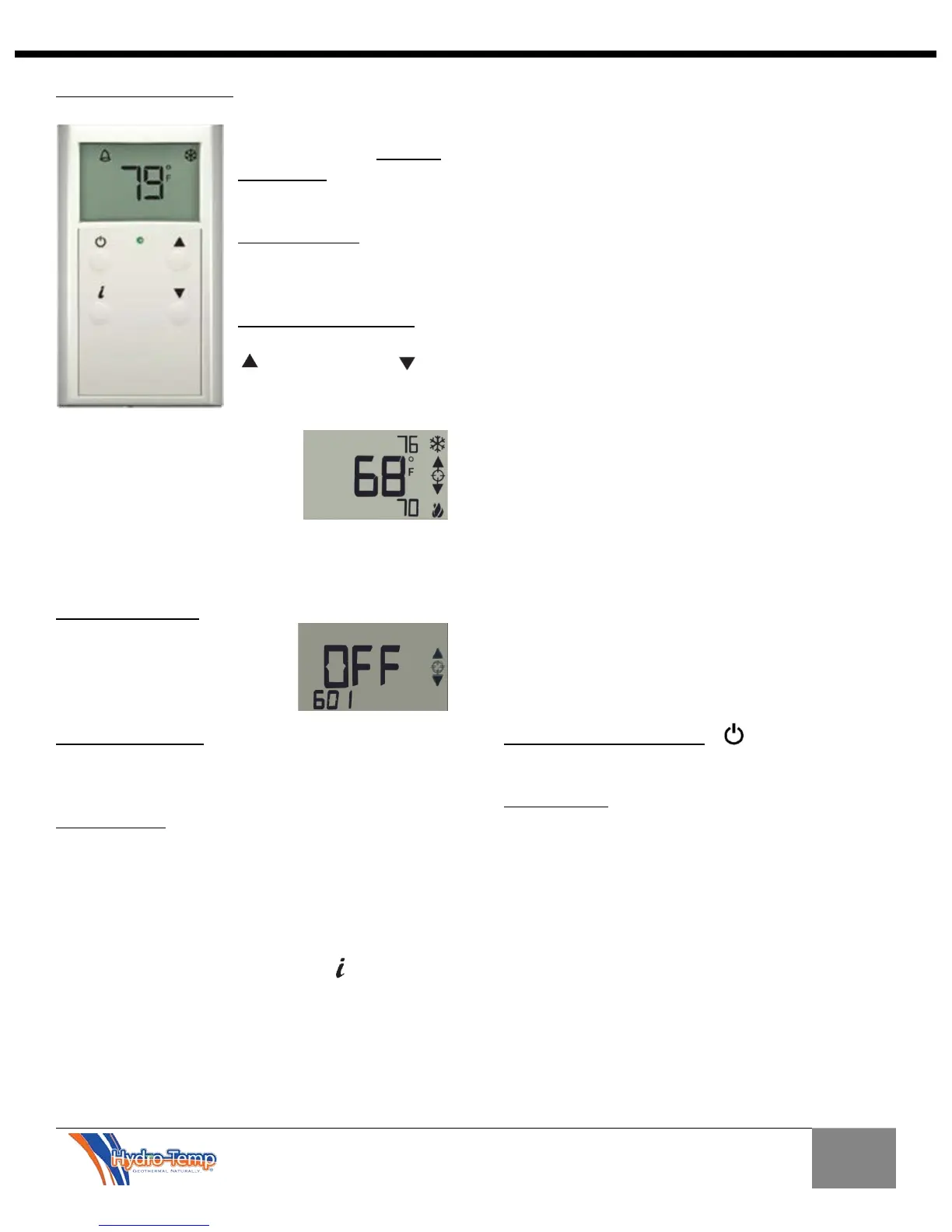
The ZS thermostat is
commonly used for zone two
through four thermostats
when there are multiple
zones.
The home screen will display
room temperature, zone
mode icon and a fault bell if a
system fault is detected.
The Zone Temp set point can
be adjusted by pressing the
up arrow key or
the down arrow key. Each
press will change the
effective set point one half of a
degree. The effective heating
and cooling set points will also
display as adjustment is being
made. The screen will revert
back to the home screen after 5 seconds. The
illustration on the right shows the room temp is 78,
effective cooling set point is 76 and the effective
heating set point is 70.
The zone mode Icon will display as a snow flake when in
cool mode and a flame when in
heat mode. They will alternate
when in auto mode. Changing
modes will be discussed later
from the Info Screen setup.
The system fault bell will only be displayed if the
system has detected a system fault or the system is in a
power up delay (power up delay is 5 minutes).
The info Screen allows for adjusting of base set points,
zone mode, and displays system fault. Each display
output has a reference number or text that shows in the
bottom left corner. For example 601 refers to the zone
mode and 1500 refers to the system faults status. The
illustration below shows this zone’s mode set to off. If
you wanted to change the zone mode from off to auto
(auto heat & cool) you would press the button until
the number 601 is displayed in the bottom left, the
current mode will also be displayed. In this example the
zone mode has been set to off. By pressing the up or
down arrow one can scroll through the various modes
and select the desired mode.
Information available to view or adjust from the
information screen include:
601 refers to Zone Mode
Off – This zone will not run.
Cool – Zone will be allowed to run in cooling mode only
as needed
Heat – Zone will be allowed to run in heating mode only
as needed
Auto – Zone will be allowed to run in heating or cooling
mode as needed, also referred to as auto changeover
mode.
E-heat – When in E-heat the compressors will be locked
off and optional strip heaters will be used for heating
the zone as needed.
1500 refers to System Fault status. If the system is in a
fault condition this information would be good to
transfer to the service personal when they are called
(Some examples are No Faults, Low Pressure trip, High
Pressure trip, Sensor Failure, Freeze, Master switch off)
Occ cool set point refers to the occupied cooling set
point.
Occ heat set point refers to the occupied heating set
point.
Un-Occ cool set point refers to the un-occupied cooling
set point.
Un-Occ heat set point refers to the un-occupied heating
set point.
Others may be present depending on zone being
accessed. Call installing dealer if adjustment is needed.
The Manual override button can be used to
override the system if the system is un-occupied.
The Green LED in the middle of the thermostat will
come on when the system is occupied and will be off
when un-occupied. Each ZS thermostat is addressed for
the zone it’s controlling, thermostats can’t be freely
moved from zone to zone unless address is changed.
Contact the installing dealer before moving
thermostats.


 To Next Page