Installation Manual 5.1.2
21
Screen Navigation
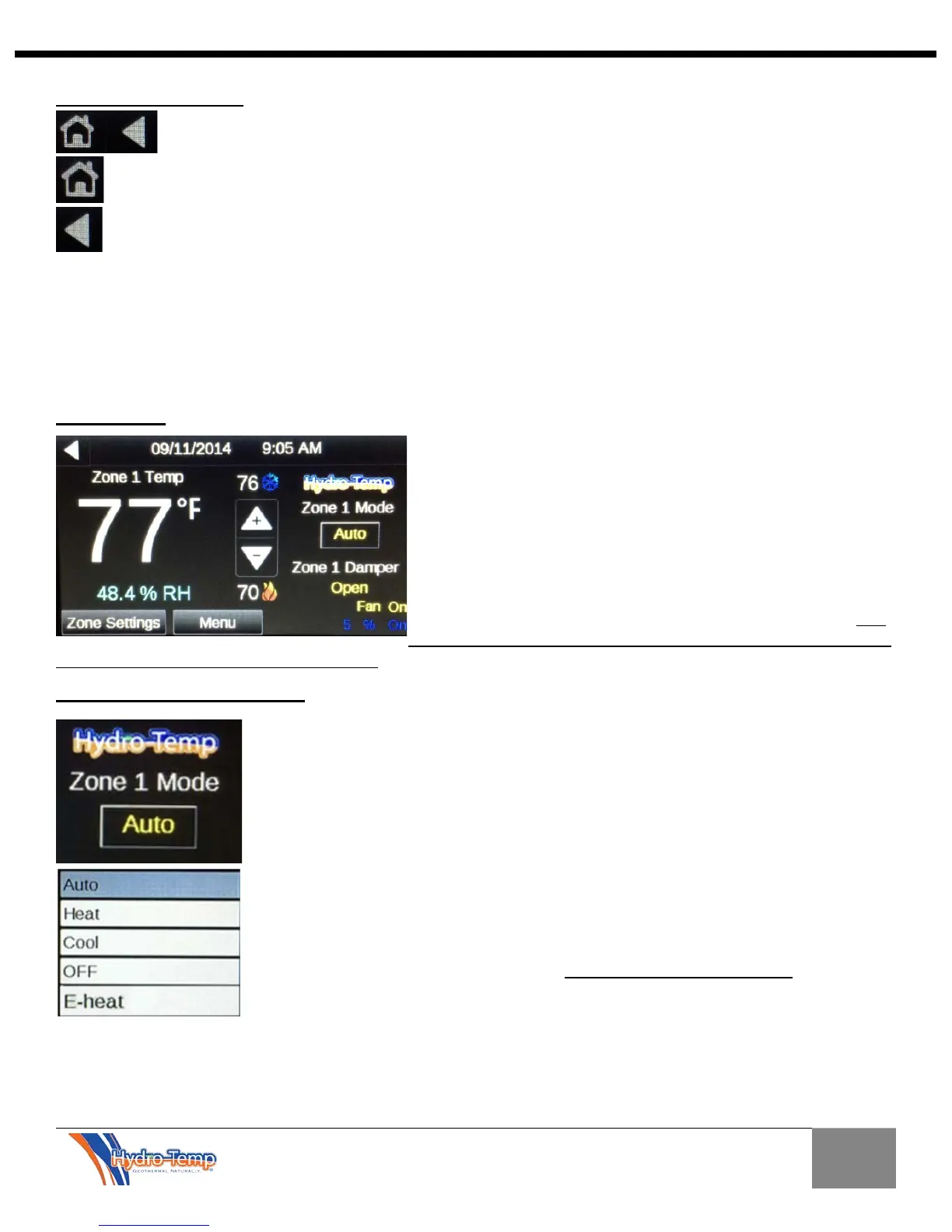
At the top left hand corner of every page you will find these two buttons. The only exception is
the home screen which does not have the “Home” button
The “Home” Button will return you to the Home screen.
The left arrow or “Previous” button will return you to your previous screen
The bottom row will show navigation buttons including a fault and Check Filter button that will only be shown
if the system is in a fault / check filter condition. (Neither Fault nor check filter button shown below)
The Hydro-Temp unit has built in diagnostic features to inform the end user when an issue occurs. If a fault
occurs, simply press the fault button and the fault screen will indicate which fault has occurred. In some cases
repeated faults will lock out the unit's compressor in order to protect the unit. All faults should be addressed by
contacting your installing dealer so the system fault can be addressed by correcting the indicated issue.
Home Screen
From the home screen you will see current room temp, current
humidity, up and down arrows to adjust heating and cooling set
points, Mode switch to set zone from off, heat, cool, emergency
heat or auto. If multiple zones then the damper position will be
displayed. At the bottom right the percentage of the compressor
running and on/off state will be displayed. It will be displayed in
blue if on in cooling and orange if on in heating. Just above
that will be the fan status on/off. If the optional strip heaters are
energized SH will appear just above the Fan status in red. The
CK Filter button will show on the first of every month to serve as
a reminder to clean or replace the air filter. Press the button for instructions on how to reset the filter indicator.
Adjusting Zone / System Mode
To select the Zone mode press the button as shown. A pop-up window will be
displayed to either choose between Auto, Heat, Cool, off, or E-heat.
Auto Mode: This mode will allow the unit to automatically switch between heating
and cooling.
Heat Mode: When this mode is selected the unit will only run when heating is
required.
Cool Mode: When this mode is selected the unit will only run when cooling is
required.
Off Mode: This mode will prevent the unit from running in either the heating or
cooling modes.
E-heat: This mode will cycle the optional strip heaters as needed to provide
heat. The compressor will be locked off. Used for emergency heat only
As a suggestion when using the Auto mode, keep the set-point between heating and
cooling no closer than 4 degrees (i.e. 72 degrees heating and 76 degrees cooling). This will prevent
undesirable switching between heating and cooling modes during days when both heating and cooling could
occur. For best operation it is recommended to dedicate the units operation to heating or cooling as required.


 To Next Page