Installation Manual 5.1.2
22
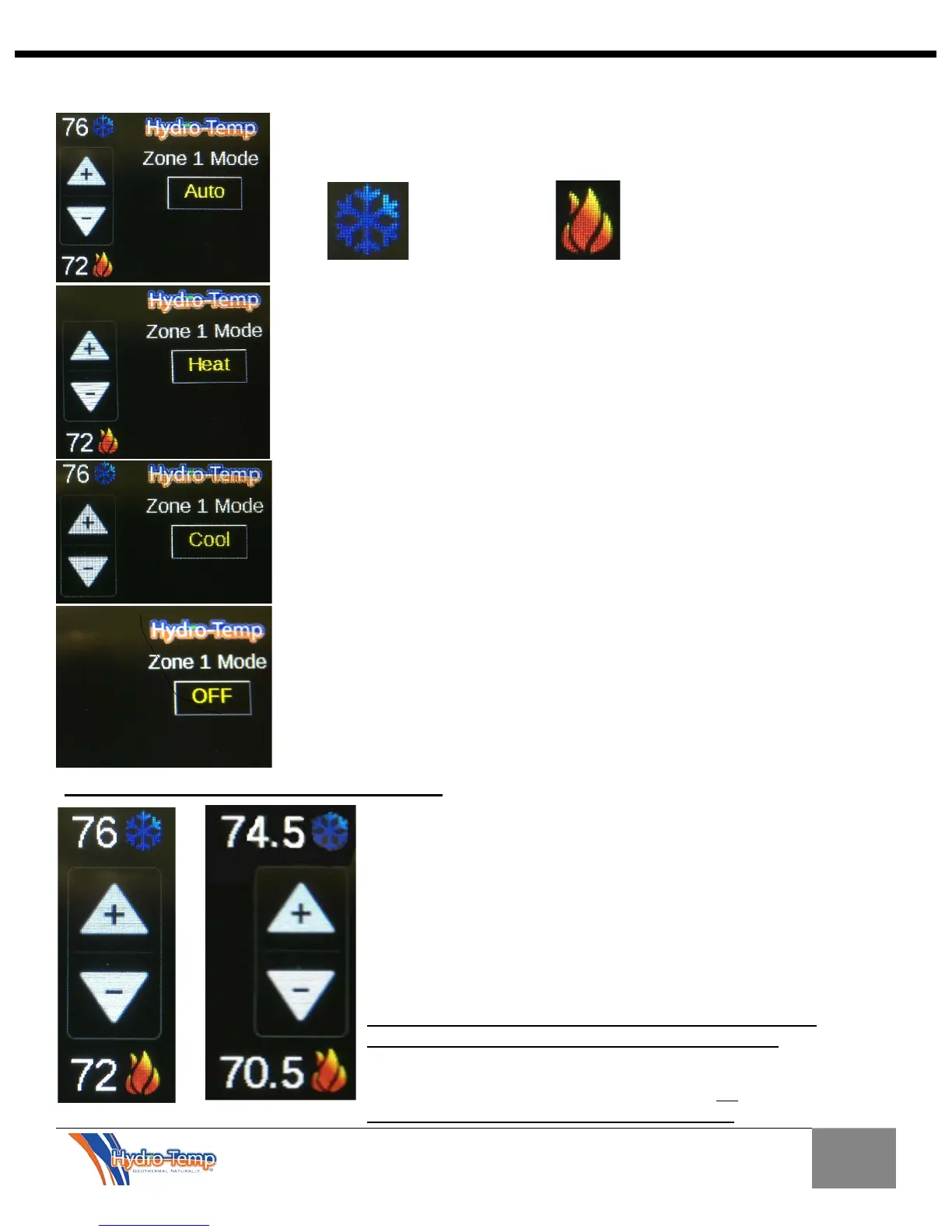
In the auto mode both the heating and cooling set-points will be displayed
above and below the plus and minus (up and down) arrows.
In the heat mode only the heating set-point will be displayed below the plus
and minus (up and down) arrows.
In the cool mode only the cooling set-points will be displayed above the
plus and minus (up and down) arrows.
In the off mode neither the heating or cooling set-points or plus and minus
arrows are displayed.
Plus and Minus Arrows (Set-point Adjustment)
The temperature for the space can be manually adjusted by
pressing the plus and minus arrows. In this example the original
set-points were 76 and 72. The minus button was depressed 3
times (0.5 degrees/ push) and both the heating and cooling set-
points were lowered by 1.5 degrees. Conversely if the plus
arrow was pushed the temperature would increase. In this
example the mode was “Auto”. If the mode was set for either
heating or cooling only the heating or cooling temperature
would be affected.
*After any adjustment wait a few seconds before navigating
away for this screen to allow adjustment to take effect.
*If pressing the plus or minus buttons have no effect on the set
points verify the system is in occupied mode. No
adjustment will be allowed in un-occupied mode.


 To Next Page