Installation Manual 5.1.2
23
If your equipment has been setup for multiple zones (maximum of 4
zones) all of the zones can be monitored and adjusted from the Protostar
touch thermostat or from the zone thermostat installed in each zone’s
area. If a zone’s set point is changed on the zone thermostat it will
automatically update on the Protostar and vice versa.
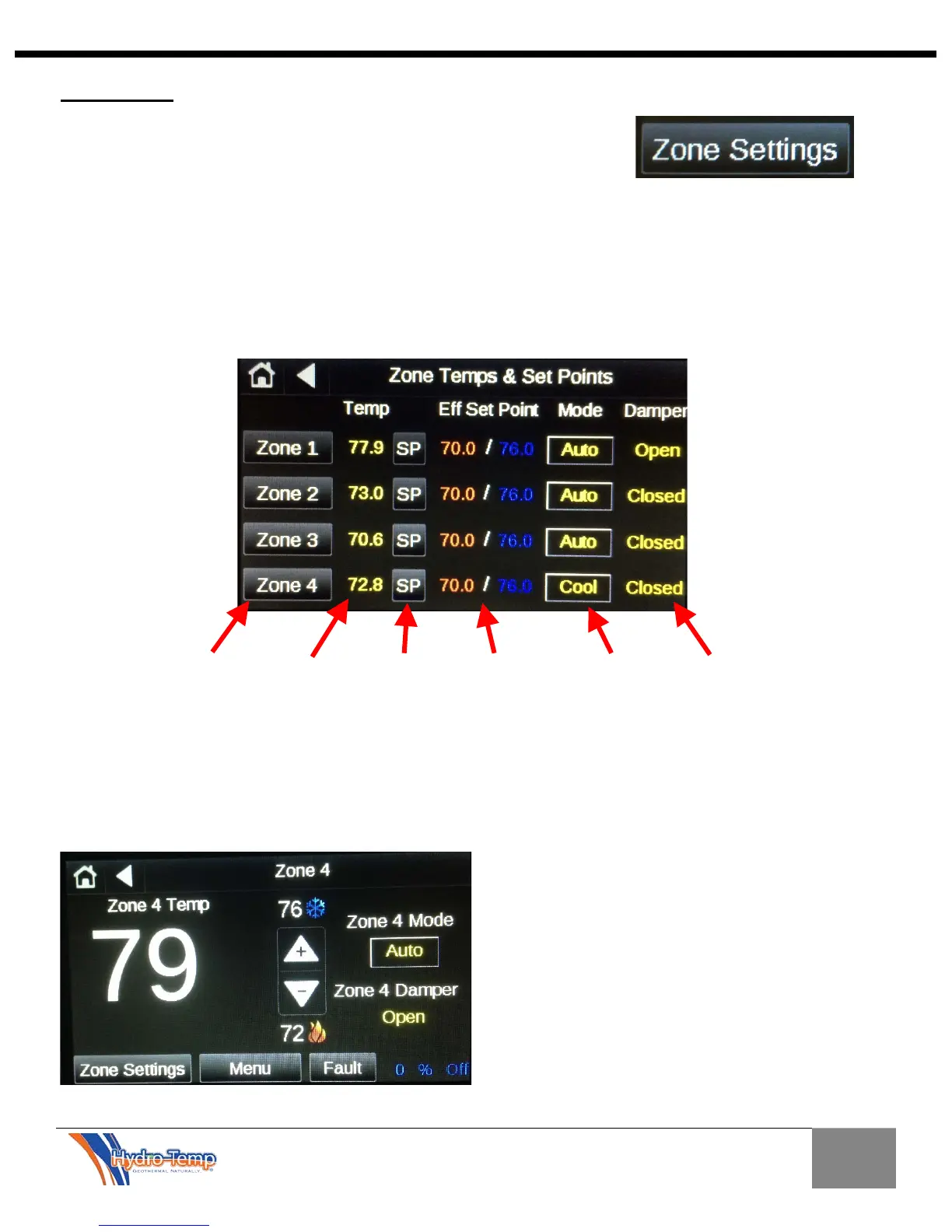
In order to access the other zones, depress the “Zone Settings” button on
the home screen. This will navigate you to the “Zone Temps & Set Points”
screen.
This screen displays the number of zones connected to the controller. In this example the controller has 4
zones connected. If only 2 zones were connected the areas on the screen in this example occupied by Zone
3 and 4 would be completely blank.
Button
Zone
Temp
occupied
Set-Point
Heat / Cool
Set-Points
Zone
Mode
Damper
Position
By depressing the “Zone ID” Button you will see a screen similar to the main home screen. The big
difference is the zone is identified and any changes you make effect that zone only, in this example Zone
4. All adjustments described for the main zone can be made to each connected zone. For example you
can adjust the heating and cooling set points and zone mode for zone 4 from the Protostar thermostat!!


 To Next Page