Installation Manual 5.1.2
24
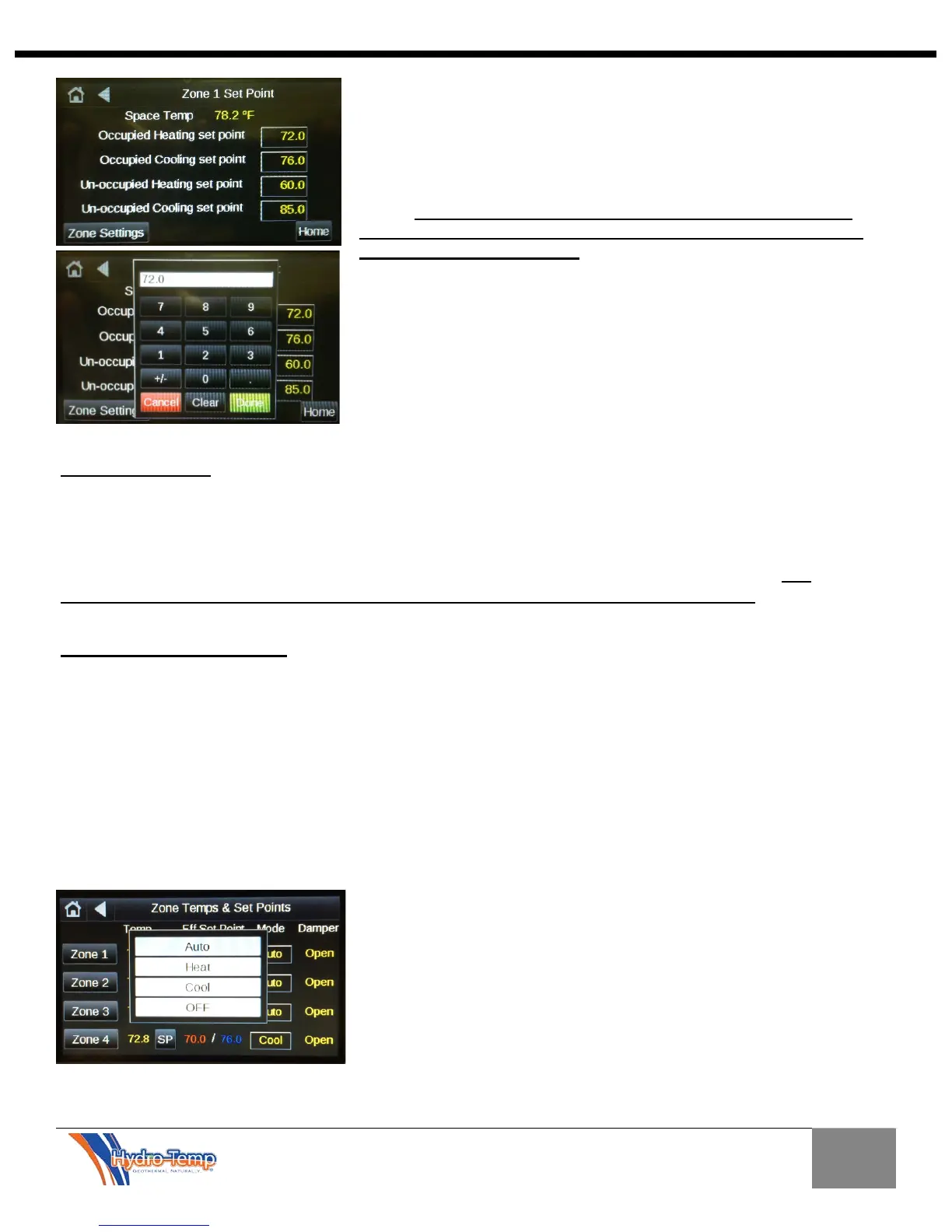
The “Un-occupied Set-Point Adjust” Button allows for the
adjustment of the base un-occupied temperature set-points. Press
each temperature box and a numerical keypad will pop up to adjust
each of the set-points. This temperature set point will be the base
set point and any adjustments made from the zone home screen
(“plus” or “minus” arrows) will be added / subtracted from this
value. These set points will rarely need adjusting. Any room
temperature adjustments needed should always be done from
the zone’s HOME SCREEN. The factory default settings for the
occupied set points are 70 for heating and 76 for cooling.
It is highly recommended to keep the cooling set-point 4 - 6
degrees warmer than the heating set-point.
Note the microprocessor will not allow the difference between the
heating and cooling set-points to be any closer than two degrees.
The Current Mode can also be adjusted in the
same manner as it could be adjusted from the
home screen.
Each zone can be set separately for desired
mode or set to off if no heating or cooling is
needed.
The effective set-point shown on this screen is the calculated temperature the unit is trying to achieve.
The effective set-point for each zone is calculated individually. The zone effective set point is the base
set-point entered using the “SP” button on the [zone temps and set points] screen and any plus or minus
adjustments that have been made using the “plus” and “minus” arrows on the home screen. The
effective set-point shown on this screen will reflect any smart set point adjustment delays.
Smart Set Point Adjustment
Should a set point adjustment be made, some instances will occur where the effective set point will
change at a rate of only five degree per hour (adjustable in the dealer settings screen). This is critical to
keep the compressor from ramping up unnecessarily to high speed when someone adjusts the thermostat
set point or the unit comes out of setback. For example, if the zone temperature is 75 degrees and the
zone cooling set point is lowered from 76 degrees to 70 degrees, the effective set point will drop quickly to
the zone temperature (in this example 75 degrees) then slowly continue to drop after that at a rate of 5
degrees per hour. This programming will initiate a response from the equipment when adjustment is
made but prevents the V-
Star compressor from ramping up into a higher speed (capacity) then necessary.
The lower the compressor speed the unit is running at, the higher the unit’s efficiency.


 To Next Page