Using your Charger: Scheduling
Accessing ‘schedule charging’
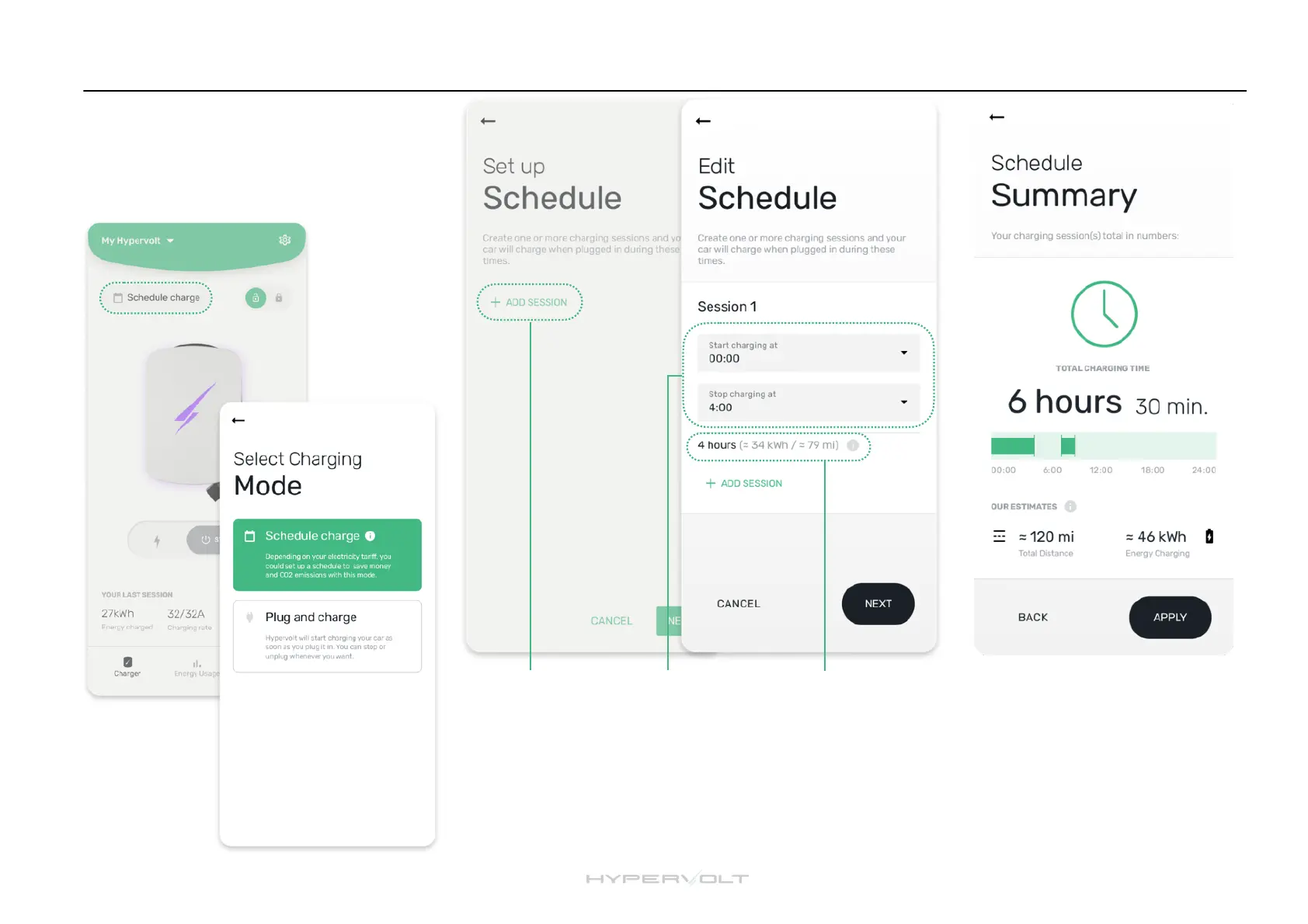
To access schedule charging settings, simply
tap on the mode button which will be showing
“Plug and Charge” or “Schedule Charge” and
select “Schedule Charge” on the next screen.
Adding sessions
By clicking ‘add
session’ you can
a d d o n e o r
multiple sessions.
Then change the
times to suit.
Setting scheduling
times
The top box is to set
the ‘starting’ time
and the bottom is to
set the ‘finishing’
time for the session.
Session total
Displayed is the total
charging time you have
s e t a n d w h a t t h e
approximate mileage
gain will be against the
rate of charge for the
session.
Saving the session
After tapping ‘next’ you will be
presented with the summary of
the sessions you have set, to
change tap ‘back’ otherwise
tap ‘apply’. You will have now
saved your schedule charging
session(s) to your charger.


 To Next Page