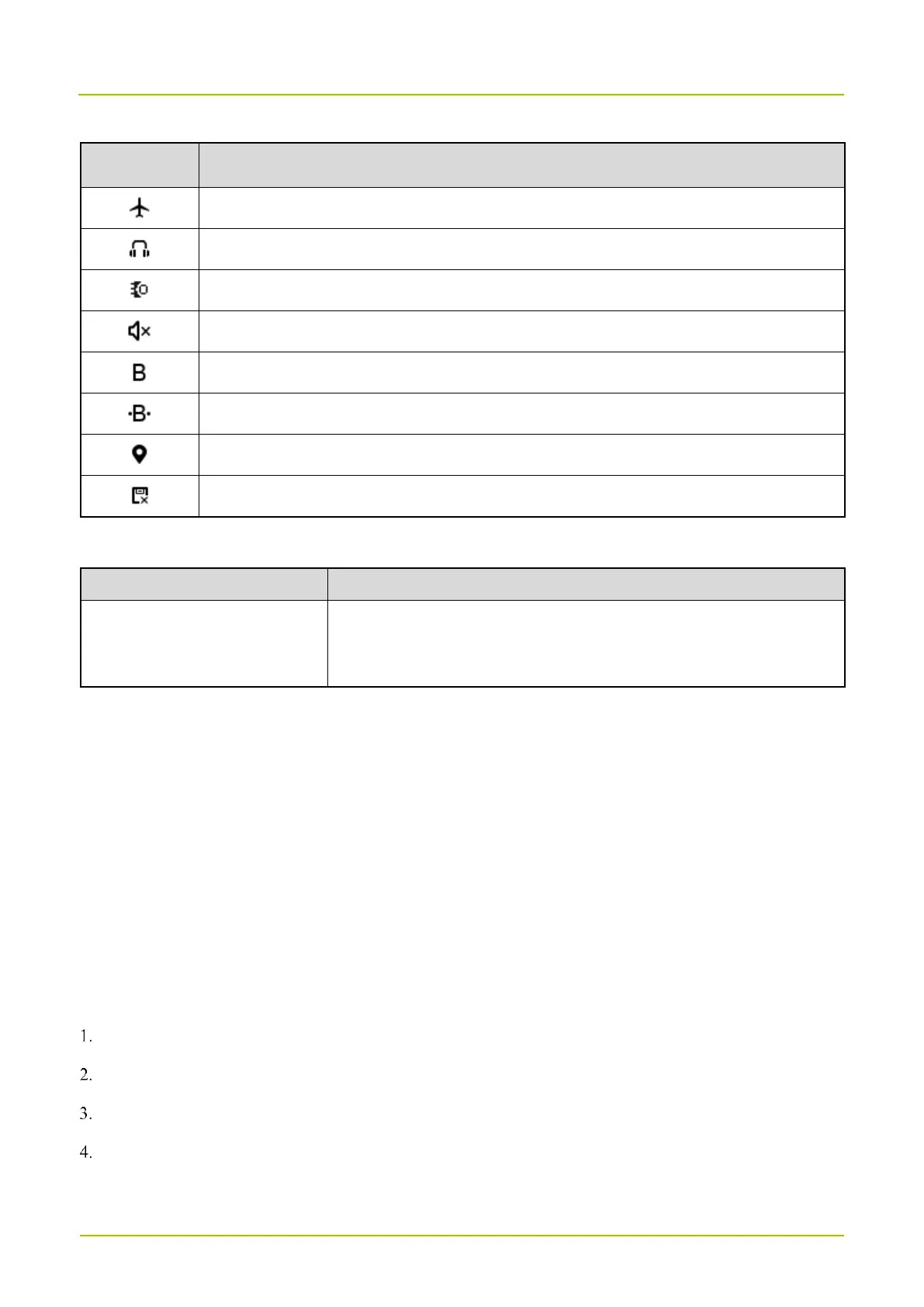
The radio operates in Airplane mode.
An earpiece is connected.
An accessory is connected.
The radio operates in Silent mode.
The BT feature is enabled.
A BT device is connected.
The memory is insufficient.
4.4.1.2 LED Indicator
Fatigue driving alarm
Overspeed alarm
4.4.2 Screen Operations
Turning Off the Screen
Short press the
On-Off
key.
Waking Up the Screen
Press any key.
4.5 Setting Programmable Keys
The radio provides
P1
,
P2
,
P3
, and
P4
as the programmable key. These keys can be programmed to perform specific
task. At one press of the programmable key, you can get quick access to radio functions.
Press the Navigation key to select Settings, and then press the OK key.
Press the Navigation key to select Programmable key, and then press the OK key.
Press the Navigation key to select P1, P2, P3, or P4, and then press the OK key.
Press the Navigation key to select the feature, and then press the OK key.



 To Next Page