LED
Indicator
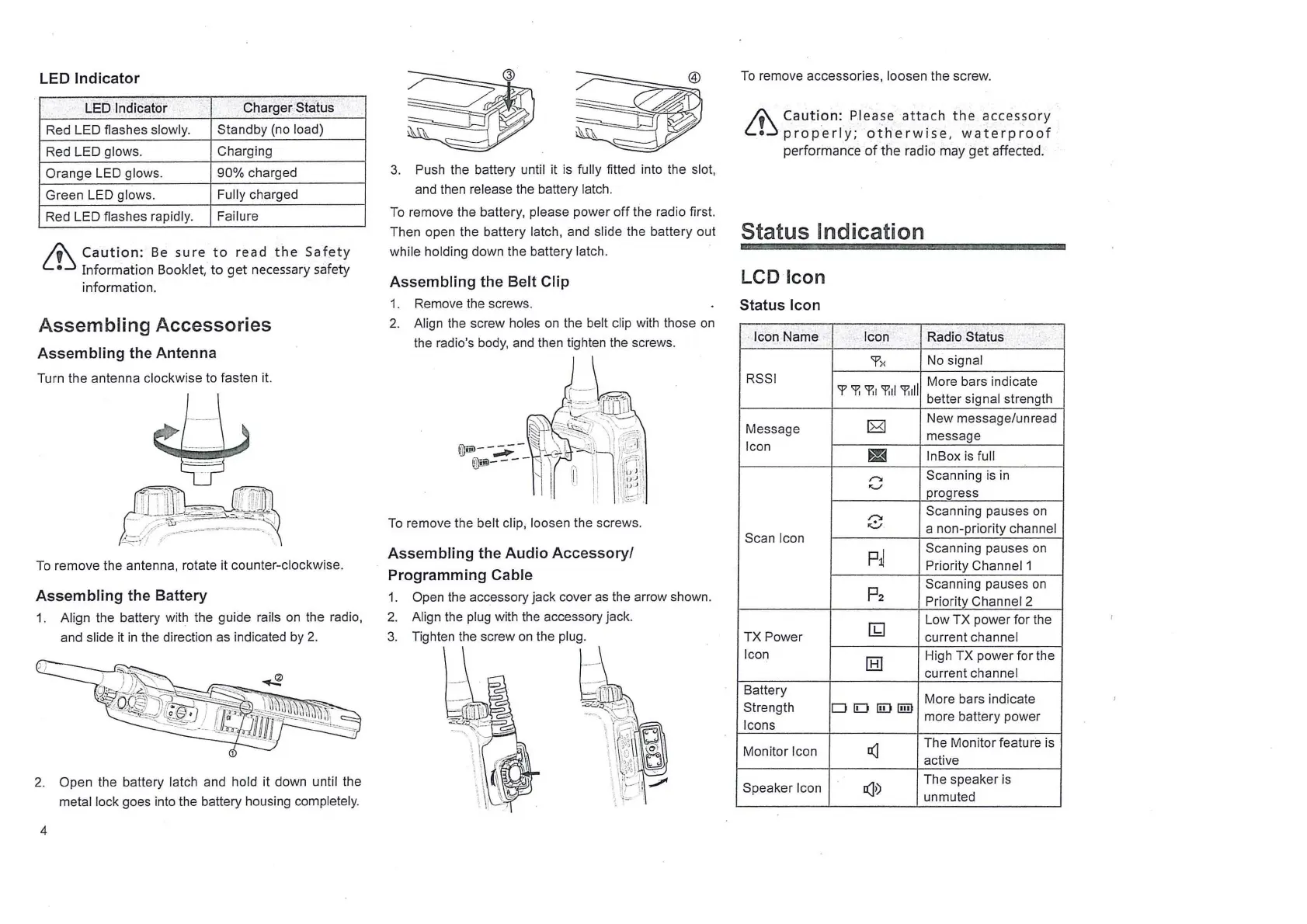
1.£0 Indicator' Charger
~tati.Js
Red LED flashes slowly.
Standby (no load)
Red LED glows.
Charging
Orange LED
glows.
90%
charged
Green LED
glows.
Fully
charged
Red LED flashes
rapidly.
Failure
&
Caution:
Be
sure
to
read
the
Safety
•
Information
Booklet,
to
get
necessary safety
information.
Assembling Accessories
Assembling
the
Antenna
Turn the antenna clockwise
to
fasten it.
To
remove the antenna, rotate it counter-clockwise.
Assembling
the
Battery
1. Align the battery with the guide rails
on
the radio,
and
slide it
in
the
direction as indicated
by
2.
2. Open the battery latch and hold it down until the
metal lock goes into the battery housing completely.
4
3.
Push the battery until it
is
fully fitted into the slot,
and then release the battery latch.
To
remove the battery, please power
off
the radio first.
Then open the battery
latch, and slide the battery out
while holding down the battery latch.
Assembling
the
Belt
Clip
1. Remove the screws.
2.
Align the screw holes
on
the belt clip with those
on
the radio's
body,
and
then tighten the screws.
To
remove the belt clip, loosen the screws.
Assembling
the
Audio
Accessory/
Programming
Cable
1.
Open the accessory jack cover
as
the arrow shown.
2.
Align the plug with the accessory jack.
3.
To
remove accessories, loosen the screw.
~
Caution:
Please
attach
the
accessory
LL~
properly;
otherwise,
waterproof
performance
of
the radio may
get
affected.
Status Indication
LCD Icon
Status Icon
· Icon Name
, Icon
Radio Status
'f
x
No
signal
RSSI
More bars indicate
'f
'f,
'P:i
'f,fl
'P:ill
better signal strength
Message
[8)
New message/unread
Icon
message
~
lnBox
is
full
/"::.
Scanning
is
in
"-'
progress
r-.
Scanning pauses
on
v
a non-priority channel
Scan Icon
p~
Scanning pauses
on
Priority Channel1
p2
Scanning pauses
on
Priority Channel 2
[b)
Low TX power for the
TX
Power
current channel
Icon
[8]
High TX power for the
current
channel
Battery
More bars indicate
Strength
DIDI!Diilll
more battery power
Icons
Monitor Icon
!(]
The Monitor feature
is
active
Speaker
Icon
!(]>)
The speaker is
unmuted



 To Next Page