EasyManua.ls Logo

Hytera RD625 - User Manual

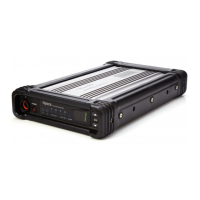
Hytera RD625
18 pages
Print Icon
To Next Page IconTo Next Page
Loading...
Preface
Thanks for your favor in our product. To derive optimum performance from the product, please read this
manual and the Safety Information Booklet carefully before use.
This manual is applicable to the following product:
RD62X Repeater(X may represent 2, 5, 6 or 8)

Other manuals for Hytera RD625

Questions and Answers

  • M
    Marcia TurnerAug 13, 2025
    Why is the communication distance short and voice quality poor on my Hytera Repeater?
    • J
      Johnny LopezAug 13, 2025
      If the communication distance is short and the voice quality is poor when using your Hytera Repeater, there might be a signal loss due to connecting cable damage. Inspect the cable for any significant damage and replace it if necessary. Also, check if the antenna and cable connections are loose or disconnected. Secure these connections, and replace the connector if needed. Internal damage to the cable can also cause this issue, so consider replacing the cable. If a duplexer is installed, it might be improperly adjusted, in which case you should contact Hytera or your local dealer for readjustment.
  • M
    Marc Adams IIAug 17, 2025
    How to troubleshoot power-on failure on Hytera RD625?
    • N
      Nicholas MartinAug 17, 2025
      If your Hytera Repeater fails to power on, first ensure the power cord is properly and securely connected to the outlet. Next, check the DC power fuse for any damage and replace it if necessary. Finally, verify that the DC power supply voltage is within the repeater's operating voltage range (13.6V±15%) and adjust if needed.
  • B
    Brad AndersonAug 20, 2025
    What to do if RX is indicated, but Hytera Repeater members can't communicate?
    • C
      Christopher James PhDAug 20, 2025
      If you have RX indication on the radios but members cannot communicate with each other via your Hytera Repeater, ensure that the Radio ID matches that of all other members. Also, check whether the CTCSS/CDCSS settings are consistent across all radios; reset them if necessary.
  • E
    Eric PenaAug 25, 2025
    Why can't my radio communicate with other members through the Hytera Repeater?
    • R
      rogerconradAug 25, 2025
      If your radio is unable to communicate with other members through the Hytera Repeater, check that the TX/RX frequency of the repeater is consistent with that of the portable/mobile radios; reset the frequencies if they are not. If strong interference signals are present, try to remove or bypass the interference source, or change to operate at other frequencies. Also, verify that the radio is within the coverage area of the repeater.
  • M
    Melissa McdanielAug 28, 2025
    What to do if my Hytera Repeater fails to power on?
    • L
      Luis BurgessAug 28, 2025
      If your Hytera Repeater fails to power on, there are several potential causes. First, ensure the power cord is properly and securely connected to the outlet. Next, check the DC power fuse for any damage and replace it if necessary. Finally, verify that the DC power supply voltage is within the repeater's operating range of 13.6V±15%, and adjust if needed.
  • B
    Billy WrightSep 1, 2025
    Why is my Hytera RD625 not allowing communication between radios?
    • E
      Erin WrightSep 1, 2025
      If radios can't communicate via the Hytera Repeater, several factors could be at play. Check that the TX/RX frequencies of the repeater match those of the portable/mobile radios, and reset them if needed. Also, strong interference signals may be preventing the repeater from relaying the signal; try changing to different frequencies if you cannot remove the interference. Finally, ensure that the radios are within the repeater's coverage area.
  • B
    Brittany PowellSep 5, 2025
    How to fix short communication distance and poor voice quality on Hytera Repeater?
    • C
      ccainSep 5, 2025
      Poor voice quality and short communication distance on your Hytera Repeater can stem from a few issues. Begin by inspecting the connecting cable for any damage, replacing it if the damage is significant. Next, check the antenna and cable connections to ensure they are secure, replacing the connector if necessary. Finally, internal cable damage can also cause these issues, so consider replacing the cable.
  • J
    johnibarraSep 8, 2025
    What to do if there's RX indication but Hytera RD625 Repeater users can't communicate?
    • E
      evanselizabethSep 8, 2025
      If your Hytera Repeater shows an RX indication but users can't communicate, the issue might be related to mismatched settings. Ensure that the radio ID is the same for all members. Also, verify that the CTCSS/CDCSS settings are consistent across all radios, and reset them if necessary.

Summary

Preface and Introduction

Usage Guidance and Icons

Introduction to the manual, product, and explanation of instructional icons.

Technical Terms and Definitions

Defines key technical terms, such as Voltage Standing Wave Ratio (VSWR).

Legal and Regulatory Information

Copyright and Disclaimer

Provides legal information regarding copyright ownership and product disclaimers.

RF Radiation and Compliance

Covers RF exposure information, safety standards, FCC, and EU regulations.

Product Overview and Setup

Package Contents and Components

Lists package contents and identifies repeater parts, front, and rear panels.

Pre-Use Instructions and Installation

Covers operating instructions, voltage checks, and optional wall-mount installation.

Operation and Maintenance

Status Indication and Alarms

Explains LED indicators for status and details alarm types and causes.

Troubleshooting and Solutions

Provides guidance for diagnosing and resolving common operational problems.

Care, Cleaning, and Accessories

Offers maintenance tips and lists available optional accessories for the repeater.

Hytera RD625 Specifications

General IconGeneral
Output Power25W
Operating Temperature-30°C to +60°C
Modulation4FSK
IP RatingIP54
Frequency Range400-470 MHz
Channel Capacity16
Power SupplyAC: 100-240V, 50/60Hz
Digital ProtocolDMR

Related product manuals