EasyManua.ls Logo

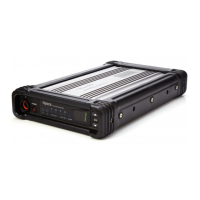
Hytera RD988 U5 - User Manual

Hytera RD988 U5
25 pages
Print Icon
To Next Page IconTo Next Page
Loading...
Preface
Thanks for your favor in our product. To derive optimum performance from the product. To ensure you get
maximum benefit from the product, please read this manual carefully before use.
This manual is applicable to the following model:
RD98XS U(5) (X may indicate 0, 2, 5, 6 or 8)

Questions and Answers

  • G
    Gregory BarnesAug 7, 2025
    Why group members cannot talk to each other on Hytera RD988 U5, or the repeater cannot communicate with a subscriber radio?
    • E
      Eric AyalaAug 7, 2025
      There are several reasons why group members might not be able to communicate or the repeater might fail to communicate with a subscriber radio: * The TX/RX frequency of the repeater is inconsistent with that of portable/mobile terminals. In this case, re-set the frequencies. * Strong interference signal prevents repeating useful signal. If you cannot remove or bypass the interference source, change to operate at other frequencies. * The group member is out of the coverage of the repeater. To solve this, go within the coverage of the repeater.
  • D
    Daniel ShepherdAug 14, 2025
    What to do if I have short communication range or poor audio on my Hytera Repeater?
    • J
      John WardAug 14, 2025
      If you are experiencing short communication range or poor audio quality, consider the following: * A damaged connection cable may cause leakage of signal energy. Replace the cable with a new one if necessary. * A loose connection between the antenna connector and the cable, or a complete loss of connection can cause this problem. Secure or replace the cable to resolve this.
  • S
    Susan CampbellAug 22, 2025
    What to do if group members cannot talk to each other, even though RX indication is given on Hytera RD988 U5 Repeater?
    • D
      David AbbottAug 22, 2025
      If group members cannot communicate despite an RX indication, it could be due to: * Your ID being inconsistent with that of other group members. Set your ID to the same as that of other members. * Inconsistent CTCSS/CDCSS settings. Re-set CTCSS/CDCSS.
  • D
    Dillon StoneAug 28, 2025
    How to fix Hytera RD988 U5 Repeater that cannot be powered on?
    • L
      Laura RamirezAug 28, 2025
      If the repeater cannot be powered on, check the following: * Ensure the power cord is properly and securely connected to the outlet. If it is not, properly connect the power cord and ensure secure connection. * Check if the power cord fuse is damaged. If it is, replace it with a new one.

Summary

Instructional Icons

Term Explanation

Duplexer

Definition of a device enabling bi-directional communication by isolating TX/RX signals.

Feed Line

Definition of the cable connecting the antenna to the radio transmitter or receiver.

Voltage Standing Wave Ratio (VSWR)

Definition of VSWR as a measure of impedance matching to a source.

Squelch

Definition of Squelch as a circuit function to suppress audio output without strong input.

Copyright Information

Disclaimer

RF Radiation Information

RF Radiation Profile

Explains Radio Frequency (RF) and its widespread use and potential for radiation.

RF Radiation Safety

Discusses standards development for safe RF exposure based on expert recommendations.

FCC Regulations

Compliance with RF Exposure Standards

Operational Instructions and Training Guidelines

Checking Items in the Package

Product Overview

Front Panel

Details the components and indicators on the front panel of the device.

Programmable Keys

Explains the function and customization options for the programmable keys.

Rear Panel

Describes the connectors and ports located on the rear of the device.

Internal Parts

Identifies and labels the major internal components of the device.

Installation Guide

Installation Requirements

Outlines the necessary environmental and location conditions for installing the repeater.

Before Installation

Details pre-installation checks including voltage, product status, and parameter configuration.

Installation Steps

Provides a step-by-step guide for physically installing the repeater unit.

Installing the Duplexer

Guides on how to install an optional duplexer module onto the repeater.

Installation Diagram

Illustrates the physical connections and layout during the repeater installation process.

After-installation Verification

Confirms the repeater is functioning correctly after installation.

Status Indication

LCD Icon

Lists and explains the various icons displayed on the LCD for status indication.

LED Indicator

Describes the meaning of different LED indicators on the device.

Basic Operations

Turning the Repeater On;Off

Instructions on how to power the repeater on and off correctly.

Adjusting the Volume

Details how to adjust the audio volume for the repeater.

Adjusting the Power Level

Explains how to set the transmitter power level to High or Low.

Backlight

Describes how to activate and configure the device's backlight.

Locking;Unlocking the Repeater

Information on how to lock/unlock device controls to prevent accidental operation.

Changing the Channel

How to cycle through and select different channels on the repeater.

Menu Navigation

Radio Info

Accesses and displays detailed information about the repeater's hardware and software.

Channel Info

Displays specific configuration details for each channel.

Scan

Enables monitoring of communication activities on selected channels.

Digital Speaker

Controls audio output for digital channels by selecting slots or muting.

Alarm Information

Over Temperature Alarm

Details the cause and resolution for the over-temperature alarm condition.

Fan Failure Alarm

Explains the fan failure alarm, its implications, and troubleshooting steps.

VSWR Alarm

Describes the VSWR alarm, its causes, and how to resolve it.

Low Forward Power Alarm

Outlines the low forward power alarm and steps for troubleshooting.

Over;Low Voltage Alarm

Covers alarms related to power supply voltage deviations and their solutions.

TX;RX Unlock Alarm

Explains alarms indicating issues with TX/RX PLL unlocking and troubleshooting.

Troubleshooting

Care and Cleaning

Product Care

Provides guidelines for maintaining the product's performance and longevity.

Product Cleaning

Instructions on how to safely clean the device's exterior and components.

Optional Accessories

Hytera RD988 U5 Specifications

General IconGeneral
Frequency Range400-470 MHz
Operating Voltage13.6 V DC
Channel Spacing12.5/20/25 kHz
Operating Temperature-30°C to +60°C
Cooling MethodFan
Digital ProtocolDMR
Modulation4FSK

Related product manuals