
 Need help?
Do you have a question about the Hytera TF-515 and is the answer not in the manual?
This document provides a user manual for the Hytera TF-51X Portable Radio, where 'X' can represent either 2 or 5, indicating two distinct models: TF-512 and TF-515. The manual outlines the functions, step-by-step procedures for use, and important safety information. Users are advised to read the Safety Information Booklet before use to prevent bodily injury or property loss due to incorrect operation.
Hytera Communications Corporation Limited holds the trademarks and product names for its devices. The company retains exclusive rights to its computer programs, and purchasing the product does not grant rights to copy, modify, distribute, decompile, or reverse-engineer these programs without prior written consent. The manual emphasizes that while the company strives for accuracy, specifications and designs are subject to change due to continuous technological development. No part of the manual may be reproduced without prior written consent. The company also disclaims guarantees for third-party products or content mentioned. For further information, users can visit http://www.hytera.com.
The device complies with FCC Class B digital device limits (Part 15 of FCC Rules) and is designed to provide reasonable protection against harmful interference. Users are advised to reorient/relocate the receiving antenna, increase separation between equipment and receiver, or connect the equipment to a different circuit if interference occurs. Changes or modifications not expressly approved by the responsible party could void the user's authority to operate the equipment.
The radio complies with RF energy exposure standards and guidelines from the United States Federal Communications Commission (47 CFR § 1.1307, 1.1310, and 2.1093), American National Standards Institute (ANSI) / Institute of Electrical and Electronic Engineers (IEEE) C95.1:2005, and Canada RSS102 Issue 5 March 2015.
To ensure compliance with occupational/controlled environmental exposure limits, users must adhere to specific procedures:
The device has been tested and complies with SAR limits. Canadian information on RF exposure and compliance is available. The device complies with Industry Canada license-exempt RSS standard(s), subject to two conditions: it must not cause harmful interference, and it must accept any interference received, including undesired operation.
The product complies with essential requirements and relevant provisions of directives 1999/5/EC or 2014/53/EU, 2006/66/EC, 2011/65/EU, and 2012/19/EU. This information applies to EU countries only.
Upon unpacking, users should verify receipt of all items. Missing or damaged items should be reported to the local dealer. The standard packing list includes:
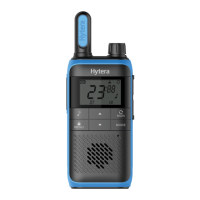
Both models share similar controls, including:
The radio can use either the provided Ni-MH battery or three AA alkaline batteries.
Rotate the On-Off knob clockwise or counter-clockwise until a click is heard.
Rotate the Volume Control knob clockwise (increase) or counter-clockwise (decrease) after turning on the radio.
To communicate, all users must select the same channel.
This feature prevents unwanted calls. Only calls from radios with matching CTCSS/CDCSS codes are received.
The LCD displays various icons to indicate radio status:
Listen to the call without operation. To speak, wait for the other person to release their PTT key, then press and hold your PTT key and speak.
Locks the keypad to prevent accidental operations. Calls can still be initiated, and the radio can be turned on/off.
Helps find team members who changed channels or find unused channels.
Allows the radio to receive weak signals on the current channel.
Adjusts the power level for the selected channel.
Transmits a tone to notify others you want to talk.
Sends a tone when the PTT key is released, signaling the end of your talk.
Allows automatic voice transmission when voice volume reaches a preset level, with or without an earpiece.
Mutes the speaker to avoid disturbance from received calls. The backlight turns on and flashes when calls are received, indicating missed calls even after the call disappears.
Enables a tone when a key is pressed.
Allows the radio to automatically transmit voice when the voice volume reaches a preset level, useful for monitoring a room when away.
Allows the radio to enter sleep mode for a selected duration if no call is received or key is pressed, saving battery power.
Allows listening to weather reports and setting alerts for NOAA Weather Radio broadcasts.
When on, the radio rings an alert tone and switches to the selected weather channel upon receiving NOAA emergency messages.
Maximizes operational life on a single charge. The radio enters battery save mode if no activity or operation is detected for three seconds.
When battery is low, the battery icon flashes, and an alert tone rings when the PTT key is pressed. In this mode, call tones or calls cannot be initiated.
Prevents a user from occupying a channel for more than 60 seconds. After 60 seconds, the radio stops transmitting and beeps. Release the PTT key to stop beeping.
Improves voice clarity by automatically removing background noise during calls.
The manual includes a table for common issues and their solutions:
| Phenomena | Analysis | Solution |
|---|---|---|
| The radio cannot be turned on. | The battery may be installed improperly. | Remove and reattach the battery. |
| The battery power may run out. | Recharge or replace the battery. | |
| The battery may suffer from poor contact caused by dirtied or damaged battery contacts. | Clean the battery contacts or replace the battery. | |
| During receiving, the voice is weak, discontinuous or totally inactive. | The battery voltage may be low. | Recharge or replace the battery. |
| The volume level may be low. | Increase the volume. | |
| The speaker may be blocked. | Clean the surface of the speaker. | |
| You cannot communicate with other members. | The channel or CTCSS/CDCSS code may be inconsistent with that of other members. | Set your channel and CTCSS/CDCSS code to the same as those of other members. |
| You may be too far away from other members. | Move towards other members. | |
| You hear unknown voices or noise. | You may be interrupted by radios using the same channel and/or CTCSS/CDCSS code. | Change the channel and/or the CTCSS/CDCSS code. |
| The radio may be set with no CTCSS/CDCSS code. | Set a CTCSS/CDCSS code for all radios in your team to avoid interference. | |
| You are unable to hear anyone because of too much noise and hiss. | You may be too far away from other members. | Move towards other members. |
| You may locate in an unfavorable position. For example, your communication may be blocked by high buildings or frustrated in the underground areas. | Move to an open and flat area, restart the radio, and try it again. | |
| It could be the result of external disturbance (such as electromagnetic interference). | Stay away from equipment that may cause interference. | |
| You cannot use the keys. | The keypad may fail to function temporarily. | Restart the radio. |
| The LCD does not display any information. | The LCD may fail to work temporarily. | Restart the radio. |
For further issues or queries, users should contact Hytera or their local point of purchase for technical support.
Users should contact their local dealer for optional accessories.
| Channel | Frequency (MHz) | Description | Channel | Frequency (MHz) | Description |
|---|---|---|---|---|---|
| 1 | 462.5625 | GMRS/FRS | 12 | 467.6625 | FRS |
| 2 | 462.5875 | GMRS/FRS | 13 | 467.6875 | FRS |
| 3 | 462.6125 | GMRS/FRS | 14 | 467.7125 | FRS |
| 4 | 462.6375 | GMRS/FRS | 15 | 462.5500 | GMRS |
| 5 | 462.6625 | GMRS/FRS | 16 | 462.5750 | GMRS |
| 6 | 462.6875 | GMRS/FRS | 17 | 462.6000 | GMRS |
| 7 | 462.7125 | GMRS/FRS | 18 | 462.6250 | GMRS |
| 8 | 467.5625 | FRS | 19 | 462.6500 | GMRS |
| 9 | 467.5875 | FRS | 20 | 462.6750 | GMRS |
| 10 | 467.6125 | FRS | 21 | 462.7000 | GMRS |
| 11 | 467.6375 | FRS | 22 | 462.7250 | GMRS |
| Channel No. | Frequency (MHz) | Channel No. | Frequency (MHz) |
|---|---|---|---|
| 1 | 446.00625 | 5 | 446.05625 |
| 2 | 446.01875 | 6 | 446.06875 |
| 3 | 446.03125 | 7 | 446.08125 |
| 4 | 446.04375 | 8 | 446.09375 |
| Channel No. | Frequency (MHz) | Channel No. | Frequency (MHz) |
|---|---|---|---|
| 1 | 162.550 | 6 | 162.500 |
| 2 | 162.400 | 7 | 162.525 |
| 3 | 162.475 | 8 | 161.650 |
| 4 | 162.425 | 9 | 161.775 |
| 5 | 162.450 | 10 | 163.275 |
 General
| Brand | Hytera |
|---|---|
| Model | TF-515 |
| Category | Portable Radio |
| Language | English |

 To Next Page










