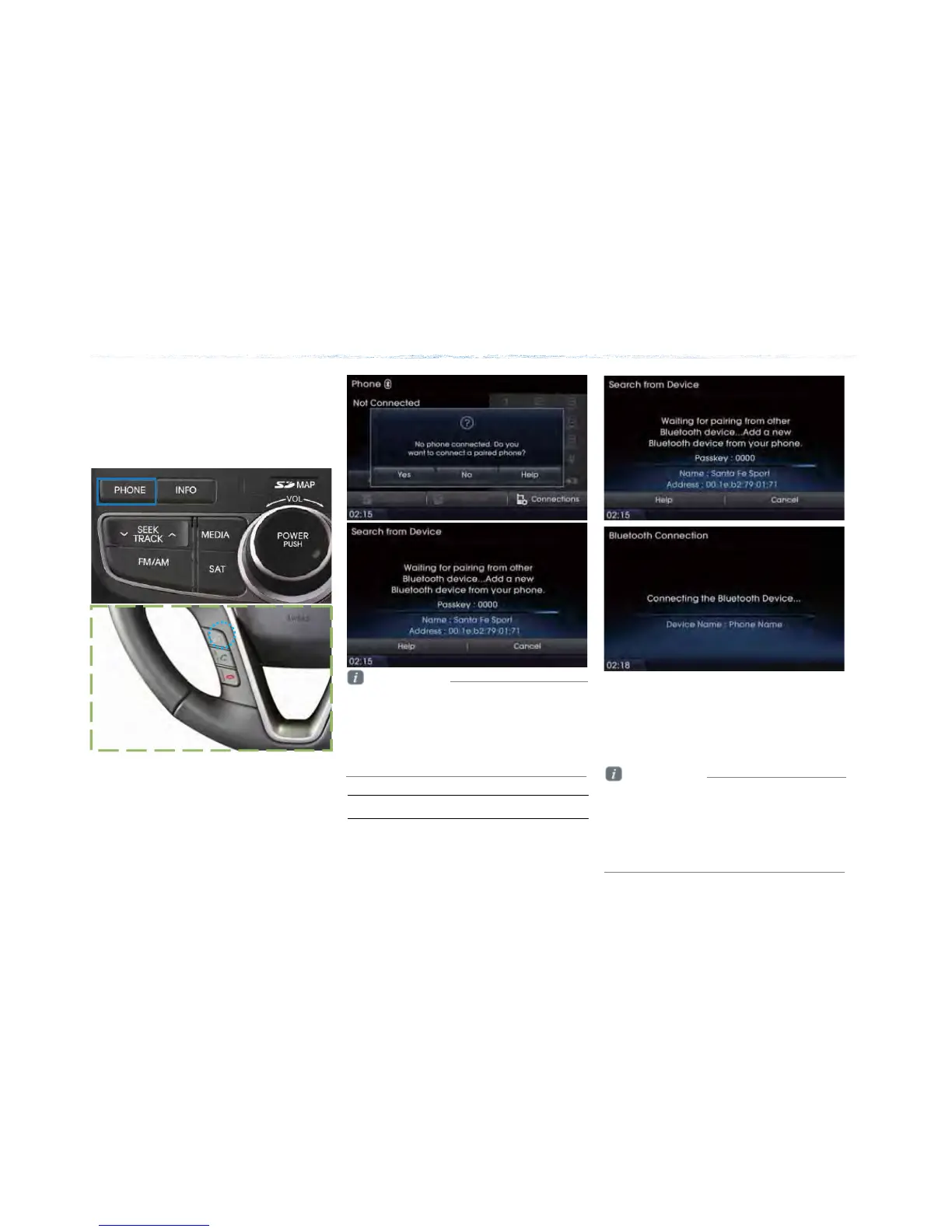
Press the [೨] key on the steering remote
controller or press the [PHONE] Press
|Yes|
Basic Mode Screen
Information
• Press the |Help| button within the pop-up to
view the help section with information related
to pairing and connecting Bluetooth® devices,
and using Handsfree related features.
• The same Help section can be viewed by
going to |ȿInfo| |ȿHelp| |ȿBluetooth|.
When no phones have been
paired
ࢇ ء (্ࣛࢇ)
Pairing from the Bluetooth® Device
Press the |Add New Device| button
Select car name Enter passkey
From the Bluetooth® device, search for
the car name and pair the device.
When searching from the Bluetooth® device,
the car name is Santa Fe and the default
passkey is ‘0000’.
Information
• To learn more about searching from
Bluetooth® devices and pairing, refer to the
user's manual for your Bluetooth® device.
• Bluetooth® devices cannot be paired when
the vehicle is in motion. For your safety, first
park the vehicle to pair a Bluetooth® device.







 To Next Page