5 CONTROLS
• Switch on the truck, the head light will flash.
• Turn on the radio, the head lights remain on and you hear the horn sound.
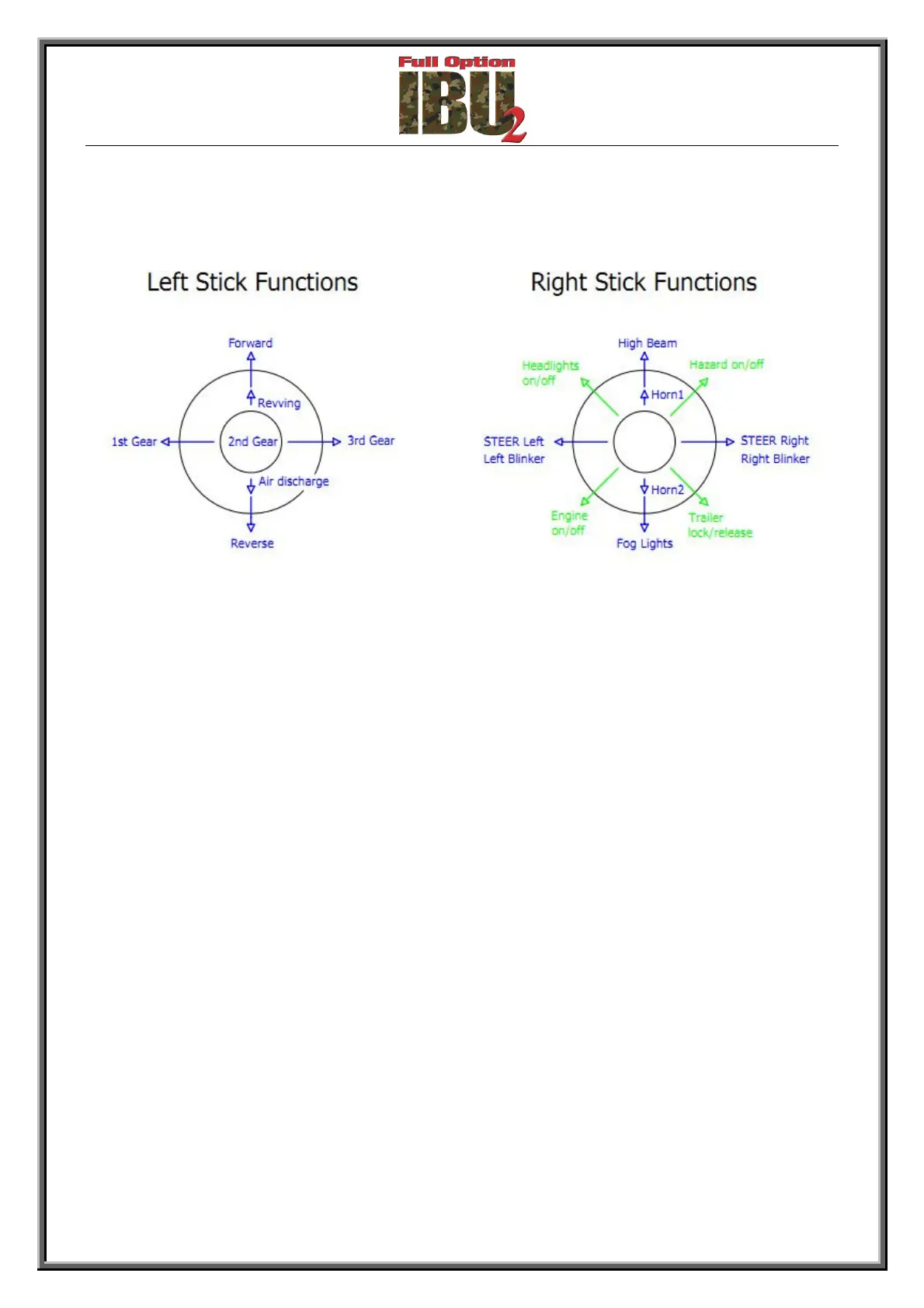
• At this point you can activate certain functions such as:
High beam lights, fog lights, indicators, emergency lights, horn 1 & 2, coupling / uncoupling
trailers.
• Start the engine of the truck (right stick diagonally lower left for 5 seconds) and wait for the
engine to finish starting up and starts idling.
• Engage a gear and bring the left stick forward or backward to move, make sure the truck is
moving in the right direction.
• Try to steer right and left and check that the wheels are moving in the right direction, check
also the activation of turning indicator lights.
NOTE
If some of the movements are reversed compared to the command you need to reverse its own
channel on the radio, or change the parameter for the channel in the file "IBU2_TR.ini" in the root
of the microSD board inserted in IBU2 (see chapter 7 below).



 To Next Page