22
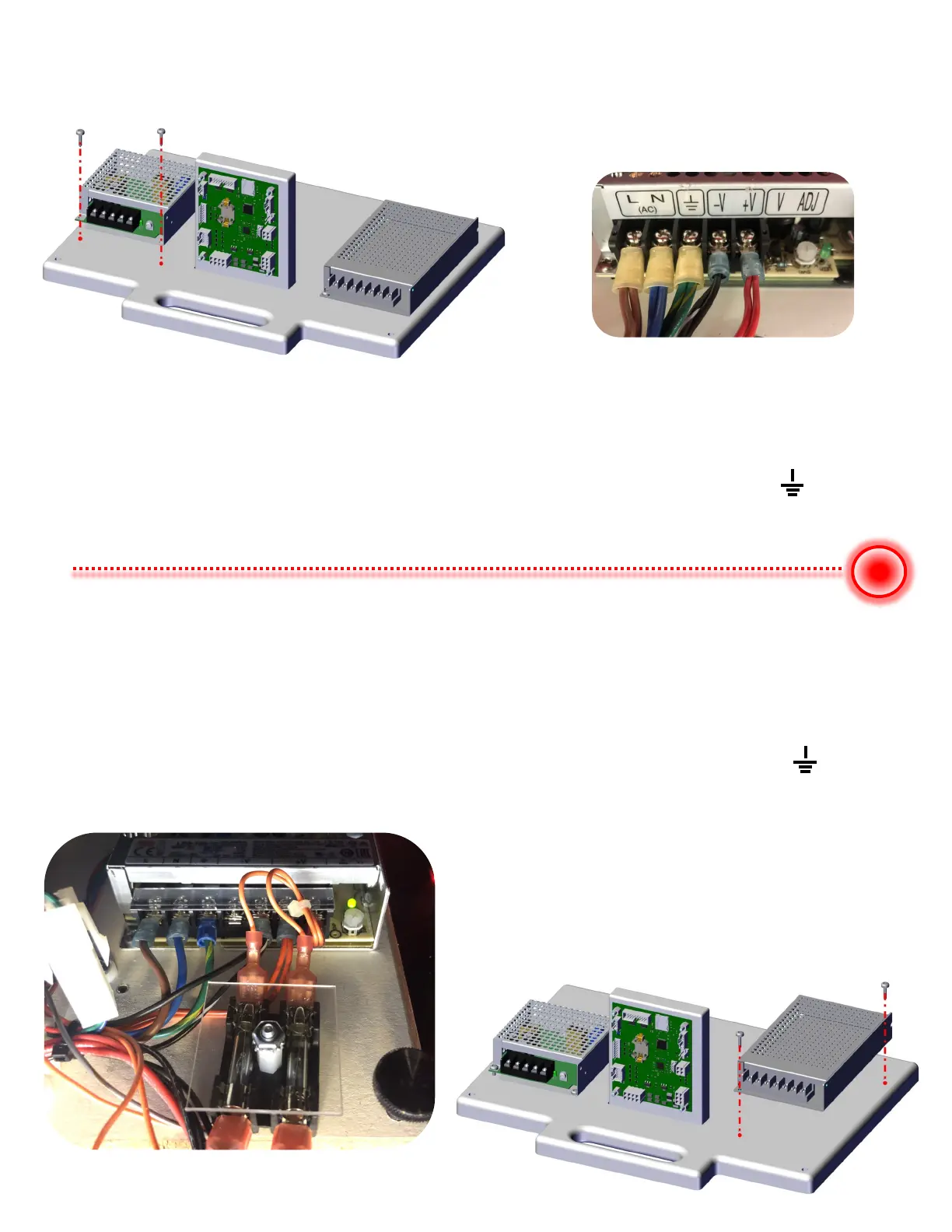
To replace the +5 supply, remove the two mounting bolts at the front of the +5 supply.
WARNING - Make sure AC power cord to the game is unplugged!
Use a #2 Phillip screw driver and loose each screw holding a wire to the wire terminals.
Replace the power supply with same voltage and either equal or greater amperage.
Colors for +5 supply are:
Brown = L (AC HOT) Blue = N (AC NETRUAL) Green w/yellow strip = (Earth)
Black w/white strip = V- (ground) Red = V+ (+5 VDC).
To Replace the +12 supply, remove the two mounting bolts, one at the front of the +12
supply and one at the back. WARNING - Make sure AC power cord to the game is unplugged!
Replace the power supply with same voltage and either equal or greater amperage.
Colors for +12 supply are:
Brown = L (AC HOT) Blue = N (AC NETRUAL) Green w/yellow strip = (Earth)
Black w/white strip = V- (ground) Orange = V+ (+12 VDC) Black w/fuse holder = V+ (+12 VDC)


 To Next Page