
 Need help?
Do you have a question about the I.C.E Iceball Pro and is the answer not in the manual?
Details on accessing the main fuse, its location, and specifications for 120V users.
Lists and illustrates all parts and hardware included for assembly.
Identifies necessary tools like Allen wrenches and specific components such as latch tools.
Illustrates the main back cabinet and side panels of the game.
Provides contact details for missing parts or service inquiries.
Recommends using protective foam from packaging to prevent cabinet damage during assembly.
Ensures wire harness is tucked safely in the channel before inserting the side panel.
Suggests pushing the ramp down to ensure the side panel aligns flush with the ramp assembly.
Specific instruction for securing the ramp using Allen bolts and fender washers.
Instruction to connect the RGB harness originating from the support bar.
Guides on partially extending latches using the latch tool for easier cabinet joining.
Details using bolts, washers, and connectors to secure the clear plastic side panels.
Instruction for installing the bottom panel with bumper and joint connector.
Emphasizes locking the latches securely before inserting the latch plugs.
Instruction to connect various internal wiring harnesses at the sides and underneath.
Critical safety instruction mandating the use of a grounded AC outlet for operation.
Warning against using adapters that eliminate or bypass the essential third prong ground connection.
Guides on using keys to unlock the main cabinet locks by turning clockwise.
Instructions on flipping the AC power switch to the 'on' position, indicated by an 'I'.
Describes the classic alley roller game where players aim for maximum points.
Explains the goal of reaching zero points first by subtracting points with each ball.
Details the fast-paced mode focusing on accuracy and speed for bonus points.
Describes the dartboard-inspired game where hitting holes three times is key.
Explains the bonus multiplier awarded for hitting the same hole consecutively.
Provides instructions on how to adjust game volume during play using arrow keys.
Steps to take the back cabinet apart if it doesn't fit through a doorway.
Instruction to remove latch hole plugs using a small flat blade screwdriver.
Guidance on using the latch tool to unlock the four cabinet latches.
Details accent color settings and high score reset options for Arcade mode.
Lists starting points, high score reset, and default configuration for First to Zero.
Outlines high score reset and default settings for the Fast N Accurate mode.
Covers ball count per round, high score reset, and default settings for Cricket.
Details ball count per game, high score reset, and default settings for Combo Bonus.
Explains how to enter the diagnostic mode by pressing and holding the Down arrow button.
Describes how the diagnostic mode displays faults and the status of buttons and sensors.
Details the procedure for testing score sensors by dropping balls into holes.
Instructions on removing bolts and lifting out the playfield to access score sensors.
Identifies the physical location of the score sensors within the game's playfield area.
Critical safety warning to disconnect the AC power cord before replacing any sensors.
Details the score sensors for 10, 20, 30, and 40 point holes and their board configuration.
Reiterates the safety instruction to unplug the AC power cord before sensor replacement.
Describes the left and right 100 point score sensors and their alignment across the playfield.
Instructions on using keys to unlock and lower the display assembly for access.
Identifies and labels the AC Fuse, +5 Power, Mainboard, and +12 Power units.
Step-by-step guide on how to safely remove and install the AC fuse.
Specifics on the single fuse location and rating for 110V models.
Instructions for removing mounting screws to pull out the electronics panel for maintenance.
Emphasizes ensuring the AC power cord is unplugged before performing any electronics maintenance.
Steps for replacing the +5V power supply, including wire color identification for connections.
Steps for replacing the +12V power supply, including wire color identification for connections.
Crucial safety reminder to ensure the AC power cord is unplugged before replacing power supplies.
Instructions using a nut driver to remove and replace the main circuit board.
Procedure for inserting and removing the SD card from its socket on the board.
Specifies the 4 AMP @ 250 volt FAST-BLOW fuse for overhead RGB LEDs.
Specifies the 5 AMP @ 250 volt FAST-BLOW fuse for under cabinet RGB LEDs.
Details pinouts and wire colors for audio, button, and power input headers.
Describes pinouts for +5VDC output and RGB lighting interface headers.
Details pinouts and wire colors for sensor and display interface headers.
States the one-year warranty period for defects in materials and workmanship from purchase date.
Lists specific conditions under which warranty claims may be denied by I.C.E. Inc.
Explains the mandatory process of obtaining an authorized RMA number for warranty service.
Provides company contact details and address for Innovative Concepts in Entertainment.
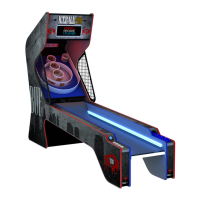
The device described in the manual is the ICEBALL Pro Home Edition arcade game, a classic alley roller game designed for indoor use.
The ICEBALL Pro is an arcade game where players roll balls into scoring holes to accumulate points. It offers multiple game modes, including:
The game features a glowing cabinet and an upper display. Players can select from five game modes and up to four players. Game volume can be adjusted using arrow keys during gameplay.
 General
| Brand | I.C.E |
|---|---|
| Model | Iceball Pro |
| Category | Arcade Game Machines |
| Language | English |

 To Next Page
