EasyManua.ls Logo

i-SENS CareSens N - User Manual

i-SENS CareSens N
31 pages
Print Icon
To Next Page IconTo Next Page
Loading...
Owners Booklet
©
2018 i-SENS, Inc. All Rights Reserved PGA1E3422 REV1 12/2018
i-SENS, Inc.
43, Banpo-daero 28-gil, Seocho-gu,
Seoul 06646, Korea
www.i-sens.com
Medical Technology Promedt
Consulting GmbH,
Altenhofstrasse 80,
66386 St. Ingbert, Germany
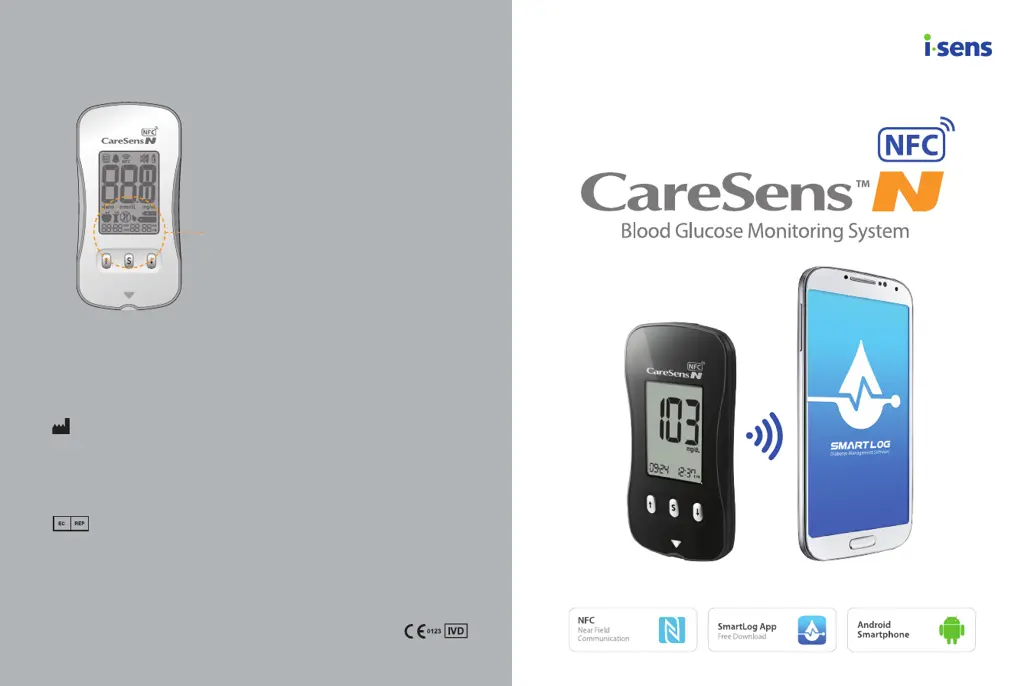
NFC antenna in the back of the meter

Other manuals for i-SENS CareSens N

Questions and Answers

  • H
    hoffmandavidSep 4, 2025
    Why is the display blank on my i-SENS Blood Glucose Meter even after inserting a test strip?
    • D
      Darrell JonesSep 4, 2025
      If the display of your i-SENS Blood Glucose Meter is blank after inserting a test strip, check the following: Ensure the test strip is inserted with the contact bars facing up; confirm the strip is fully inserted into the test strip port; verify you are using the correct test strip; check that the batteries are inserted correctly with the ‘+’ side facing up. If necessary, replace the batteries.
  • M
    Michelle ShortSep 18, 2025
    What to do if blood sample has high viscosity on i-SENS Blood Glucose Meter?
    • D
      danacunninghamSep 18, 2025
      If the blood sample used with your i-SENS Blood Glucose Meter has abnormally high viscosity or insufficient volume, repeat the test using a new test strip.
  • J
    Jamie BairdSep 16, 2025
    What to do if wrong test strip is used in i-SENS Blood Glucose Meter?
    • K
      Kelly DiazSep 16, 2025
      If you see an error message indicating that the wrong blood glucose test strip was used with your i-SENS Blood Glucose Meter, repeat the test using a CareSens N test strip.
  • K
    Kim JohnsonSep 14, 2025
    What to do if i-SENS Blood Glucose Meter test result doesn't match how I feel?
    • N
      Natasha ValdezSep 14, 2025
      If the test result from your i-SENS Blood Glucose Meter doesn't match how you feel, try the following: 1. Repeat the test using a new test strip. 2. Check the "Use By" date on the test strip. 3. Perform a control solution test.
  • M
    Maurice RobertsSep 12, 2025
    Why test doesn't start after applying blood on i-SENS Blood Glucose Meter?
    • M
      markcarlsonSep 12, 2025
      If the test on your i-SENS Blood Glucose Meter does not start even after applying the blood sample, ensure the confirmation window is completely filled. If not, repeat the test using a new test strip.
  • R
    Rebecca FoleySep 12, 2025
    What to do if i-SENS Blood Glucose Meter display is blank?
    • B
      bryantcolleenSep 12, 2025
      If the display of your i-SENS Blood Glucose Meter is blank even after inserting a test strip, consider the following: * Ensure the test strip is inserted with the contact bars facing up. * Verify the strip is fully inserted into the test strip port. * Confirm that you are using the correct test strip. * Check that the batteries are correctly inserted with the ‘+’ side facing up. * Try replacing the batteries.
  • D
    Derrick SteeleSep 9, 2025
    Why does the i-SENS CareSens N test result not match my expectation?
    • C
      Charles WilsonSep 9, 2025
      If the test result from your i-SENS Blood Glucose Meter doesn’t match your expectation, repeat the test using a new test strip. Also, check the validity period of the test strip and check the meter itself.
  • K
    Kelly ClarkeSep 7, 2025
    What to do if the blood sample is not good for i-SENS CareSens N Blood Glucose Meter?
    • A
      Ashley LarsonSep 7, 2025
      If the blood sample used with your i-SENS Blood Glucose Meter has abnormally high viscosity or insufficient volume, repeat the test using a new test strip.
  • B
    Becky CruzSep 5, 2025
    What to do if the i-SENS Blood Glucose Meter test doesn't start after applying blood?
    • R
      Richard TaylorSep 6, 2025
      If the test on your i-SENS Blood Glucose Meter doesn't start after applying the blood sample, check if the confirmation window is completely filled. If not, repeat the test with a new test strip.
  • T
    tammy24Aug 20, 2025
    What to do if the i-SENS CareSens N display is blank?
    • L
      Lindsey PerezAug 21, 2025
      If the display of your i-SENS Blood Glucose Meter is blank even after inserting a test strip, make sure the test strip is inserted correctly with the contact bars facing up and fully inserted. Also, verify that the batteries are inserted with the ‘+’ side facing up. If the issue persists, try replacing the batteries.

Summary

CareSens N NFC Blood Glucose Monitoring System

Important Information

Intended Use

Details the specific applications and limitations of the glucose monitoring system.

Understanding the CareSens N NFC Meter

Meter Components and Display

Identifies meter parts like the data port, buttons, and explains display elements and icons.

Initial System Setup

Setting Up Your System

Guides users through the initial configuration of the meter.

Test Strip Expiration and System Checking

Checking the System with Control Solution

Guidance on using control solution to verify meter and strip performance.

Control Solution Testing Procedures

Control Solution Testing Steps

Detailed instructions for performing a control solution test, including sample application.

Blood Sample Collection

Applying Blood Sample

Detailed procedure for obtaining a blood sample from the finger.

Performing the Glucose Test

Applying Blood to Test Strip

Guidance on applying the blood sample to the test strip for accurate measurement.

Test Result Flags and Lancet Disposal

Discarding Used Lancets

Safe and proper procedures for disposing of used lancets.

Alternate Site Testing (AST)

AST Considerations and Precautions

Key information and precautions for performing tests at alternate sites.

AST Precautions and Meter Messages

HI and Lo Message Interpretation

Explains the meaning and recommended actions for "HI" (high) and "Lo" (low) glucose messages.

Blood Glucose Targets and Data Transfer

NFC Functionality Explained

Explains the NFC function for transmitting test results to smartphones.

Using the NFC Function

NFC Data Transfer Steps

Step-by-step guide on how to use the NFC function for transferring results.

Meter Memory and Averages

Overview of meter memory capacity and how to view stored test results and averages.

Understanding Error Messages

Error Code Er1

Meaning and action for "Er1" error (used test strip inserted).

Error Code Er2

Meaning and action for "Er2" error (sample applied before symbol appeared).

Error Code Er3

Meaning and action for "Er3" error (temperature outside operating range).

Troubleshooting Meter Issues

Error Codes Er4, Er5, Er6

Meaning and action for "Er4" (viscosity/volume), "Er5" (wrong strip), "Er6" (meter problem).

General Troubleshooting Steps

Solutions and steps to resolve common meter and test strip problems.

i-SENS CareSens N Specifications

General IconGeneral
Brandi-SENS
ModelCareSens N
CategoryBlood Glucose Meter
LanguageEnglish

Related product manuals