EasyManua.ls Logo

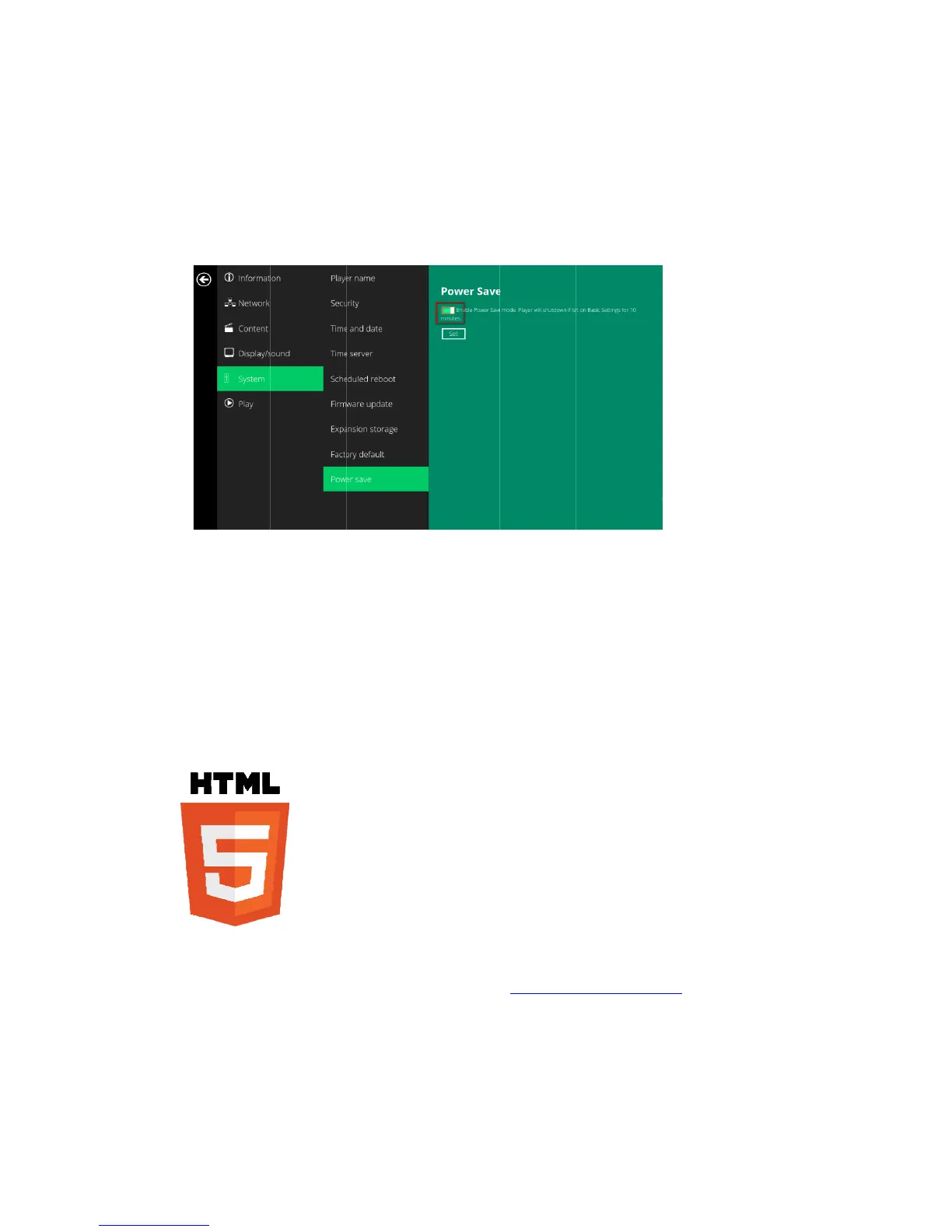
IAdea XMP-7300 - System Configuration - Power Save; 3 Content Management; 4 Authoring in HTML5; 5 Working with SMIL

IAdea XMP-7300
33 pages
Print Icon
To Next Page IconTo Next Page
To Previous Page IconTo Previous Page
Loading...
23
4.19. S
y
TheP
o
witho
u
1
Cl
2
Cl
3
Cl
4
Cl
5. Co
n
Thepl
setup
6. Aut
Amaj
o
infor
m
Tofin
d
7. Wo
r
Thepl
mean
s
invest
y
stemco
n
o
wersavefea
u
tanyaction
ickthe
Adva
n
ickon
Syste
m
ickthe
Enabl
e
ickon
Set
to
s
n
tentMa
ayerisdesig
n
instructions.
horingi
n
o
radvancem
e
m
ation.
d
outmorea
b
r
kingwi
t
ayerusesop
e
s
predictable
r
mentsarene
v
n
figurati
o
tureallowst
h
takenfor10
m
n
ced
button,
a
m
,andclicko
n
e
PowerSav
e
s
avethesetti
n
nageme
n
edtowork
w
n
HTML
5
e
ntinthepla
y
b
outusingHT
t
hSMIL
e
ncommunic
a
r
esultsacross
v
erobsolete.
o
nPow
e
h
eplayertop
m
inutes.
a
dvancedcon
f
n
Powersave
.
e
mode
butto
n
n
g.
nt
w
ith3
rd
party
m
5
y
eristheabili
ML5fordigit
a
a
tionsprotoc
o
multipledev
e
rsave
oweroffaut
o
f
igurationm
e
n
asmarkedi
n
m
anagement
s
tytoplaybac
k
a
lsignage,vis
i
o
lsforconte
n
ices,andSMI
o
maticallywh
i
e
nuwillbela
u
n
redbelowt
o
s
olutions.Ple
k
HTML5con
t
i
thttp://ww
w
n
tpresentatio
L’snonpropr
i
lestayingat
t
u
nched.(Fig.
2
o
enable/disa
aserefertot
h
t
entwhichca
n
w
.digisignage.
c
nandplayba
c
ietarynature
t
heBasicsett
i
2
.6.1)
blethepowe

(Fig.2.19.1)
h
eprintedgu
i
n
containdyn
c
om/
c
kcontrol.S
M
meansthaty
i
ngsmenu
rsavefuncti
o
i
deforrelate
d
amic
M
ILcomplianc
our
o
n.
d
e

Related product manuals