2
Afterboot‐upcompletes,playerwillstayinBasicsettingsmenuifnocontentservicehasbeenconfigured(i.e.
firstboot‐upforbrandnewunitorafterafactoryreset).Ifyouhavealreadysetcontentintotheplayer,contents
willplaybackautomaticallyafter15secondsafter
boot‐up.
4.2. Basicsettings
YoumustattachaUSBmousetotheplayertoconfiguresettings.Iftheplayerhastouchscreen,thentheUSB
mouseisnotrequired,andalltheclickactioncanbereplac edbytapaction.
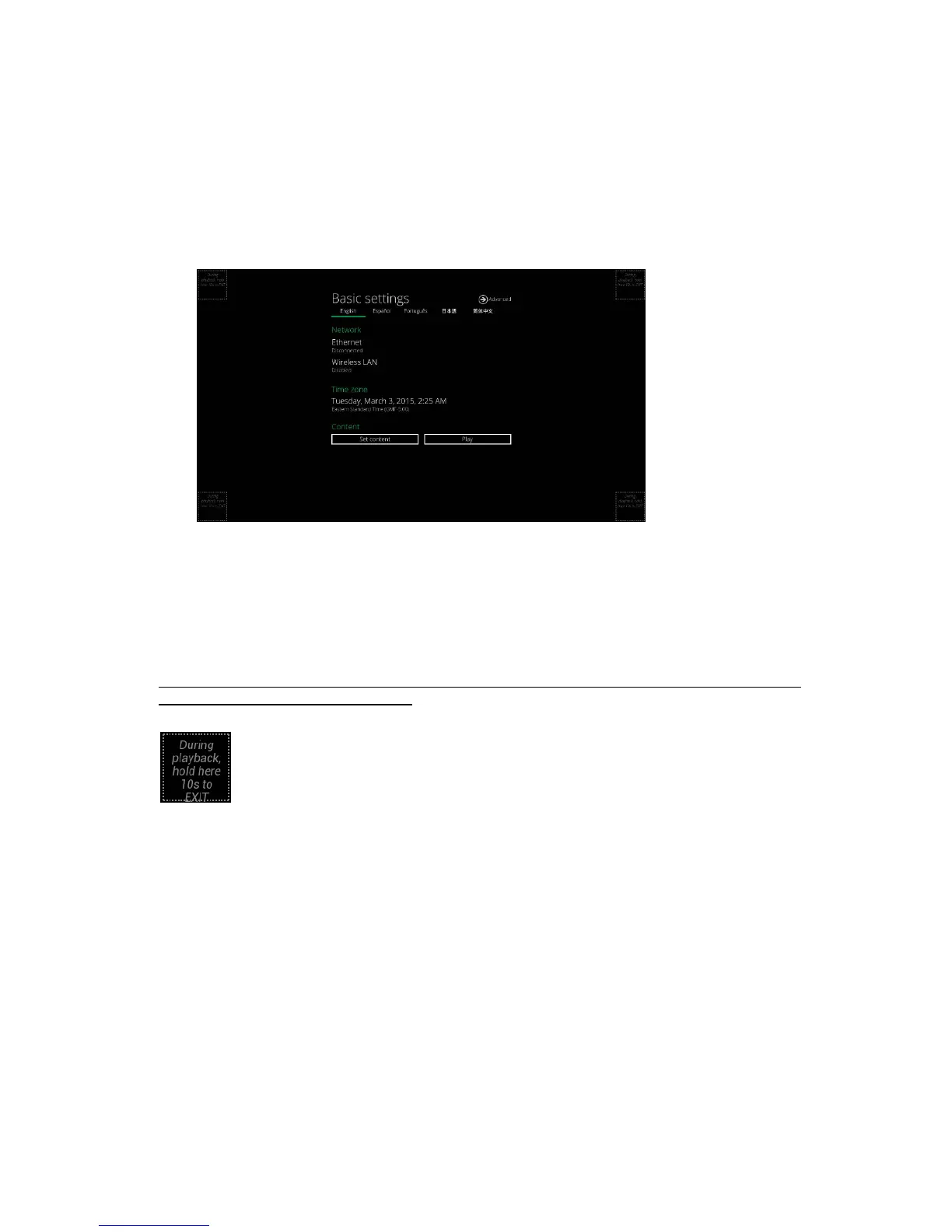
(Fig.2.2.1)
Basicsettings:
–Network,TimezoneandContent.
EachtimetheBasicsettingsmenuisentered,playbackwillautomaticallybeginafter15secondsifcontent
serviceshavebeenpreviouslyset.Autoplaybackcanbecanceledbyclickingonthebuttonbeforethecountdown
ends.
UserisabletoenterAdvancedSettings
byclickingtheAdvancedbu tton.
Toenterthemenusystematanytimeduringplayback,pluginaUSBmouseandholdtheleftmousekeyinthe
cornerareaasshownbelowfor10seconds.Iftheplayerhastouchscreen,thentappingandholdinginthe
cornerareasfor10secondswouldalsobringyoutothemenu.
*Playerwillaskforpasswordifpasswordhasbeenconfigured.


 To Next Page