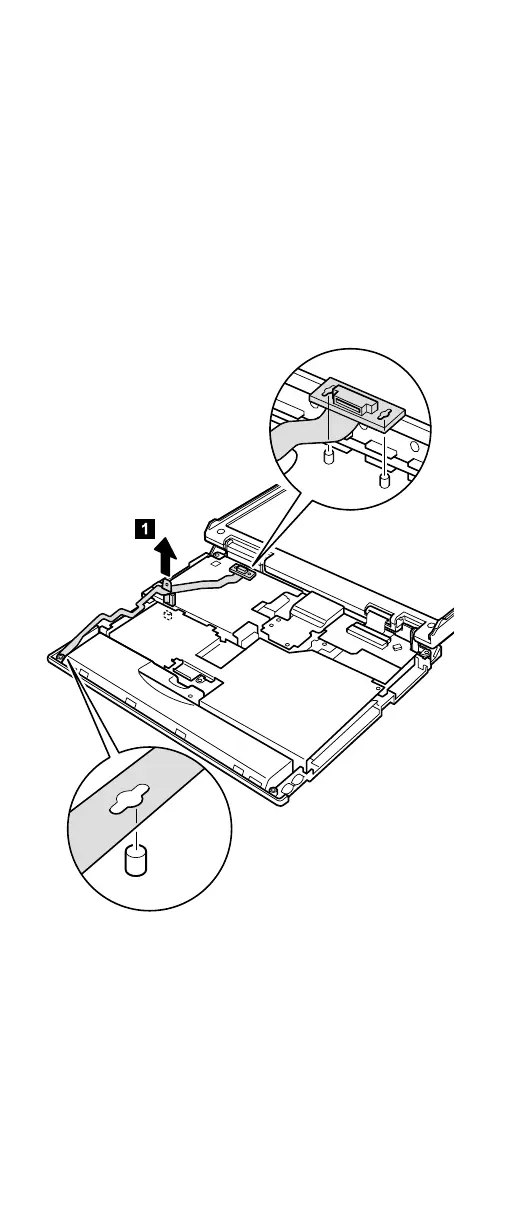
1110 Microphone and speaker cable
For access, remove these FRUs, in order:
v “1010 Battery pack” on page 60
v “1050 Hard-disk drive or RF ID adapter” on page 67
v “1060 Ultrabay 2000 device” on page 69
v “1070 Keyboard” on page 71
v “1080 Keyboard CRU insulator” on page 74
v “1090 Hinge cover and clear sheet icon” on page 75
v “1100 Keyboard bezel and speaker” on page 76
For A20m/p and A21m/p series (microphone
and speaker cable)
When installing: Make sure that you fasten the connector
firmly.
(continued)
Removing and replacing a FRU
78 ThinkPad A20m/p, A21m/p, A22m/p



 To Next Page