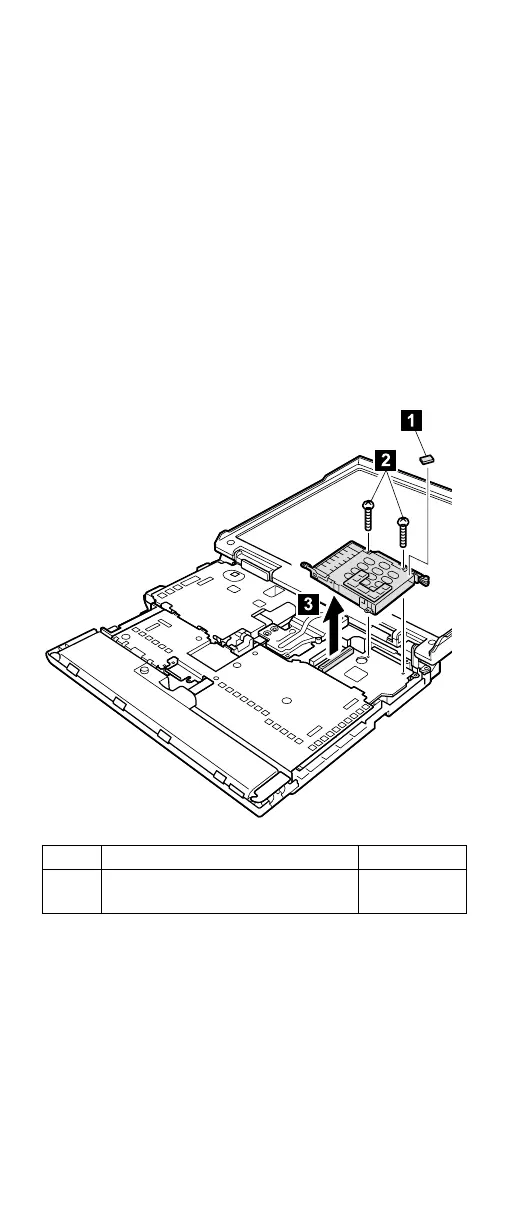
1130 PC Card slot assembly
For access, remove these FRUs, in order:
v “1010 Battery pack” on page 60
v “1050 Hard-disk drive or RF ID adapter” on page 67
v “1060 Ultrabay 2000 device” on page 69
v “1070 Keyboard” on page 71
v “1080 Keyboard CRU insulator” on page 74
v “1090 Hinge cover and clear sheet icon” on page 75
v “1100 Keyboard bezel and speaker” on page 76
v “1120 Sub card” on page 80
Note: Step 1 (PC Card slot spacer) is only for MT2629.
Other model do not have the spacer. Remove it
gently; it will be reused when installing new PC
Card slot assembly.
Step Screw (quantity) Torque
2 M2.0 × 9.5 mm, nylon-coated (2) 0.245 Nm
(2.5 kgfcm)
Removing and replacing a FRU
82 ThinkPad A20m/p, A21m/p, A22m/p



 To Next Page