Checkingtheacpoweradapter
Youareherebecausethecomputerfailsonlywhentheacpoweradapterisused.
•Ifthepowerproblemoccursonlywhenthedockingstationortheportreplicatorisused,replacethe
dockingstationortheportreplicator.
•Ifthesystem-statusindicatordoesnotblinkthreetimeswhenanacpowersourceisconnected,check
thepowercordoftheacpoweradapterforcorrectcontinuityandinstallation.
•Ifthecomputerdoesnotchargeduringoperation,goto“Checkingtheexternalbatterypackandthe
operationalcharging”onpage27
.
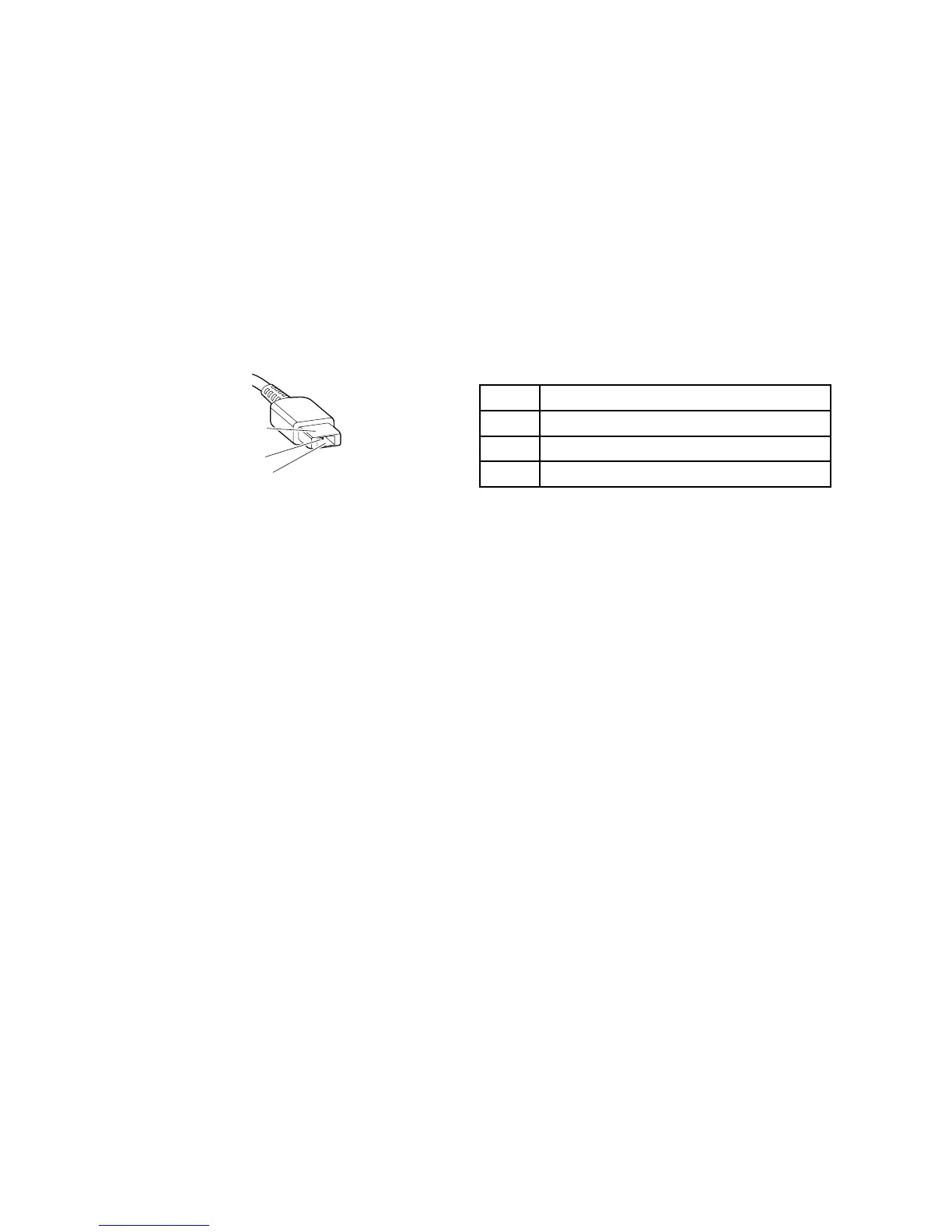
Tochecktheacpoweradapter,dothefollowing:
1.Unplugtheacpoweradaptercablefromthecomputer.
2.Measuretheoutputvoltageattheplugoftheacpoweradaptercable.Seethefollowingillustration:
Pin
Voltage(Vdc)
1+20
20
3
Ground
Note:Outputvoltageofpin2oftheacpoweradaptermightdifferfromtheoneyouareservicing.
3.Ifthevoltageisnotcorrect,replacetheacpoweradapter.
4.Ifthevoltageisacceptable,replacethesystemboard.
Note:Noisefromtheacpoweradapterdoesnotalwaysindicateadefect.
Checkingtheexternalbatterypackandtheoperationalcharging
Checkingtheexternalbatterypack
Thiscomputersupportsonlybatteriesspeciallydesignedforthisspecificsystemandmanufacturedby
Lenovooranauthorizedbuilder.Thesystemdoesnotsupportunauthorizedbatteriesorbatteriesdesigned
forothersystems.Ifanunauthorizedbatteryorabatterydesignedforanothersystemsisinstalled,the
systemwillnotcharge.
Attention:Lenovohasnoresponsibilityfortheperformanceorsafetyofunauthorizedbatteries,and
providesnowarrantiesforfailuresordamagearisingoutoftheiruse.
Moveyourpointertothebattery-statusiconintheWindowsnotificationareatocheckthebatterystatus.
Thebattery-statusicondisplaysthepercentageofbatterypowerremainingandhowlongyoucanuse
yourcomputerbeforeyoumustchargethebattery.
Note:Iftheexternalbatterypackbecomeshot,itmaynotbeabletocharge.Removeitfromthecomputer
andleaveitatroomtemperatureforawhile.Afteritcoolsdown,reinstallandrechargeit.
Tochecktheexternalbatterypack,dothefollowing:
1.Poweroffthecomputer.
2.Removetheexternalbatterypackandmeasurethevoltagebetweenbatteryterminals1(+)and7
(-).Seethefollowingfigure:
Chapter3.Generalcheckout27


 To Next Page