Chapter6.Functionkeys
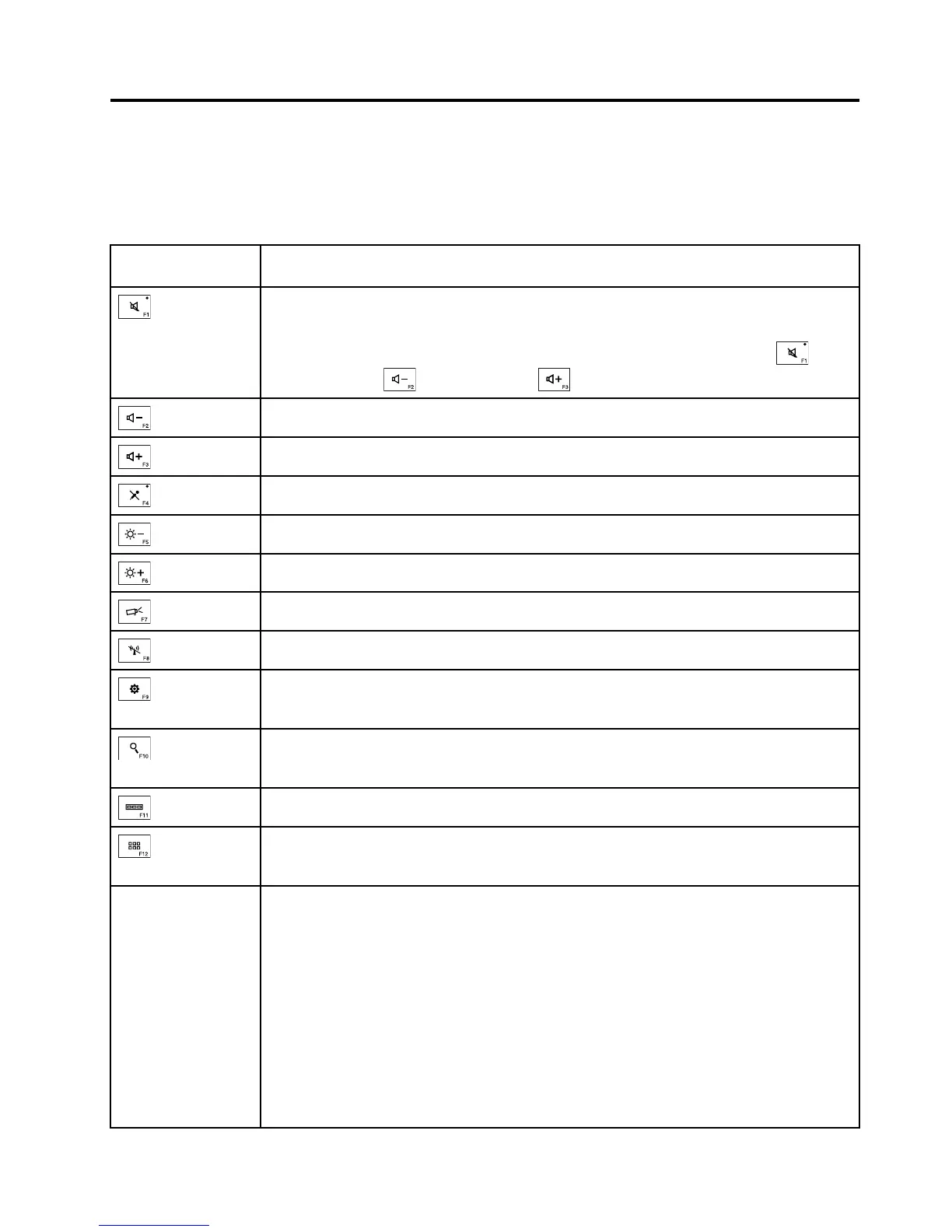
Thefollowingtabledescribesthefunctionsoffunctionkeysandkeycombinations.
Table8.Functionkeys
Functionkeyand
keycombination
Description
Mutesorunmutesthespeakers.
Ifyoumutethesoundandturnoffyourcomputer,thesoundwillremainmutedwhenyou
turnonyourcomputeragain.Toturnonthesound,pressthespeaker-mutekey,
volume-downkey,orvolume-upkey.
Decreasesthespeakervolume.
Increasesthespeakervolume.
Mutesorunmutesthemicrophones.
Darkensthedisplay.
Brightensthedisplay.
Switchesthedisplayoutputlocationbetweenthecomputerdisplayandanexternalmonitor.
Enablesordisablesthewirelessfeatures.
ForWindows7:OpensControlPanel.
ForWindows10:OpenstheSettingswindow.
ForWindows7:OpensWindowsSearch.
ForWindows10:OpenstheCortana
®
searchbox.
Viewstheprogramsthatyouhaveopened.
ForWindows7:OpensComputer.
ForWindows10:Viewsalltheprograms.
Fn+Esc
YoucanconfiguretheFnkeyandfunctionkeysintheKeyboardPropertieswindowby
doingthefollowing:
1.GotoControlPanel.ChangetheviewofControlPanelfromCategorytoLargeicons
orSmallicons.
2.ClickKeyboard.IntheKeyboardPropertieswindow,clicktheFnandfunctionkeys
orThinkPadF1–F12keystab.
3.Selecttheoptionsofyourpreference.
PressFn+EsctoenableordisabletheFnLockfunction.
•WhentheFnLockfunctionisdisabled:TheFnLockindicatorisoff.Toinitiatethespecial
functionprintedasanicononeachfunctionkey,pressthecorrespondingfunctionkey
directly.ToinputF1-F12,presstheFnkeyandthecorrespondingfunctionkey.
©CopyrightLenovo2016
43



 To Next Page