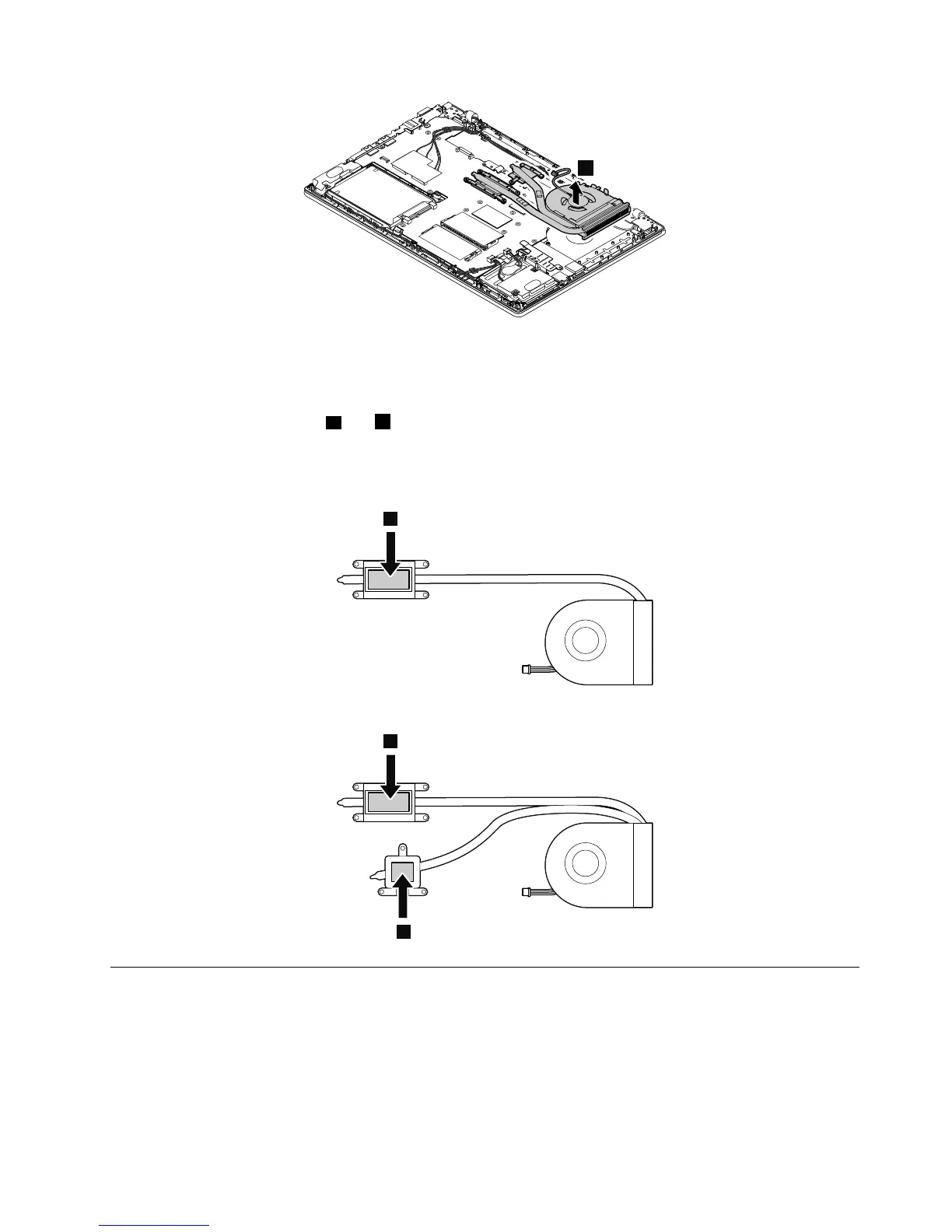
Wheninstalling:
•Ensurethattheconnectorofthethermalfanisattachedfirmly.
•Beforeyouattachthethermalfanassemblytothecomputer,applythermalgrease,atanamountof0.2
grams,onthepartsmarked
aandbasshowninthefollowingillustrations.Eithertoomuchortooless
applicationofgreasecancauseathermalproblemduetoimperfectcontactwithacomponent.Forthe
newthermalfanassembly,youmustpeelthethinfilmofffromtherubbers.
Forintegrated-graphicsmodels
1170I/Obracket
Foraccess,removetheseFRUsinorder:
•“1010SIM-cardtray”onpage62
•“1020Externalbatterypack”onpage62
•“1030Keyboardrubbers”onpage63
•“1050Basecoverassembly”onpage70
Chapter9.RemovingorreplacingaFRU89


 To Next Page