s. 19 / 40
Programmable outputs of master device
Device role (master or slave)
Programmable outputs of slave device 01
Programmable outputs of slave device 08
Programmable digital inputs
Password access management
Communication channels parameters
Base protections of the panel
Harmonic protections (MCP5 module)
Limit thresholds on measurements
Generic programmable counters
Programmable analog inputs
Programmable analog outputs
Pulses for energy meters increment
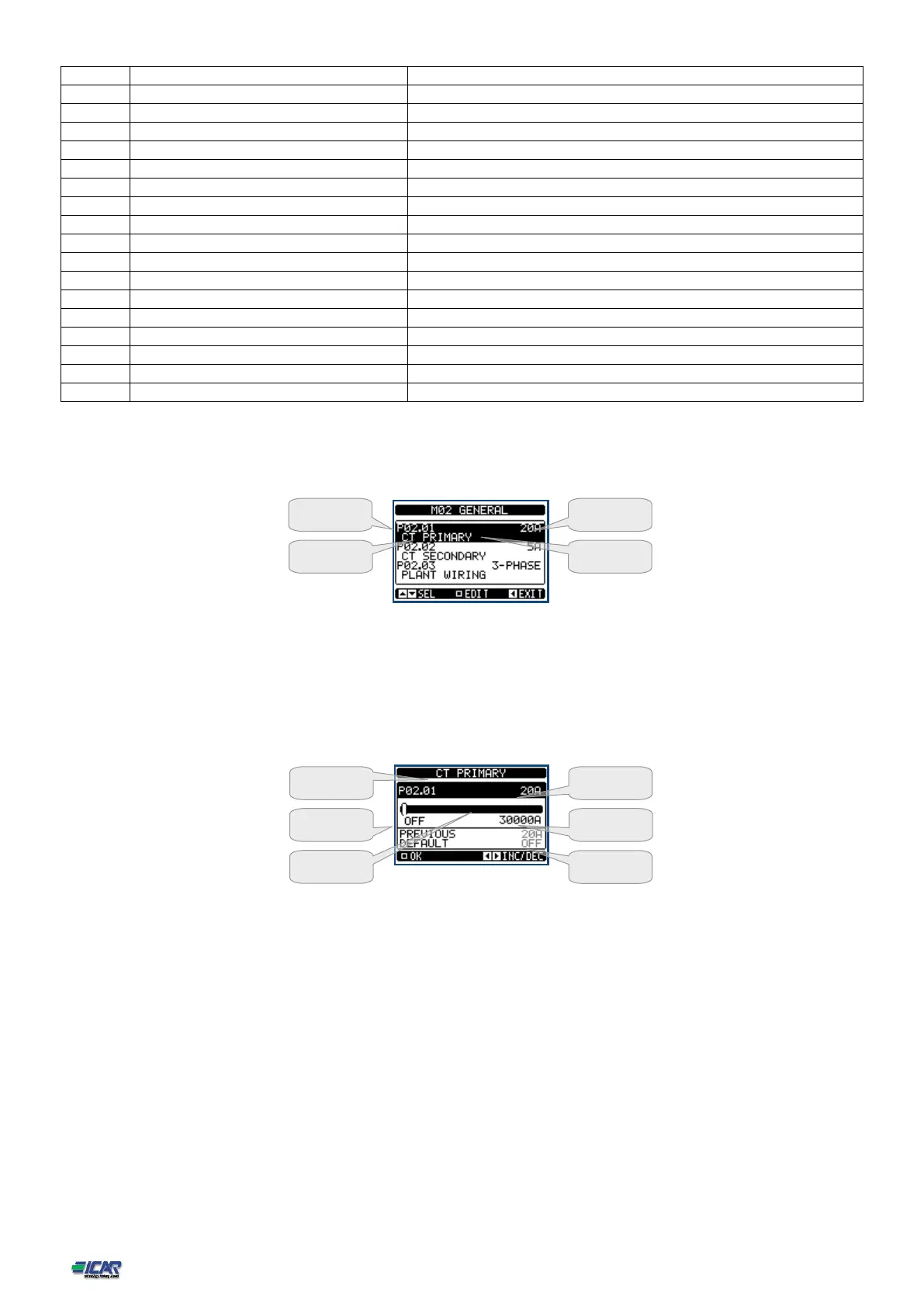
Select the sub-menu and press □ to show the parameters.
Each parameter is shown with code, description and actual setting value.
Set-up: parameter selection
To modify the setting of one parameter, select it and then press □.
If the Advanced level access code has not been entered, it will not be possible to enter editing page and
an access denied message will be shown.
If instead the access rights are confirmed, then the editing screen will be shown.
Set-up: editing page
When the editing screen is displayed, the parameter setting can be modified with ◄ and ►keys. The
screen shows the new setting, a graphic bar that shows the setting range, the maximum and minimum
values, the previous setting and the factory default.
Pressing ◄ + ▼the value decreases faster, while with ▲+ ►the value grows faster.
Pressing simultaneously ◄ + ►, the setting is set to factory default.
During the entry of a text string, keys ▲and ▼are used to select the alphanumeric character while◄
and ► are used to move the cursor along the text string. Pressing keys ▲and ▼simultaneously will
move the character selection straight to character ‘A’.
Press □ to go back to the parameter selection. The entered value is stored.
Press ◄ to save all the settings and to quit the setup menu. The controller executes a reset and returns to
normal operation.
If the user does not press any key for more than 2 minutes, the system leaves the setup automatically
and goes back to normal viewing without saving the changes done on parameters.
N.B.: a backup copy of the setup data (settings that can be modified using the keyboard) can be saved in
the eeprom memory of the power factor controller. This data can be restored when necessary in the
Graph bar of the
value-range



 To Next Page