EN-3
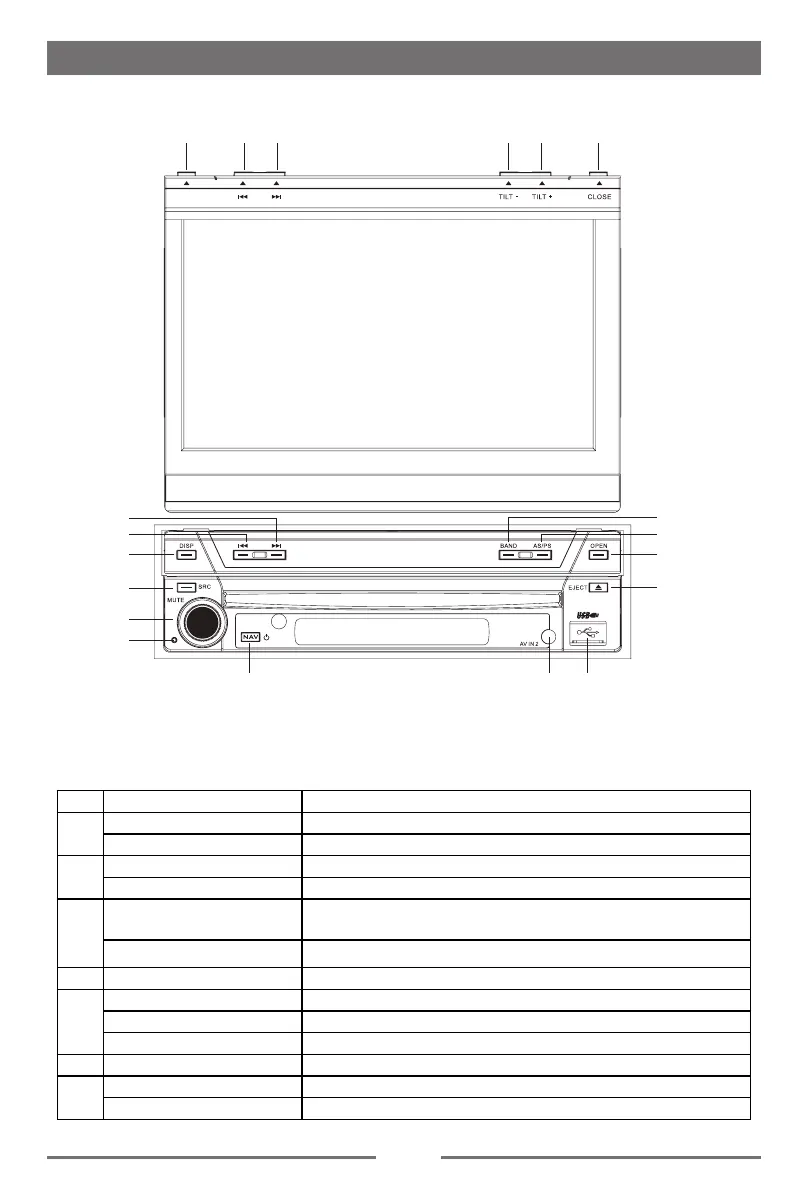
Front Panel
Before using
ཱ
ི
ཱི
ཱུ
ཹ
ེ
ོ
ཻ
ུ
DIM
Notice:
The buttons in this picture is for reference only,and may be different from that in real unit.
Reference to real unit is suggested.
Key Operation Description
1
Press Next
Press and hold Scan(Frequency From High to Low)
2
Press Previous
Press and hold Scan(Frequency From Low to High)
3
Press
TFT Display Open: Dimmer Mode;
TFT Display Close: Time Mode.
Press and hold TFT Display Open: TFT Display Off
4 Press Change Current Source
5
Press Mute
Turn counter-clockwise Decrease Volume
Turn clockwise Increase Volume
6 Press Reset the unit
7
Press Naviation/Power On
Press and hold Power Off


 To Next Page