EN-20
iPod & iPhone Mode
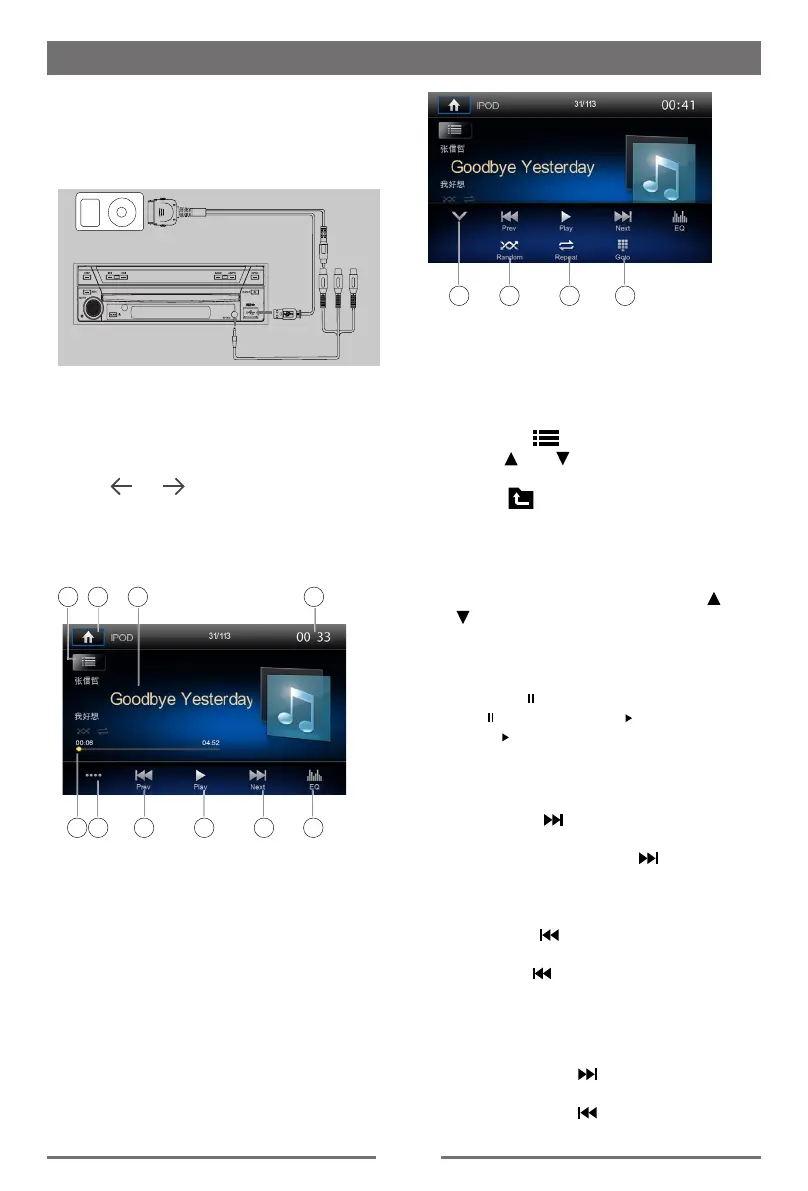
Connect an iPod or iPhone to the USB
connector via ipod cable.
When connecting a device, the unit will read
the files automatically. The track information
display on the screen once playback start.
1411 12 13
11. Hide the 2nd menu
12. Random play
13. Repeat play
14. Select a track
Browse mode
1. Touch the [ ] button to show le list.
Touch [ ] or [ ] to browse. Touch a item
of list on the screen to select it.
2. Touch [
] button to show the following
categories: Playlists, Artists, Albums,
Genres, Songs, Composers, Audiobooks,
Podcasts.
3. Touch to select a category, the contents of
the category are displayed. Touch [
] or
[ ] to browse.
4. Touch an option to select it.
Pausing play
1. Touch the [ ] button to pause play.
And [ ] button becomes [ ] .
2. Touch [ ] button to resume play.
Selecting a track
Track-up
1. Touch the [ ] button to move to the
beginning of the next track.
2. Each time you touch the [ ] button, the
track advances to the beginning of the
next track.
Track-down
1. Touch the [ ] button to move back to
the beginning of the current track.
2. Touch the [ ] button twice to move back
to the beginning of the previous track.
Fast forward/Fast reverse
Fast forward
Touch and hold the [ ] button .
Fast reverse
Touch and hold the [
] button .
Accessing iPod mode
Enter main source menu, then select [USB/
IPOD] to enter iPod mode.
If [iPod] is not on the current source menu,
touch [ ] / [ ] buttons on the bottom of
the screen, or hold the center of screen and
drag left/right to show more icons.
At iPod Audio mode.
5
1
6
2
7
3 4
8 9 10
1. Show le list (Browse)
2.
Enter the main menu
3. Song/Artist/Album information
4. Display system time
5. Progress bar
6. Display the 2nd menu
7. Previous track
Fast reverse (long press)
8. Play/Pause
9. Next track
Fast forward (long press)
10.
EQ setting


 To Next Page